pylon 會自動修正浮點數值#
當您嘗試設定一個與該參數增量設定不符的浮點數值時,Pylon 不會顯示錯誤訊息,而是會自動修正為最接近的可能數值。
此說明適用於 Basler 的pylon Viewer 以及相關 API。
例如,a2A3840-45ucPRO 的曝光時間增量為 9 µs。
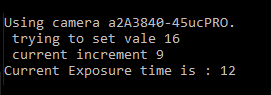
若將其設定為 16 µs,雖然不會出現錯誤訊息,但實際曝光時間將為 12 µs。
為什麼自動修正功能會選擇 12 µs 而不是 18 µs?
- 這台特定相機的最低曝光時間為 12 µs。
- 由於增量為 9 µs,下一個可能的數值是 21 µs。
- 由於目標值為 16 µs,與 21 µs 之間有 5 µs 的差異,但與 12 µs 之間僅有 4 µs 的差異。因此,最近鄰演算法會選取 12 µs 作為曝光時間。
以下是 API 指令的範例:
double val = 16;

Console.WriteLine(" trying to set value " + val);
camera.Parameters[PLCamera.ExposureTime].SetValue(val);
Console.WriteLine(" current increment " +
 camera.Parameters[PLCamera.ExposureTime].GetIncrement());
Console.WriteLine("Current Exposure time is : " +
 camera.Parameters[PLCamera.ExposureTime].GetValue());
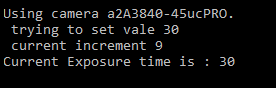
若目標曝光時間為 30 µs,則沒有問題,因為這是被接受的數值(12 + 2 × 9 = 30 µs)