適用於 marathon ACL 的 Acquisition Applets#
擷取卡的功用是由特定的硬體相關程式所定義。此硬體實作稱為 applet。針對每張擷取卡,均提供有多個 applet。
透過將 applet 載入擷取卡,您可以定義擷取卡的功能,並使其配合特定應用的需求。
marathon ACL 的採集 Applet 已包含在 Framegrabber SDK 中。
在 marathon 擷取卡上,只要將 applet 燒錄至擷取卡,即可使用。
要求#
- 主機軟體:Framegrabber SDK(5.7、5.10a 或更高版本),搭配硬體相依的取像 applet
- 硬體:marathon ACL frame grabber 已連接至您的系統
限制
在所有 applet 中,無法配置大於 4GB 的緩衝區。即使 applet 允許更大的緩衝區大小,由於驅動程式與韌體的限制,您仍無法配置大於 4GB 的緩衝區。
您可以透過以下方式計算緩衝區大小:
緩衝區大小 = 影像高度 * 影像寬度 * (像素寬度 / 8)。
對於 RGB 影像:緩衝區大小 = (影像高度 * 影像寬度 * (像素寬度 / 8)) * 3。
文件#
以下章節提供採集 applet 文件的連結:
面陣取像 Applet#
提供以下 Area Scan Acquisition Applets:
- Acq_DualBaseAreaBayer
- Acq_DualBaseAreaGray
- Acq_DualBaseAreaRGB
- Acq_SingleBaseAreaBayer
- Acq_SingleBaseAreaGray
- Acq_SingleBaseAreaRGB
- Acq_SingleFullAreaBayer
- Acq_SingleFullAreaGray
- Acq_SingleFullAreaRGB
- Acq_SingleMediumAreaBayer
- Acq_SingleMediumAreaGray
- Acq_SingleMediumAreaRGB
Applet 名稱中的分母「single」和「dual」是指您可以連接的最大相機數量。如需詳細資訊,請參閱 Choosing the Right Area Scan Acquisition Applet。
選擇正確的面陣取像 Applet#
您必須為相機設定選擇正確的 applet。否則,從相機接收到的影像將無法正確處理或顯示,或者相機效能可能會大幅降低。
哪一個 applet 是正確的,取決於相機數量、每台相機的通道數以及所需的 ROI 步進大小。
ROI 遞增尺寸取決於影像前處理的 Parallelism,因此會因相機和擷取卡而異。
| 相機數量 | 相機連接埠數量 | 擷取卡連接埠數量 | 模式 | Applet | ROI 步進尺寸 [px] | 拓樸 |
|---|---|---|---|---|---|---|
| 1 | 1 | 2 | 拜耳圖案 (Bayer Pattern) | Acq_SingleBaseAreaBayer | x: 4 y: 1 | 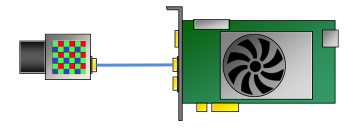 |
| 1 | 1 | 2 | 灰階 | Acq_SingleBaseAreaGray | x: 4 y: 1 | 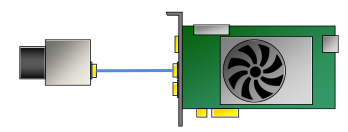 |
| 1 | 1 | 2 | RGB | Acq_SingleBaseAreaRGB | x: 8 y: 1 | 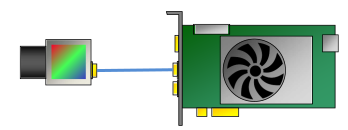 |
| 1 | 2 | 2 | 拜耳圖案 (Bayer Pattern) | Acq_SingleFullAreaBayer Acq_SingleMediumAreaBayer | x: 8; y: 1 x: 4; y: 1 | 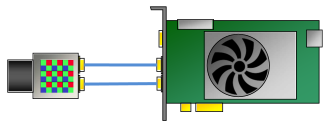 |
| 1 | 2 | 2 | 灰階 | Acq_SingleFullAreaGray Acq_SingleMediumAreaGray | x: 16; y: 1 x: 4; y: 1 | 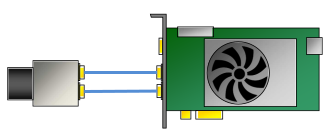 |
| 1 | 2 | 2 | RGB | Acq_SingleFullAreaRGB Acq_SingleMediumAreaRGB | x: 4; y: 1 x: 4; y: 1 | 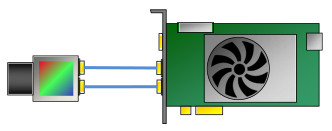 |
| 2 | 1 | 2 | 拜耳圖案 (Bayer Pattern) | Acq_DualBaseAreaBayer | x: 4 y: 1 | 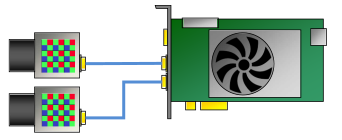 |
| 2 | 1 | 2 | 灰階 | Acq_DualBaseAreaGray | x: 4 y: 1 | 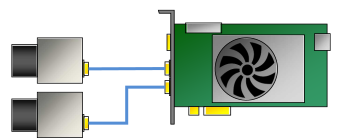 |
| 2 | 1 | 2 | RGB | Acq_DualBaseAreaRGB | x: 1 y: 1 | 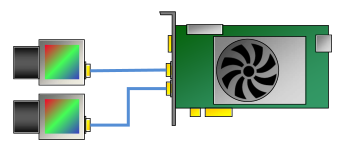 |
所有面陣取像 Applets 的共用規格#
| Max. Image Size [px] | 16k x 64kb |
| Camera Clock Max. | 85 MHz |
| Image Selector | 是 |
| LUT | 完整解析度 |
面陣取像 Applets 之間的相異規格#
| Camera Ports | Camera Type | ROI 步進尺寸 [px] | Bit Depth Processing [bit] | Bit Depth Output [bit] | 模式 | Mirroring | 抽頭幾何結構排序 | Bayer Color Reconstruction (HQe) | 白平衡 | Bandwidth: Mean per Camera [MP/s] | Bandwidth Total DMA [MB/s] c | |
|---|---|---|---|---|---|---|---|---|---|---|---|---|
| Acq_DualBaseAreaBayer | 2 | BASE | x: 4 y: 1 | 8 per color component | BGR 24 | 拜耳圖案 (Bayer Pattern) | 是,水平與垂直 | 1, 2, 4 (horizontal and vertical) | Yes, High Quality Extended (HQe) | 是 | 255 | 1800 |
| Acq_DualBaseAreaGray | 2 | BASE | x: 4 y: 1 | 16 | Grayscale 8, 10 packed, 12 packed, or 16 | 灰階 | 是,水平與垂直 | 1, 2, 4 (horizontal and vertical) | 否 | 否 | 255 | 900 |
| Acq_DualBaseAreaRGB | 2 | BASE | x: 1 y: 1 | 8 per color component | BGR 24 | RGB | 是,水平與垂直 | 1, 2, 4 (horizontal and vertical) | 否 | 是 | 85 | 900 |
| Acq_SingleBaseAreaBayer | 1 | BASE | x: 4 y: 1 | 12 per color component | BGR 24, 48 | 拜耳圖案 (Bayer Pattern) | 是,水平與垂直 | 1, 2, 4 (horizontal and vertical) | Yes, High Quality Extended (HQe) | 是 | 255 | 1800 |
| Acq_SingleBaseAreaGray | 1 | BASE | x: 4 y: 1 | 16 | Grayscale 8, 16 | 灰階 | 是,水平與垂直 | 1, 2, 4 (horizontal and vertical) | 否 | 否 | 255 | 1800 |
| Acq_SingleBaseAreaRGB | 1 | BASE | x: 8 y: 1 | 8 per color component | BGR 24 | RGB | 是,水平與垂直 | 1, 2, 4 (horizontal and vertical) | 否 | 是 | 85 | 1800 |
| Acq_SingleFullAreaBayer | 1 | FULL | x: 8 y: 1 | 10 per color component | BGR 24,or 48 | 拜耳圖案 (Bayer Pattern) | Yes, horizontal | 8, 10 (horizontal) | Yes, High Quality Extended (HQe) | 是 | 850 | 1800 |
| Acq_SingleFullAreaGray | 1 | FULL | x: 16 y: 1 | 10 | Gray-scale 8, 10 packed, or 16 | 灰階 | Yes, horizontal | 8, 10 (horizontal) | 否 | 否 | 850 | 1800 |
| Acq_SingleFullAreaRGB | 1 | FULL | x: 4 y: 1 | 10 per color component | BGR 24, or 48 | RGB | Yes, horizontal | 1, 2, 4 (horizontal and vertical) | 否 | 是 | 284 | 1800 |
| Acq_SingleMediumAreaBayer | 1 | MEDIUM | x: 4 y: 1 | 12 per color component | BGR 24, or 48 | 拜耳圖案 (Bayer Pattern) | 是,水平與垂直 | 1, 2, 4 (horizontal and vertical) | Yes, High Quality Extended (HQe) | 是 | 340 | 1800 |
| Acq_SingleMediumAreaGray | 1 | MEDIUM | x: 4 y: 1 | 12 | Grayscale 8, or 16 | 灰階 | 是,水平與垂直 | 1, 2, 4 (horizontal and vertical) | 否 | 否 | 340 | 1800 |
| Acq_SingleMediumAreaRGB | 1 | MEDIUM | x: 4 y: 1 | 12 per color component | BGR 24, or 48 | RGB | 是,水平與垂直 | 1, 2, 4 (horizontal and vertical) | 否 | 是 | 170 | 1800 |
線陣取像 Applets#
提供以下 Line Scan Acquisition Applets:
- Acq_SingleBaseLineGray
- Acq_SingleBaseLineRGB
- Acq_SingleFullLineBayer_RB_GG
- Acq_SingleFullLineBayer_RG_GB
- Acq_SingleFullLineGray
- Acq_SingleFullLineRGB
- Acq_SingleMediumLineGray
- Acq_SingleMediumLineRGB
- Acq_DualBaseLineBayer_RG_GB
- Acq_DualBaseLineGray
- Acq_DualBaseLineRGB
Applet 名稱中的「single」與「dual」分母是指您可以連接的相機最大數量。如需詳細資訊,請參閱 Choosing the Right Line Scan Acquisition Applet。
如何選擇正確的線陣取像 Applet#
您必須為相機設定選擇正確的 applet。否則,相機可能無法運作或相機效能可能會大幅降低。
哪一個 applet 是正確的,取決於相機數量、每台相機的通道數以及所需的 ROI 步進大小。
ROI 遞增尺寸取決於影像前處理的 Parallelism,因此會因相機和擷取卡而異。
| 相機數量 | 相機連接埠數量 | 擷取卡連接埠數量 | 模式 | Applet | ROI 步進尺寸 [px] | 拓樸 |
|---|---|---|---|---|---|---|
| 1 | 1 | 2 | 灰階 | Acq_SingleBaseLineGray | x: 4 y: 1 | |
| 1 | 1 | 2 | RGB | Acq_SingleBaseLineRGB | x: 1 y: 1 | |
| 1 | 2 | 2 | 拜耳圖案 (Bayer Pattern) | Acq_SingleFullLineBayer_RB_GG Acq_SingleFullLineBayer_RB_GB | x: 8; y: 1 x: 8; y: 1 | |
| 1 | 2 | 2 | 灰階 | Acq_SingleFullLineGray Acq_SingleMediumLineGray | x: 8; y: 1 x: 8; y: 1 | |
| 1 | 2 | 2 | RGB | Acq_SingleFullLineRGB Acq_SingleMediumLineRGB | x: 4; y: 1 x: 4; y: 1 | |
| 2 | 1 | 2 | 拜耳圖案 (Bayer Pattern) | Acq_DualBaseLineBayer_RG_GB | x: 4 y: 1 | |
| 2 | 1 | 2 | 灰階 | Acq_DualBaseLineGray | x: 4 y: 1 | |
| 2 | 1 | 2 | RGB | Acq_DualBaseLineRGB | x: 1 y: 1 | |
所有線陣取像 Applets 的共用規格#
| Camera Clock | 85 MHz |
| Image Selector | 是 |
| LUT | 完整解析度 |
線陣取像 Applets 之間的相異規格#
| Image Size [px] b | Camera Ports | Camera Type | ROI 步進尺寸 [px] | Bit Depth Processing [bit] | Bit Depth Output [bit] | 模式 | Mirroring | 抽頭幾何結構排序 | Bayer Color Reconstruction (HQe) | 白平衡 | Bandwidth: Mean per Camera [MP/s] | Bandwidth Total DMA [MB/s] c | |
|---|---|---|---|---|---|---|---|---|---|---|---|---|---|
| Acq_DualBaseLineBayer_RG_GB | 16k x 64k | 2 | BASE | x: 4 y: 1 | 8 per color component | BGR 24 | 拜耳圖案 (Bayer Pattern) | 否 | 否 | Yes (2 lines) | 是 | 566 | 900 |
| Acq_DualBaseLineGray | 48k x 16M | 2 | BASE | x: 4 y: 1 | 12 | Grayscale 8, or 16 | 灰階 | Yes, horizontal | 1, 2, 3, 4 (horizontal) | 否 | 否 | 250 | 900 |
| Acq_DualBaseLineRGB | 32k x 16M | 2 | BASE | x: 1 y: 1 | 8 per color component | BGR 24 | RGB | Yes, horizontal | 1, 2, 4 (horizontal) | 否 | 是 | 85 | 900 |
| Acq_SingleBaseLineGray | 48k x 16M | 1 | BASE | x: 4 y: 1 | 16 | Grayscale 8, or 16 | 灰階 | Yes, horizontal | 1, 2, 3, 4 (horizontal) | 否 | 否 | 255 | 1800 |
| Acq_SingleBaseLineRGB | 64k x 16M | 1 | BASE | x: 1 y: 1 | 8 per color component | BGR 24 | RGB | Yes, horizontal | 1, 2, 4 (horizontal) | 否 | 是 | 85 | 1800 |
| Acq_SingleFullLineBayer_RB_GG | 16k x 16M | 1 | FULL | x: 8 y: 1 | 8 per color component | BGR 24 | 拜耳圖案 (Bayer Pattern) | Yes, horizontal | 8, 10 (horizontal) | Yes (2 lines) | 是 | 850 | 1800 |
| Acq_SingleFullLineBayer_RG_GB | 16k x 16M | 1 | FULL | x: 8 y: 1 | 8 per color component | BGR 24 | 拜耳圖案 (Bayer Pattern) | Yes, horizontal | 8, 10 (horizontal) | Yes (2 lines) | 是 | 566 | 1800 |
| Acq_SingleFullLineGray | 51k x 16M | 1 | FULL | x: 8 y: 1 | 10 | Grayscale 8, or 16 | 灰階 | Yes, horizontal | 8, 10 (horizontal) | 否 | 否 | 850 | 1800 |
| Acq_SingleFullLineRGB | 32k x 16M | 1 | FULL | x: 4 y: 1 | 10 per color component | BGR 24, or 48 | RGB | Yes, horizontal | 1, 2, 4 (horizontal) | 否 | 是 | 284 | 1800 |
| Acq_SingleMediumLineGray | 48k x 16M | 1 | MEDIUM | x: 8 y: 1 | 12 | Grayscale 8, or 16 | 灰階 | Yes, horizontal | 1, 2, 3, 4 (horizontal) | 否 | 否 | 340 | 1800 |
| Acq_SingleMediumLineRGB | 32k x 16M | 1 | MEDIUM | x: 4 y: 1 | 12 per color component | BGR 24, or 48 | RGB | Yes, horizontal | 1, 2, 4 (horizontal) | 否 | 是 | 170 | 1800 |
Frame Grabber Test Applet#
此 applet 為 Frame Grabber Test Applet。其用途是測試硬體。
此 applet 提供以下功能:
| 功能 | 說明 |
|---|---|
| DMA 效能測試 | 測試針對不同記憶體大小和中斷速率的不同影像尺寸 |
| RAM 測試 | 檢查錯誤與處理 |
| 檢查 Camera Port Image Acquisition | 檢查相機連接埠影像擷取 |
| 傳送觸發訊號至相機 | 向相機傳送觸發訊號 |
| GPIO Monitoring | 監控 GPI 並設定 GPO |
| Event Test | 產生軟體回呼事件 |
| General Monitoring | 監控 FPGA 溫度、電源管理、PoCXP 等 |
使用 Acquisition Applets#
在此尋找關於搭配 Framegrabber SDK 使用 Applet 的一般資訊:Acquisition Applets。
安裝 Applets#
在圖形擷取卡上使用特定 Applet 之前,必須先將其安裝到圖形擷取卡上。有關安裝 Applet 的說明,請參閱 Managing Applets (microDiagnostics)。
手動新增 Applet#
若要將作為 *.dll 檔案(而非安裝程式形式)接收到的 Applet 新增至主機檔案系統:
- 取得您收到的 Applet 檔案 (*.dll)。
- Copy this file into the following directory: <Framegrabber SDK installation directory>/Dll/<Frame grabber model>
現在您可以使用新的 Applet 了。
測試影像擷取#
在您自己的軟體(透過 API)中開始使用 Applet 之前,您可能會想要測試系統設定或個別的 Applet(及其參數化選項)。
為此,您可以使用 microDisplay X 工具,該工具已作為 Framegrabber SDK 環境的一部分安裝在您的電腦上。有關如何載載入和測試 Applet 的說明,請參閱 Configuring the Applet (microDisplay X)。
儲存 Applet 組態#
在 microDisplay X 中或透過 Framegrabber API 設定 Applet 後,您可以儲存設定。如需詳細資訊,請參閱 Other Tasks (microDisplay X)。