設定裝置使用者 ID#
這對於在具有大量裝置的環境中識別個別相機非常有用。
若要設定 Device User ID:
- 在 Device User ID 欄位中為相機輸入新的 Device User ID。
- 按一下 Save 按鈕。
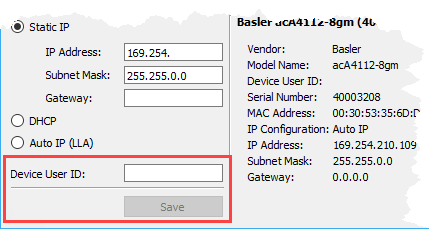
IP Configurator 會儲存您的變更。這需要幾秒鐘的時間。當 IP Configurator 完成儲存後,上方窗格和下方中央區域中的資訊將會自動更新。
若要使變更在 pylon Viewer 中顯示,您需要關閉並重新開啟 pylon Viewer。
這對於在具有大量裝置的環境中識別個別相機非常有用。
若要設定 Device User ID:
IP Configurator 會儲存您的變更。這需要幾秒鐘的時間。當 IP Configurator 完成儲存後,上方窗格和下方中央區域中的資訊將會自動更新。
若要使變更在 pylon Viewer 中顯示,您需要關閉並重新開啟 pylon Viewer。