
Operator Library: Arithmetics
此運算子會計算輸入的餘弦值。
餘弦函數的輸入範圍為 [-∞, ∞]。 由於餘弦函數具有週期性,VisualApplets 運算子的輸入範圍受限於 [-π, π[ 亦即輸入的最小值為 -π,而輸入的最大值加 1 則為 π。 因此,輸入值不可能為 +π。
因此,餘弦函數的引數 x 由以下公式決定:
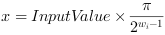
其中

is the bit width at the input link.
餘弦函數的結果範圍為 [-1, 1]。 運算子在 VisualApplets 中的輸出值範圍會對應至
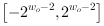
其中

是輸出 link 處的 Bit Width。因此輸出值為

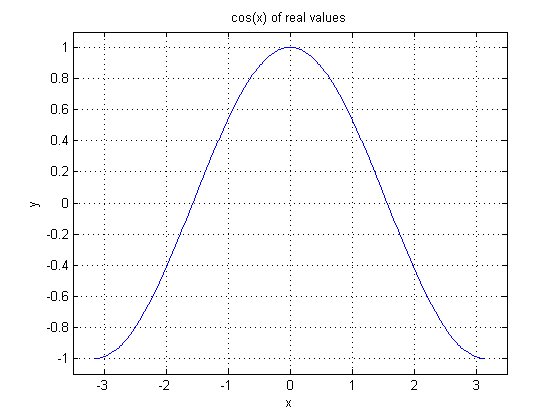
下圖顯示了餘弦函數的圖表。
下一張圖顯示了 VisualApplets Operator 的實作。請注意輸入與輸出的 Bit Width。
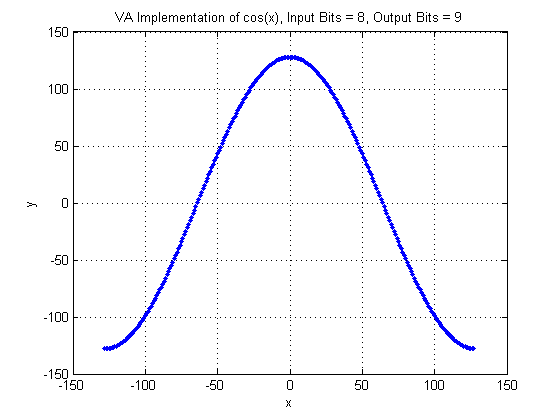
讓我們來看一個輸入像素值,例如 -50。 在給定的 Bit Width 為 8 的情況下,像素值的實際值表示法為 -50 * pi / 128。 接著,餘弦計算結果將會是 0.33。 在像素值表示法中,此結果會變成 43,這與圖表中顯示的相同。
| Link Parameter | Input Link I | Output Link O |
|---|---|---|
| Bit Width | [8, 12] | [8, 32] |
| Arithmetic | signed | signed |
| Parallelism | any | as I |
| Kernel Columns | 1 | as I |
| Kernel Rows | 1 | as I |
| Img Protocol | {VALT_IMAGE2D, VALT_LINE1D, VALT_PIXEL0D} | as I |
| Color Format | VAF_GRAY | as I |
| Color Flavor | FL_NONE | as I |
| Max. Img Width | any | as I |
| Max. Img Height | any | as I |
以下範例顯示了 COS 運算子的使用方式:
-
'Geometric Transformation and Distortion Correction'
範例 - 使用 PixelReplicator 的幾何轉換與 Distortion Correction
-
'Functional Example for Specific Operators of Library Arithmentics: Trigonometric Functions'
範例 - 如何使用此運算子的示範
 上一頁

