
在本節中,您將看到一個範例,說明如何在 執行期間輕鬆地將內容填入 LUT 中。此方法是基於 structFieldParameterAccess 結構體。 有關struct FieldParameterAccess 結構體及Fg_setParameterWithType() 函式的文件,請參閱 Basler 幀擷取卡 API 文件。
實作範例:
此結構體FieldParameterAccess允許以靈活的方式存取 任何類型的陣列參數。無論是範圍存取還是單一值 存取,皆可實現。
範例:
# include <fgrab_struct.h>

struct FieldParameterAccess singleaccess;

struct FieldParameterAccess rangeaccess;
要使用 Basler 的Framegrabber API 將 LUT 填入資料:
-
定義 LUT 內容的數值
範例:
uint64_t primes[7] = { 1, 2, 3, 5, 7, 11, 13 }; uint32_t answer = 42; -
設定單一值存取或範圍存取:
-
FieldParameterAccess:: vtype:設定所包含 資料的類型
-
FieldParameterAccess:: index:設定區間內的 第一個索引
-
FieldParameterAccess:: count:設定區間的計數值
-
根據所包含資料的類型而定的數值範圍: FieldParameterAccess:: p_double、p_int32_t、p_int64_t、 p_uint32_t 或 puint64_t
範例:
// set up single value access

singleaccess.vtype = FG_PARAM_TYPE_UINT32_T;

singleaccess.index = 17;

singleaccess.count = 1;

singleaccess.p_uint32_t = &answer;


// set up range access

rangeaccess.vtype = FG_PARAM_TYPE_UINT64_T// every data value is an uint64_t

rangeaccess.index = 0;

rangeaccess.count = 7;

rangeaccess.p_uint64_t = primes;
-
-
將內容寫入 Applet 運算子 LUT 中
請使用函式Fg_setParameterWithType(), 將內容寫入「Operator LUT」小程式中。
範例:
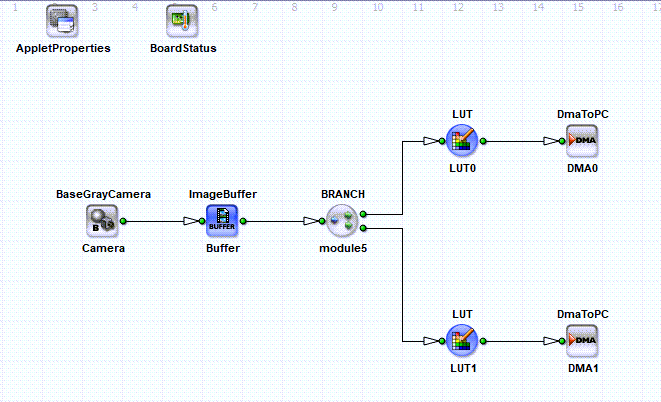
-
將 LUT 內容寫入編譯後 硬體小程式中的對應 LUT 運算子
對於如 上圖所示、包含兩個 LUT 運算子的VisualApplets 設計結構,您可以將 LUT 內容寫入編譯後硬體小程式中的對應 LUT 運算子,方法如下:
retCode += Fg_setParameterWithType(fg, Fg_getParameterIdByName(fg, "Device1_Process0_LUT0 _LUTcontent"),
&singleaccess, 0, FG_PARAM_TYPE_STRUCT_FIELDPARAMACCESS);

retCode += Fg_setParameterWithType(fg, Fg_getParameterIdByName(fg, "Device1_Process0_LUT1 _LUTcontent"),
&rangeaccess, 0, FG_PARAM_TYPE_STRUCT_FIELDPARAMACCESS);
 上一頁
上一頁

