
Operator Library: Parameters
此運算子會從設計中任何位置的模組參數產生 1:1 的對應參數 (位於參數 Value 中)。您可以在參數 Reference 中指定參照的參數 (路徑與名稱)。
被引用參數可以是以下三種類型之一:VA_SINT、VA_UINT 或 VA_ENUM。 map 參數本身始終為 Int64 類型。map 參數完全反映被引用參數的所有屬性。
若要引用一個使用完整 64 位元的無符號參數, 則必須根據 Int64 類型重新詮釋該值。
您可以在設計階層內定義一個目標,讓參照的參數在該處可見且可存取。目標由兩個參數定義:DisplayHierarchy 與 DisplayName。在 DisplayHierarchy 中,您指定參照 operator 本身所在的同一個處理程序中的階層方塊。在參數 DisplayName 中,您設定目標參數的名稱。如果同時設定了 DisplayHierarchy 與 DisplayName,則由 DisplayName 定義的參數將可在 DisplayHierarchy 所指定的階層方塊中使用。如果 DisplayName 為空,則不會建立參數。如果設定了 DisplayName,但 DisplayHierarchy 為空,則由 DisplayName 定義的參數會新增至父階層(也就是參照 operator 本身所在的階層方塊)。
這可讓您將設計的參數提供給您想要的任何階層層級(設計中)使用。例如,您可以讓受保護階層方塊內的模組參數直接在受保護階層方塊本身的屬性下進行參數化。
對應參數本身也可以被參照。因此,您既可以參照參照 operator 中參數 Value 的內容,也可以參照您在參數 DisplayName 與 DisplayHierarchy 中定義的參數。當受保護階層方塊是由其他受保護階層方塊組成時,這點尤其重要。
![[注意]](../common/images/admon/note.png) |
所有連接的參數會同時更新 |
|---|---|
|
如果其中一個連接的參數(參照參數、對應參數 Value 或目標參數)遭到變更,所有其他連接的參數中的值也會隨之變更。 |
此 operator 沒有輸入和輸出,因為它不會干擾設計的資料流結構。
關於 Library Parameters 的一般介紹,請參閱 Library Parameters。
範例:
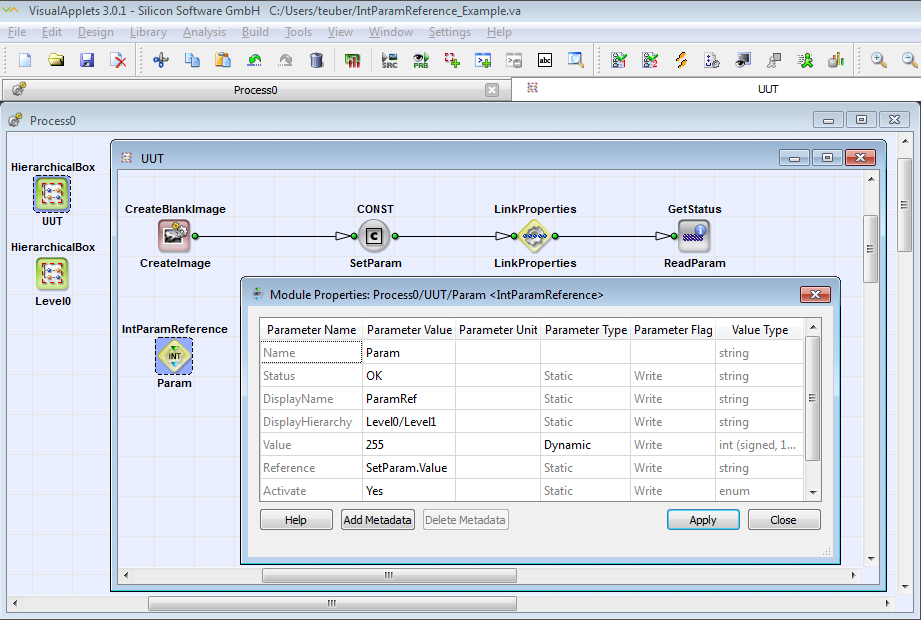
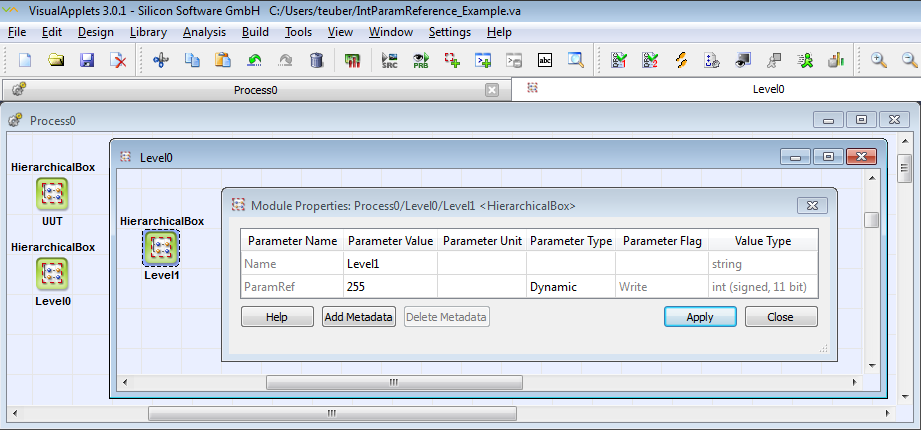
地圖參數 ParamRef 現在可在 Process0/Level0/Level1 中使用:
| Status | |
|---|---|
| Type | 靜態讀取參數(儘管 GUI 顯示為寫入) |
| Default | 無 |
| Range | OK 或錯誤訊息 |
|
顯示錯誤狀態。如果參數 Activate 設定為 Yes,則會檢查其他模組參數。此參數會顯示檢查結果,即 OK 或錯誤訊息。 此參數不屬於最終 applet 的一部分。 |
|
| DisplayName | |
|---|---|
| Type | 靜態寫入參數 |
| Default | 無 |
| Range | 任何字串 |
|
如果您想在設計的其他位置(除參照運算子執行個體本身外)授權存取參照參數(定義於參數 Reference 中),您需要定義一個新參數。請在此處指定這個新參數的名稱。 如果此欄位為空白,則不會建立新參數。 |
|
| DisplayHierarchy | ||||
|---|---|---|---|---|
| Type | 靜態寫入參數 | |||
| Default | 無 | |||
| Range | 任何字串 | |||
|
在此指定您要附加在參數 DisplayName 中定義的新 map 參數的階層式方塊。 針對此參數,您可以使用自動完成與語法突顯功能。若要使用自動完成功能,請點擊 Module Properties 對話方塊中 此參數的 Parameter Values 欄位, 並按下鍵盤上的 TAB 鍵。如需有關自動完成功能的更詳細說明, 請參閱 'Autocompletion and Syntax Highlighting for Translator and Reference Operators'。 如果您定義了新參數 DisplayName, 但將參數 DisplayHierarchy 留空:新參數將會 新增至包含參考 operator 實例的階層式方塊。 (請記住,如果參考 operator 實例 位於最高(製程)層級,則無法這樣做。)
|
||||

| Value | |
|---|---|
| Type | static、dynamic、write、read 參數 |
| Default | 0 |
| Range | 帶號整數 (64 位元)、無帶號整數 (64 位元) |
|
用於存取參照參數及自參照參數存取的對應參數。 此參數具有與參照參數相同的 Property。 |
|
| Unit | |
|---|---|
| Type | 靜態寫入參數 |
| Default | - |
| Range | Latin-1 |
|
在此輸入參數 Value 的單位。 |
|
| 描述 | |
|---|---|
| Type | 靜態寫入參數 |
| Default | - |
| Range | 任何文字 |
|
在此輸入參數 Value 的描述。 |
|
| Reference | ||||
|---|---|---|---|---|
| Type | 靜態寫入參數 | |||
| Default | 無 | |||
| Range | 定義參照參數的任意字串:模組的相對路徑、模組名稱與參數名稱 | |||
|
在此,您可以定義參照參數在設計中的位置。 針對此參數,您可以使用自動完成與語法突顯功能。若要使用自動完成功能,請點擊 Module Properties 對話方塊中 此參數的 Parameter Values 欄位, 並按下鍵盤上的 TAB 鍵。如需有關自動完成功能的更詳細說明, 請參閱 'Autocompletion and Syntax Highlighting for Translator and Reference Operators'。
|
||||

| Activate | |
|---|---|
| Type | dynamic write parameter |
| Default | 否 |
| Range | {No, Yes} |
|
Yes = 已啟用對參照參數的存取以及來自參照參數的存取 (透過對應參數 Value)。 No = 對參照參數的存取及來自參照參數的存取已停用,且 Status 參數已停用。 DisplayName 與 DisplayHierarchy 參數將無效。 |
|
以下範例展示了 IntParamReference 運算子的使用方式:
-
DMA、RAM、GPIO、觸發與 LED 硬體自我測試的範例。
-
範例 - 示範如何使用參數參照運算子。
-
範例 — 示範如何為使用者函式庫元素提供參數。
 上一頁
上一頁

