
Operator Library: Color
The operator BAYER5x5Linear reconstructs an RGB image from a Bayer input image. Technically, a Bayer raw image is a grayscale image which is composed from alternating red, green and blue pixels. BAYER5x5Linear acquires an RGB image from a Bayer camera through a bilinear reconstruction. The input link must be a 5x5 kernel of a Bayer image.
The underlying algorithm is a patent free high quality linear implementation.
The operator input is a grayscale image while the output is a color image. Therefore, the output bit width is increased by a factor of three plus 4 precision bits per component. For example, an 8 bit grayscale input image will be reconstructed into a 3 * (8 + 4) bit color image. If the added precision bits are not required they can be discarded using operator RND or ShiftRight.
The Bayer array configuration of the camera must match the operator settings. The operator setting is changed using parameter BayerInit. Four different mappings of the Bayer array on the sensor are possible:
-
GreenFollowedByRed
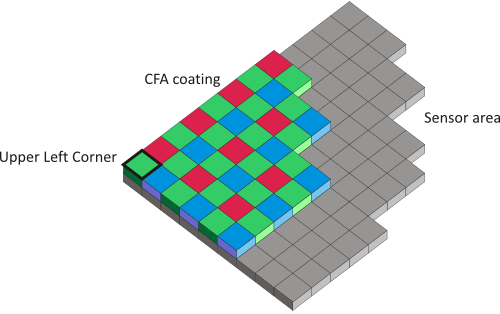
-
RedFollowedByGreen
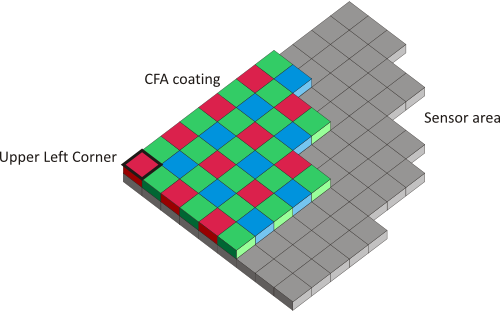
-
BlueFollowedByGreen
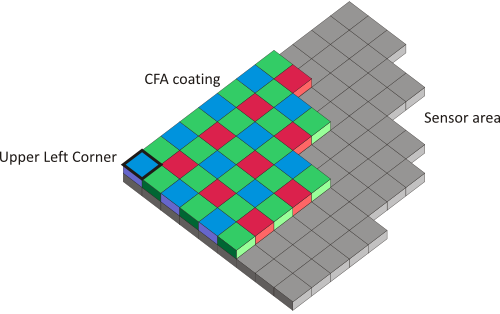
-
GreenFollowedByBlue
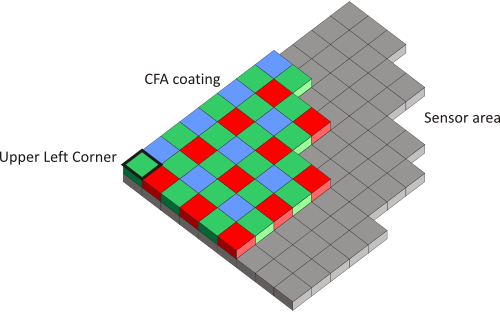
The figures show the top left corner an image transferred to the frame grabber. In general, this is the top left corner of the camera's sensor but could change if you set a region of interest in the camera. The sensor pixel are overlaid with one of the four different Bayer patterns shown in the figures. Select the Bayer pattern corresponding to the image sensor of your camera.
| Link Parameter | Input Link I | Output Link O |
|---|---|---|
| Bit Width | [1, 16] | (InputBitWidth + 4) * 3 |
| Arithmetic | unsigned | as I |
| Parallelism | any | as I |
| Kernel Columns | 3 | 1 |
| Kernel Rows | 3 | 1 |
| Img Protocol | {VALT_IMAGE2D, VALT_LINE1D} | as I |
| Color Format | VAF_GRAY | VAF_COLOR |
| Color Flavor | FL_NONE | FL_RGB |
| Max. Img Width | any | as I |
| Max. Img Height | any | as I |
| BayerInit | |
|---|---|
| Type | dynamic/static read/write parameter |
| Default | GreenFollowedByRed |
| Range | {GreenFollowedByRed, GreenFollowedByBlue, RedFollowedByGreen, BlueFollowedByGreen} |
|
The Bayer array configuration of the camera must match the operator settings. See descriptions above. |
|
| ImplementationType | ||||
|---|---|---|---|---|
| Type | 靜態寫入參數 | |||
| Default | AUTO | |||
| Range | (AUTO, EmbeddedALU, LUT) | |||
|
參數 ImplementationType 會影響 operator 的實作策略,亦即 使用哪些邏輯元素來實作 operator。 您可以選擇以下其中一個值: AUTO: 當具現化 operator 時,會根據所連接 link 的參數化設定, 自動選擇最佳的實作策略。 EmbeddedALU:此運算子使用 FPGA 中非基於 LUT 的內嵌算術邏輯元素。 LUT:此運算子使用 FPGA 的 LUT 邏輯。
|
||||

The use of operator BAYER5x5Linear is shown in the following examples:
-
範例 - 此範例展示使用 5x5 濾波器進行 Bayer RAW 模式的去馬賽克。
-
「Bayer 5x5 Demosacing with White Balancing」
範例 - 此範例展示使用 5x5 濾波器進行 Bayer RAW 模式的去馬賽克。 此外,還加入了用於色彩校正的白平衡。
-
範例 - 此範例展示具有色彩模式 Red/BlueFollowedByGreen_GreenFollowedByBlue/Red 的雙線性線掃描相機之 Bayer RAW 模式去馬賽克
-
範例 - 此範例顯示具備 Red/BlueFollowedByBlue/Red_GreenFollowedByGreen 彩色圖樣的雙線性線型掃描相機之 Bayer RAW 圖樣去邊緣化處理
-
'Bayer Demosaicing a Line Scan Camera with 8 Bit BiColor Bayer Pattern'
範例 - 此範例顯示採用 BiColor Bayer 圖樣(例如 BiColorRGBG、BiColorGRGB、BiColorBGRG 與 BiColorGBGR,適用於 racer 2 L 相機等)之 CXP-12 線型掃描相機的 8 位元 Bayer RAW 圖樣去邊緣化處理。此外,該範例還包含一個線型掃描觸發模組以及一個白平衡模組。
-
'Bayer Demosaicing a Line Scan Camera with 10 Bit BiColor Bayer Pattern'
範例 - 此範例顯示採用 BiColor Bayer 圖樣(例如 BiColorRGBG、BiColorGRGB、BiColorBGRG 與 BiColorGBGR,適用於 racer 2 L 相機等)之 CXP-12 線型掃描相機的 10 位元 Bayer RAW 圖樣去邊緣化處理。此外,該範例還包含一個線型掃描觸發模組以及一個白平衡模組。
-
'Bayer Demosaicing a Line Scan Camera with 12 Bit BiColor Bayer Pattern'
範例 - 此範例顯示採用 BiColor Bayer 圖樣(例如 BiColorRGBG、BiColorGRGB、BiColorBGRG 與 BiColorGBGR,適用於 racer 2 L 相機等)之 CXP-12 線型掃描相機的 10 位元 Bayer RAW 圖樣去邊緣化處理。此外,該範例還包含一個線型掃描觸發模組以及一個白平衡模組。
 上一頁

