
Operator Library: Synchronization
This operator splits the input image into a number of smaller images. The image height of the smaller images is specified by parameter ImageHeight. For example, setting ImageHeight to 512 and using input images of 1024 lines, the operator will split the input image into two new smaller images with the image height of 512.
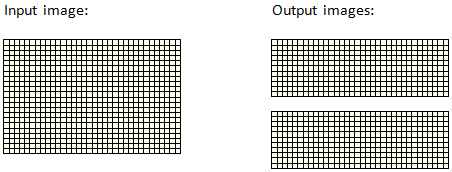
If the height of an input image is not divisible by the ImageHeight parameter value, the input image will be split into images of the specified height as far as possible. The remaining lines will generate an output image of smaller height. For example, if an input image of height 1024 is split into chunks of height 400, the operator will output two images of height 400 and and one image of height 224. If the input image height is less than parameter ImageHeight, the operator will not split the input image.
 |
提高幀率 |
|---|---|
|
Note that the operator increases the frame rate by keeping the original bandwidth. |
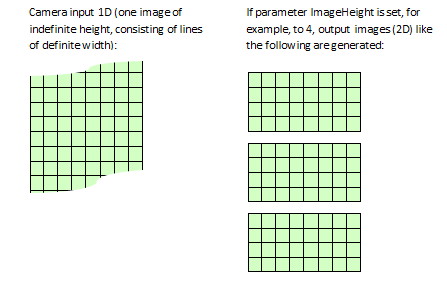
SplitImage can be used to perform a 1D to 2D conversion. The conversion is automatically performed if a link using the image protocol VALT_LINE1D is connected to the operator's input. For example, the 1D input of a line scan camera can be split into images of a specified height, effectively creating a 2D output stream. Example:
When changing the ImageHeight value dynamically while acquisition is running, the operator guarantees image integrity. The operator keeps the old ImageHeight value until the output frame is finished. After the completion of the current output frame the operator will start using the new ImageHeight value for further splitting.
The operator supports variable line length for all ImageHeight values, for example ImageHeight = 2:
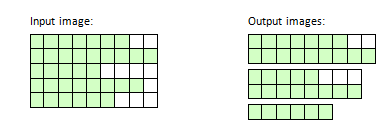
The end of each line is marked by a Eol (End of Line) flag, so that there are no undefined data in the output images.

|
|
無號輸入的 Bit Width 範圍為 [1, 64]。 針對有號輸入,範圍為 [2, 64]。 針對無號彩色輸入,範圍為 [3, 63],而針對有號彩色輸入,範圍為 [6, 63]。 |
| ImageHeight | |
|---|---|
| Type | 動態讀取/寫入參數 |
| Default | 1 |
| Range | [1, Maximum Output Image Height] |
|
Maximum number of lines in the output image. |
|
The use of operator SplitImage is shown in the following examples:
-
範例 - 顯示在線掃描應用中使用 operator Blob_Analysis_1D。
-
'Color Plane Separation Option 5 - Sequential Output with Advances Processing'
色彩平面分離範例。 RGB 輸入被分割成其組成部分,並透過一個 DMA 通道進行順序輸出。 分割是透過平行收集相同組件並使用 FrameBufferRandomRead 進行讀取來執行的。
-
範例 - 基於偵錯目的,Scope operator 提供了用於分析灰階圖片的選項。.
-
範例 - 展示如何分割與合併影像串流。並在影像附加尾碼。
-
'使用信號運算子與 CameraControl 運算子實現 microEnable 5 marathon VCL 的行掃描觸發'
本文介紹了一種行掃描觸發。此觸發包含使用擷取閘道(Capture Gate)的影像觸發以及多功能行觸發。外部來源、內部頻率產生器或軟體觸發脈衝皆可用於產生觸發。
-
'使用信號運算子實現 microEnable 5 marathon VCX QP 的行掃描觸發'
本文介紹了一種行掃描觸發。此觸發包含使用擷取閘道(Capture Gate)的影像觸發以及多功能行觸發。外部來源、內部頻率產生器或軟體觸發脈衝皆可用於產生觸發。
-
'使用信號運算子實現 imaFlex CXP-12 Quad 的行掃描觸發'
本文介紹了一種適用於 CoaXPress12 的行掃描觸發。此觸發包含使用擷取閘道(Capture Gate)的影像觸發以及多功能行觸發。外部來源、內部頻率產生器或軟體觸發脈衝皆可用於產生觸發。
 上一頁

