Brightness and Contrast (dart E)#
Brightness 和 contrast 始終作為通用數學 Brightness/Contrast 函數的一部分一起處理。
使用此功能#
調整對比度#
若要調整對比度,請輸入以下項目閥值: BslContrast 參數。此參數的數值範圍為 -1 到 1。預設情況下,此參數設為 0,表示 contrast 保持不變。
調整亮度#
若要調整 brightness,請為 BslBrightness 參數輸入數值。此參數的數值範圍為 -1 到 1。預設情況下,此參數設為 0,表示 brightness 保持不變。
運作原理#
對比度#
調整 contrast 會改變影像中明暗區域之間的差異程度。套用的 contrast 越高,差異就越明顯。
相機使用 S 曲線函數來調整對比度。
這可讓您在保留影像動態範圍的同時,提升感知 contrast。
您越是增加 contrast,函數圖形就會越呈現 S 形:
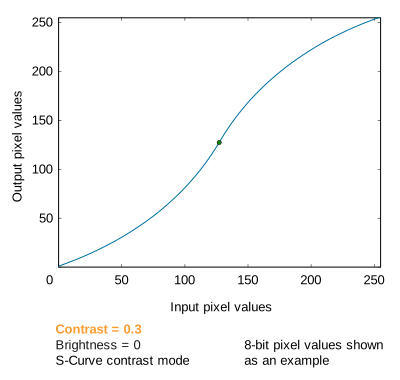
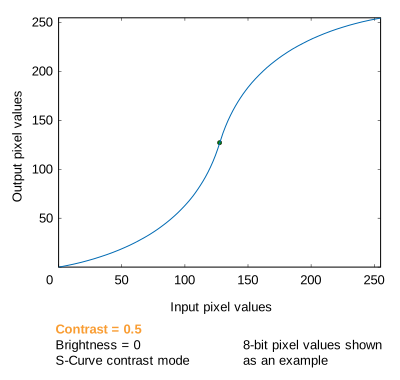
上圖顯示,在 S-Curve 模式下增加 contrast 會產生以下效果:
- S 形曲線在其起點和終點附近變得更平緩,而在中心附近變得更陡峭。因此,影像明暗區域的 contrast 降低了,而中間色調的 contrast 提高了。
- 低的輸入像素值會降低,高的輸入像素值會提高。因此,影像中極端明暗的區域會被壓縮,進一步提升感知 contrast。
- 由於曲線始於 (0,0) 並終於 (Xmax,Ymax),因此影像的動態範圍得以保留。
在 S-Curve 模式下,低於 0 的 Contrast 設定將導致相反效果的反向 S 形曲線。
亮度#
調整 Brightness 可透過增加或減少色調值來使影像變亮或變暗。
調整 Brightness 會移動 Brightness/Contrast 功能的樞紐點:
- 增加 Brightness 會將樞紐點向左上方移動。這表示影像會顯得更亮。
- 減少 Brightness 會將樞紐點向右下方移動。這表示影像會顯得更暗。
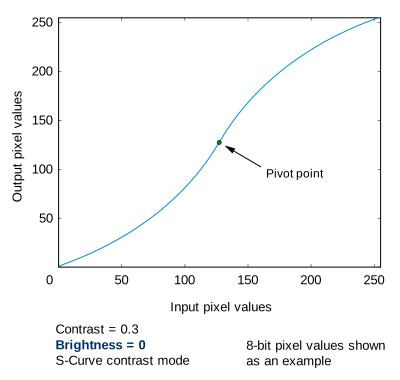
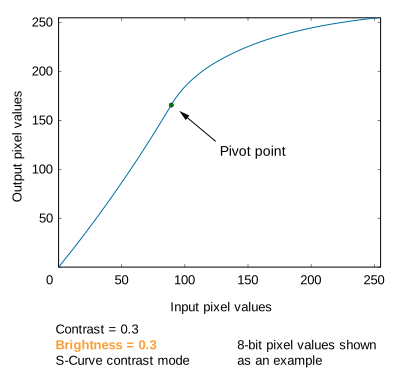
範例程式碼#
/* Macro to check for errors */
#define CHECK(errc) if (GENAPI_E_OK != errc) printErrorAndExit(errc)
GENAPIC_RESULT errRes = GENAPI_E_OK;  /* Return value of pylon methods */
/* Set the Brightness parameter to 0.5 */
errRes = PylonDeviceSetFloatFeature(hdev, "BslBrightness", 0.5);
CHECK(errRes);
/* Set the Contrast parameter to 1.2 */
errRes = PylonDeviceSetFloatFeature(hdev, "BslContrast", 1.2);
CHECK(errRes);
/* Macro to check for errors */
#define CHECK(errc) if (GENAPI_E_OK != errc) printErrorAndExit(errc)
GENAPIC_RESULT errRes = GENAPI_E_OK;  /* Return value of pylon methods */
/* Set the Brightness parameter to 0.5 */
errRes = PylonDeviceSetFloatFeature(hdev, "BslBrightness", 0.5);
CHECK(errRes);
/* Set the Contrast parameter to 1.2 */
errRes = PylonDeviceSetFloatFeature(hdev, "BslContrast", 1.2);
CHECK(errRes);
您也可以使用 pylon Viewer 輕鬆設定參數。