Tonal Range#
若要自動調整色調範圍,請使用「Tonal Range Auto」功能。
若要使用線性或 S 曲線函數來調整對比度,請使用 Brightness and Contrast 功能(若可用)。
使用功能#
調整對比度#
資訊
Basler 建議您首先使用「Tonal Range 」的「自動」功能。之後,您可以依照以下說明微調對比度。
若要手動調整對比度:
- 請確保相機已能拍攝出優質影像,僅剩對比度偏低或色彩偏移等問題。色調範圍調整操作應僅針對影像品質已相當良好的影像進行。
在優化影像品質時,請依照以下步驟進行。 - 將相機中的
TonalRangeEnable參數設為On. - 將相機中的
TonalRangeSelector參數設為Sum. - 將相機中的
TonalRangeSourceDark進行明確的生命週期管理即呼叫TonalRangeTargetDark將參數傳遞至 暗源與暗標值.
若暗標靶值為 較低 若大於暗部基準值,對比度便會增加。 - 將相機中的
TonalRangeSourceBright進行明確的生命週期管理即呼叫TonalRangeTargetBright將參數傳遞至 亮度來源值與目標值.
如果亮度目標值是 更大 若該值高於亮光源的數值,對比度便會增加。
校正色偏#
資訊
Basler 建議您首先使用「Tonal Range Auto」功能。之後,您可以依照以下說明對色彩校正進行微調。
若要手動修正色偏:
- 請確保相機已能拍攝出優質影像,僅剩對比度偏低或色彩偏移等問題。色調範圍調整操作應僅針對影像品質已相當良好的影像進行。
在優化影像品質時,請依照以下步驟進行。 - 將相機中的
TonalRangeEnable參數設為On. - 將相機中的
TonalRangeSelector參數設為Red,Green,或Blue, 視您想要修正的色偏而定。
範例: 如果您的影像帶有綠色色偏,請將參數設定為Green. - 將相機中的
TonalRangeSourceDark,TonalRangeTargetDark,TonalRangeSourceBright以及TonalRangeTargetBright參數至 來源值與目標值 用以將當前直方圖與其他直方圖對齊。
影像優化流程#
若要優化影像品質,請依照以下步驟操作,以避免產生副作用:
- 請使用 Exposure Time、 Black Level、以及「增益」功能來進行基本的影像優化。請確保影像不會過度飽和。
- 若您使用的是彩色相機,請透過以下方式調整白平衡: Light Source Preset、Balance White 自動,或 Balance White 功能來調整白平衡。
- 使用「Tonal Range Auto」和「Tonal Range 」功能,來優化對比度、色彩,或兩者兼具。
運作原理#
要理解色調範圍的操作,最好的方法是觀察影像中色調分佈的圖形化呈現,也就是影像直方圖。
Basler 的pylon Viewer 提供了「直方圖」窗格,在執行色調範圍操作時非常實用。
資訊
視您相機上啟用了哪些其他功能而定,pylon Viewer 中的「直方圖」窗格可能不會顯示「Tonal Range 」功能實際使用的資料。
例如, Gamma 功能是在色調範圍操作之後進行處理的。因此,pylon Viewer 中顯示的直方圖包含伽瑪校正,但「Tonal Range 」功能所使用的資料中則不包含此項。
來源值與目標值#
對比度和色彩調整皆基於同一概念,即把來源值映射到目標值。
為了說明這一點,不妨將來源值視為直方圖中的「錨點」,而目標值則是這些錨點被移動到的位置。
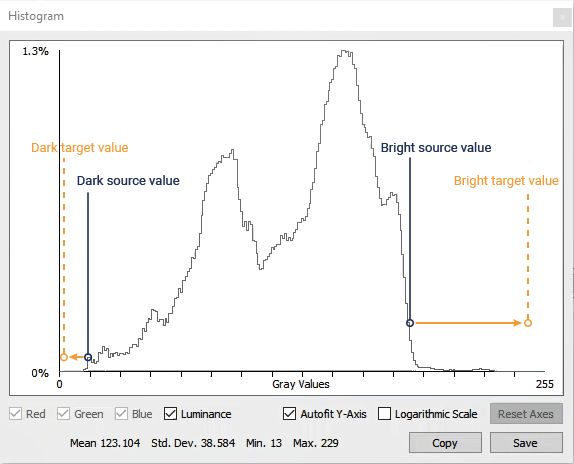
當來源值映射到目標值時,整個直方圖會相應地擴散或拉伸:
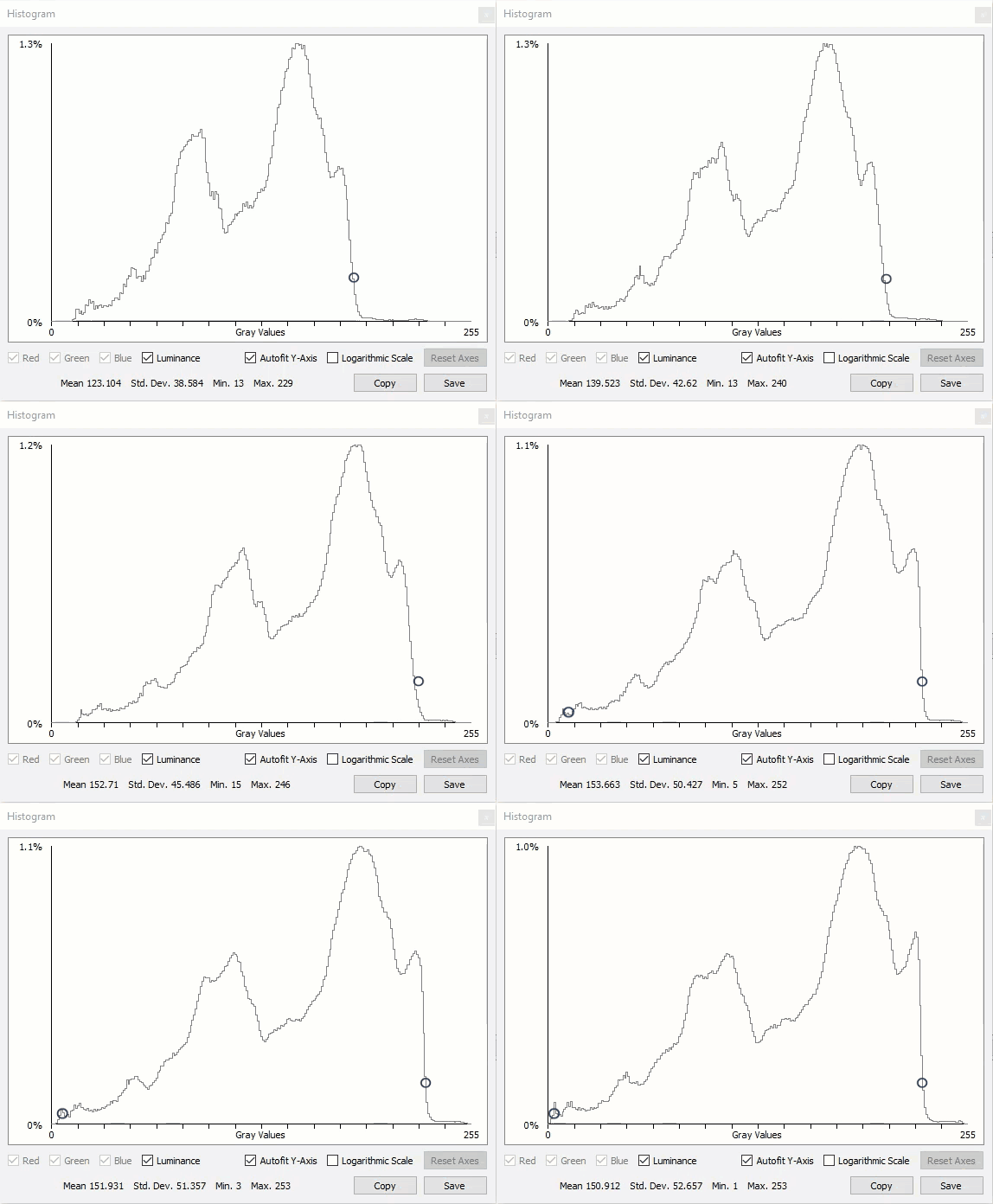
暗/亮光源與目標值#
如上所述,要執行色調範圍操作,必須定義兩組來源值與目標值:
- 黑暗 來源值與目標值,位於 較低 直方圖的末端。
您可以透過TonalRangeSourceDark進行明確的生命週期管理即呼叫TonalRangeTargetDark參數。 - 明亮 來源值與目標值,位於 上層 直方圖的末端。
您可以透過TonalRangeSourceBright進行明確的生命週期管理即呼叫TonalRangeTargetBright參數。
所有來源值和目標值的範圍均可介於 0 至最大像素值之間(例如,若設定為 12位元像素格式,則為 4095)。由於直方圖拉伸與擴散的程度受到限制,因此參數範圍也可能受到限制。
對比度調整(單色與彩色攝影機)#
在所有支援「Tonal Range 」功能的相機上,您都可以使用此功能來調整對比度。
低對比度的影像具有狹窄的色調範圍:
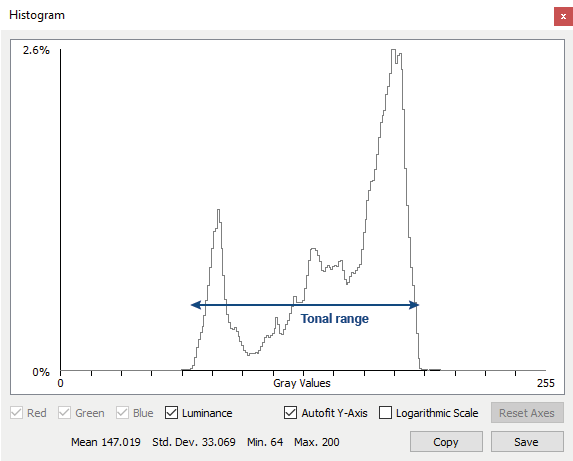
「Tonal Range 」功能可讓您手動擴大色調範圍,從而提高對比度。
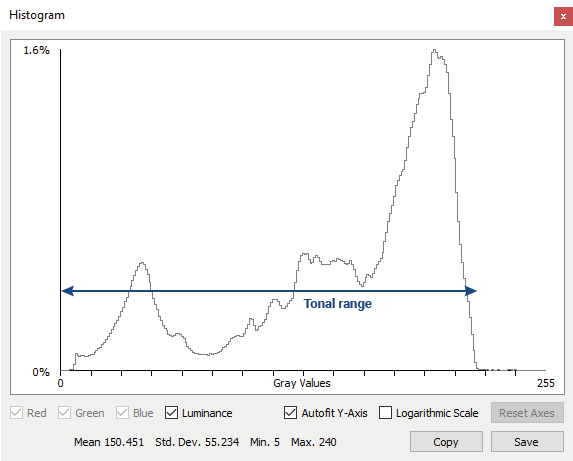
要擴展色調範圍,方法是將暗部來源值映射至較低的目标值,將亮部來源值映射至較高的目标值。
這兩組來源值之間的範圍即定義了您的中間調,也就是您認為對影像至關重要的像素值。
若要自動化此流程,請使用「Tonal Range 」的自動功能。
色彩校正(僅限彩色攝影機)#
在支援「Tonal Range 」功能的彩色相機上,您也可以利用此功能來校正色彩偏移。
如果影像中的色彩發生偏移,三個 RGB(紅、綠、藍)直方圖會呈現未對齊的狀態。例如,如果影像帶有紅色偏色,紅色直方圖的顯示位置將會比綠色和藍色直方圖更偏向右側(參見下圖範例)。
「Tonal Range 」功能可讓您手動對齊 RGB 直方圖,從而減少色彩偏移。
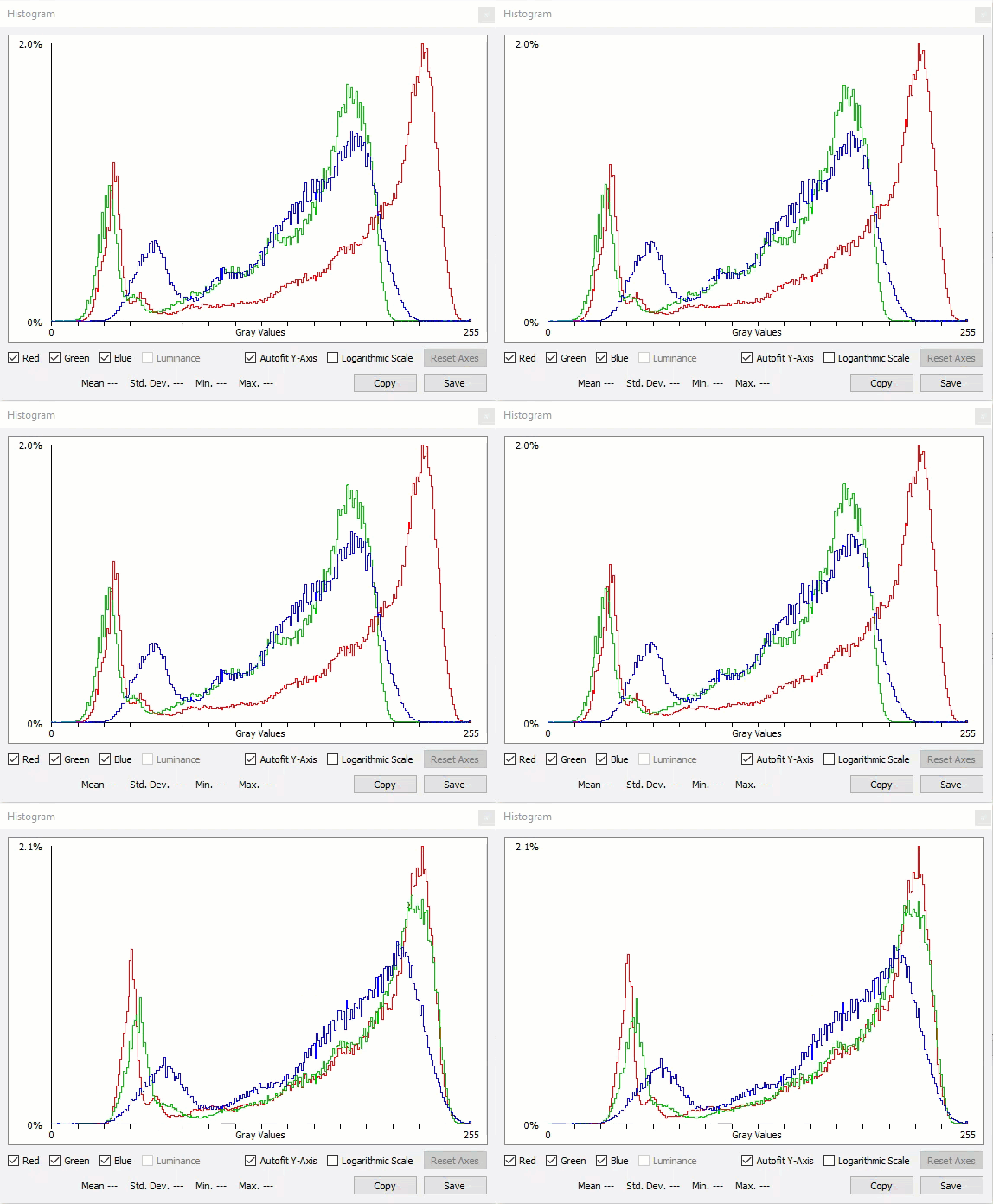
您可以透過設定來源與目標值來對齊 RGB 直方圖,使所有直方圖都被拉伸,並移至相似的起點和終點。
若要自動化此流程,請使用「Tonal Range 」的自動功能。
外部連結#
範例程式碼#
// Enable tonal range adjustments
camera.TonalRangeEnable.SetValue(TonalRangeEnable_On);
// Specify that the summed RGB pixel values are used for tonal range adjustments
camera.TonalRangeSelector.SetValue(TonalRangeSelector_Sum);
// Set the dark source and target values
camera.TonalRangeSourceDark.SetValue(30);
camera.TonalRangeTargetDark.SetValue(0);
// Set the bright source and target values
camera.TonalRangeSourceBright.SetValue(240);
camera.TonalRangeTargetBright.SetValue(255);
INodeMap& nodemap = camera.GetNodeMap();
// Enable tonal range adjustments
CEnumParameter(nodemap, "TonalRangeEnable").SetValue("On");
// Specify that the summed RGB pixel values are used for tonal range adjustments
CEnumParameter(nodemap, "TonalRangeSelector").SetValue("Sum");
// Set the dark source and target values
CIntegerParameter(nodemap, "TonalRangeSourceDark").SetValue(30);
CIntegerParameter(nodemap, "TonalRangeTargetDark").SetValue(0);
// Set the bright source and target values
CIntegerParameter(nodemap, "TonalRangeSourceBright").SetValue(240);
CIntegerParameter(nodemap, "TonalRangeTargetBright").SetValue(255);
// Enable tonal range adjustments
camera.Parameters[PLCamera.TonalRangeEnable].SetValue(PLCamera.TonalRangeEnable.On);
// Specify that the summed RGB pixel values are used for tonal range adjustments
camera.Parameters[PLCamera.TonalRangeSelector].SetValue(PLCamera.TonalRangeSelector.Sum);
// Set the dark source and target values
camera.Parameters[PLCamera.TonalRangeSourceDark].SetValue(30);
camera.Parameters[PLCamera.TonalRangeTargetDark].SetValue(0);
// Set the bright source and target values
camera.Parameters[PLCamera.TonalRangeSourceBright].SetValue(240);
camera.Parameters[PLCamera.TonalRangeTargetBright].SetValue(255);
/* Macro to check for errors */
#define CHECK(errc) if (GENAPI_E_OK != errc) printErrorAndExit(errc)
GENAPIC_RESULT errRes = GENAPI_E_OK;  /* Return value of pylon methods */
/* Enable tonal range adjustments */
errRes = PylonDeviceFeatureFromString(hdev, "TonalRangeEnable", "On");
CHECK(errRes);
/* Specify that the summed RGB pixel values are used for tonal range adjustments */
errRes = PylonDeviceFeatureFromString(hdev, "TonalRangeSelector", "Sum");
CHECK(errRes);
/* Set the dark source and target values */
errRes = PylonDeviceSetIntegerFeature(hdev, "TonalRangeSourceDark", 30);
CHECK(errRes);
errRes = PylonDeviceSetIntegerFeature(hdev, "TonalRangeTargetDark", 0);
CHECK(errRes);
/* Set the bright source and target values */
errRes = PylonDeviceSetIntegerFeature(hdev, "TonalRangeSourceBright", 240);
CHECK(errRes);
errRes = PylonDeviceSetIntegerFeature(hdev, "TonalRangeTargetBright", 255);
CHECK(errRes);
# Enable tonal range adjustments
camera.TonalRangeEnable.Value = "On"
# Specify that the summed RGB pixel values are used for tonal range adjustments
camera.TonalRangeSelector.Value = "Sum"
# Set the dark source and target values
camera.TonalRangeSourceDark.Value = 30
camera.TonalRangeTargetDark.Value = 0
# Set the bright source and target values
camera.TonalRangeSourceBright.Value = 240
camera.TonalRangeTargetBright.Value = 255
您也可以 use the pylon Viewer 來輕鬆設定參數。