Two-Wire Interface#
例如,您可以使用相機來控制相容於 TWI 的鏡頭的對焦。
使用功能#
運作原理#
TWI 匯流排是一種雙線式匯流排,由一條串列資料線(SDA)和一條串列時脈線(SCL)組成。這兩條線皆為雙向線。
攝影機(主裝置)與外部裝置(從裝置)皆連接至資料線與時脈線。攝影機透過資料線傳送資料,或請求並讀取資料。時脈線用於傳送時脈訊號,並由攝影機控制。
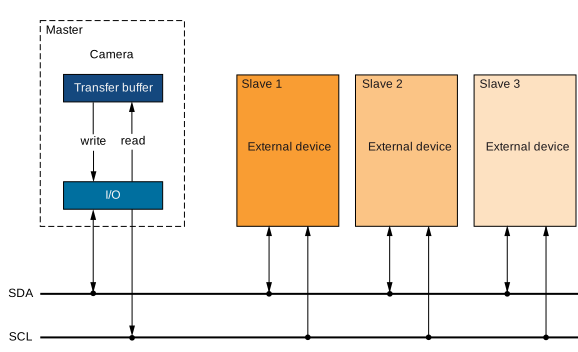
若要使用上述所述的 TWI 介面,相機的GenICam 參數必須符合從屬裝置的規格。
以下列出有助於您實作合適通訊協定的相機參數。
設定 TWI 通訊#
若要設定攝影機與外部裝置之間的 TWI 通訊:
- 將相機中的
BslTwiBitrate將此參數設定為您希望用於 TWI 的位元率,例如 50 kbps。 - 設定攝影機的輸入與輸出訊號。
- 將相機中的
LineSelector應將參數傳遞至負責讀寫序列資料的 I/O 線路,例如:Line2. 該線路必須設定為一個 輸入輸出線. - 將相機中的
BslLineConnection參數設為TwiSda. - 將相機中的
LineSelector應用於傳送時脈訊號的 I/O 線路之參數,例如:Line3. 該線路必須設定為輸入輸出線路。 - 將相機中的
BslLineConnection參數設為TwiScl.
- 將相機中的
資料的寫入與讀取#
完成TWI 通訊設定後,即可將資料寫入外部裝置,並從該裝置讀取資料。
寫入與讀取參數#
以下參數同時涉及資料的寫入與讀取:
BslTwiTransferBuffer: 傳輸緩衝區用來存放待寫入的資料,同時也包含已讀取的資料。其最大容量為 16 位元組。BslTwiTransferLength: 表示應從傳輸緩衝區傳送或傳入的位元組數。在寫入時,傳輸長度指定相機應在每次交易中傳送的位元組數;在讀取時,則指定相機在上一次交易中接收到的位元組數。最大值為 16。BslTwiTargetAddress: 表示外部從屬裝置的 7 位元目標位址。
以下參數與資料寫入有關:
BslTwiWrite: 執行此指令,將傳輸緩衝區中由傳輸長度指定的位元組數寫入從屬裝置的目標位址。
以下參數與讀取資料有關:
BslTwiRead: 執行此命令可從從屬裝置的目標位址讀取或擷取資料。讀取的位元組數由傳輸長度指定。
轉會狀態#
傳輸狀態顯示資料傳輸的當前狀態。當傳輸成功完成時,傳輸狀態會顯示 Success. 若要查詢當前的轉帳狀態,請執行以下指令來更新轉帳狀態: BslTwiUpdateTransferStatus 執行該指令,然後取得 BslTwiTransferStatus.
如果以下的值 BslTwiTransferStatus 是 Pending, 您必須反覆更新並查看轉帳狀態,直到轉帳狀態顯示為 Success. 只有當傳輸狀態顯示為 Success.
轉移狀態可取以下值:
Success: 最新一次的資料傳輸已成功完成。Pending: 有筆資料傳輸正在等待處理。NAKAddress: 相機在執行最近一次寫入或讀取指令後,未收到確認目標位址的確認位元。在此情況下,資料傳輸失敗。NAKData: 相機在執行最後一次寫入指令後,未收到表示資料傳輸成功的確認位元。在此情況下,資料傳輸失敗。
將 I/O 線拉低#
某些 TWI 從屬裝置在開始運作前,需要將 I/O 線拉低。若需將 I/O 線拉低,請將 BslTwiPullSdaLow 參數或該 BslTwiPullSclLow 參數或兩者皆為 true. 其中一位是 true, 資料傳輸功能已停用。
範例程式碼#
// Configure TWI communication
// Set the bit rate to 50 kbps
camera.BslTwiBitrate.SetValue(BslTwiBitrate_Bitrate50kbps);
// Set line 2 to input-output and use it for TWI SDA
camera.LineSelector.SetValue(LineSelector_Line2);
camera.LineMode.SetValue(LineMode_InOut);
camera.BslLineConnection.SetValue(BslLineConnection_TwiSda);
// Set line 3 to input-output and use it for TWI SCL
camera.LineSelector.SetValue(LineSelector_Line3);
camera.LineMode.SetValue(LineMode_InOut);
camera.BslLineConnection.SetValue(BslLineConnection_TwiScl);
// Now, you must implement a suitable communication protocol.
// Camera parameters that help you implement the protocol are listed
// in the "Writing and Reading and Data" section above.
INodeMap& nodemap = camera.GetNodeMap();
// Configure TWI communication
// Set the bit rate to 50 kbps
CEnumParameter(nodemap, "BslTwiBitrate").SetValue("Bitrate50kbps");
// Set line 2 to input-output and use it for TWI SDA
CEnumParameter(nodemap, "LineSelector").SetValue("Line2");
CEnumParameter(nodemap, "LineMode").SetValue("InOut");
CEnumParameter(nodemap, "BslLineConnection").SetValue("TwiSda");
// Set line 3 to input-output and use it for TWI SCL
CEnumParameter(nodemap, "LineSelector").SetValue("Line3");
CEnumParameter(nodemap, "LineMode").SetValue("InOut");
CEnumParameter(nodemap, "BslLineConnection").SetValue("TwiScl");
// Now, you must implement a suitable communication protocol.
// Camera parameters that help you implement the protocol are listed
// in the "Writing and Reading and Data" section above.
// Configure TWI communication
// Set the bit rate to 50 kbps
camera.Parameters[PLCamera.BslTwiBitrate].SetValue(PLCamera.BslTwiBitrate.Bitrate50kbps);
// Set line 2 to input-output and use it for TWI SDA
camera.Parameters[PLCamera.LineSelector].SetValue(PLCamera.LineSelector.Line2);
camera.Parameters[PLCamera.LineMode].SetValue(PLCamera.LineMode.InOut);
camera.Parameters[PLCamera.BslLineConnection].SetValue(PLCamera.BslLineConnection.TwiSda);
// Set line 3 to input-output and use it for TWI SCL
camera.Parameters[PLCamera.LineSelector].SetValue(PLCamera.LineSelector.Line3);
camera.Parameters[PLCamera.LineMode].SetValue(PLCamera.LineMode.InOut);
camera.Parameters[PLCamera.BslLineConnection].SetValue(PLCamera.BslLineConnection.TwiScl);
// Now, you must implement a suitable communication protocol.
// Camera parameters that help you implement the protocol are listed
// in the "Writing and Reading and Data" section above.
/* Macro to check for errors */
#define CHECK(errc) if (GENAPI_E_OK != errc) printErrorAndExit(errc)
GENAPIC_RESULT errRes = GENAPI_E_OK;  /* Return value of pylon methods */
/* Configure TWI communication */
/* Set the bit rate to 50 kbps */
errRes = PylonDeviceFeatureFromString(hdev, "BslTwiBitrate", "Bitrate50kbps");
CHECK(errRes);
/* Set line 2 to input-output and use it for TWI SDA */
errRes = PylonDeviceFeatureFromString(hdev, "LineSelector", "Line2");
CHECK(errRes);
errRes = PylonDeviceFeatureFromString(hdev, "LineMode", "InOut");
CHECK(errRes);
errRes = PylonDeviceFeatureFromString(hdev, "BslLineConnection", "TwiSda");
CHECK(errRes);
/* Set line 3 to input-output and use it for TWI SCL */
errRes = PylonDeviceFeatureFromString(hdev, "LineSelector", "Line3");
CHECK(errRes);
errRes = PylonDeviceFeatureFromString(hdev, "LineMode", "InOut");
CHECK(errRes);
errRes = PylonDeviceFeatureFromString(hdev, "BslLineConnection", "TwiScl");
CHECK(errRes);
/* Now, you must implement a suitable communication protocol. */
/* Camera parameters that help you implement the protocol are listed */
/* in the "Writing and Reading and Data" section above. */
# Configure TWI communication
# Set the bit rate to 50 kbps
camera.BslTwiBitrate.Value = "Bitrate50kbps"
# Set line 2 to input-output and use it for TWI SDA
camera.LineSelector.Value = "Line2"
camera.LineMode.Value = "InOut"
camera.BslLineConnection.Value = "TwiSda"
# Set line 3 to input-output and use it for TWI SCL
camera.LineSelector.Value = "Line3"
camera.LineMode.Value = "InOut"
camera.BslLineConnection.Value = "TwiScl"
# Now, you must implement a suitable communication protocol.
# Camera parameters that help you implement the protocol are listed
# in the "Writing and Reading and Data" section above.
您也可以 use the pylon Viewer 來輕鬆設定參數。