Input Filter#
此功能類似於 Line Debouncer 功能,該功能僅適用於 aceClassic/U/L 相機。
使用功能#
運作原理#
您可以透過設定以下其中一項或兩項攝影機設定,來控制輸入濾波:
Input Filter 時間#
數位輸入訊號在傳至攝影機時,往往並非完全純淨。這些訊號可能會受到環境電磁場的雜訊與干擾,特別是在使用長距離 I/O 纜線時,或是來自附近的電源設備。此外,開關輸出也可能造成串音。
因此,從「低」切換至「高」,或反之,可能需要數微秒的時間,而在過渡期間,邏輯電平是未定義的。
設定輸入濾波器時間,即可消除其中大部分問題。
輸入濾波器會評估輸入訊號所有邏輯狀態的變化及持續時間。此評估期間的持續時間由 BslInputFilterTime 參數中選擇性地指定 HTML 記錄檔 (*.html) 的路徑與檔名。
在評估過程中,相機會計算時間上的平均值,並對結果套用閾值函數以重建數位訊號。此過程可消除雜訊、干擾等,並去除短於濾波時間的訊號脈衝。
資訊
若您指定了輸入濾波時間,而輸入訊號在原始過渡之後仍不穩定,則傳播延遲將會增加。
這表示,從類比 I/O 訊號發生變化到攝影機內部狀態發生變化之間所需的時間會更長。
輸入延遲時間#
若想避免因多個觸發訊號在短時間內接連抵達(接觸抖動)而導致的誤觸發,設定輸入延遲時間會很有幫助。
若已設定輸入暫停時間,且接收到輸入觸發訊號時,攝影機將接受該訊號,並停止接受任何後續的觸發訊號或訊號變化,直至暫停時間結束為止。
舉例來說,如果你將 BslInputHoldOffTime 將參數設為 10,並向攝影機發出觸發訊號,攝影機會接收該訊號,並在隨後的 10 微秒內不再接受任何觸發訊號或訊號變化。
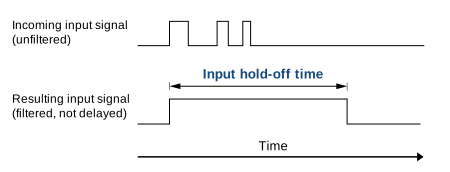
資訊
與輸入濾波器時間不同,指定輸入保持時間並不會增加傳播延遲。
設定輸入過濾#
- 請確認相機已設定為硬體觸發模式。
- 將相機中的
LineSelector將參數傳遞至所需的輸入行,例如:Line1. - 若您想設定 輸入濾波器時間, 請為
BslInputFilterTime參數中選擇性地指定 HTML 記錄檔 (*.html) 的路徑與檔名。 - 若您想設定 輸入延遲時間, 請為
BslInputHoldOffTime參數中選擇性地指定 HTML 記錄檔 (*.html) 的路徑與檔名。
選擇Input Filter 與輸入延遲時間#
- 若選擇的輸入濾波時間或輸入延遲時間過低,將會導致系統接受無效的訊號及訊號狀態。
- 若選擇的輸入濾波時間或輸入延遲時間過長,將導致有效訊號及訊號狀態被排除。
Basler 建議採取以下方法:
- 請選擇一個輸入濾波器時間,使其略長於預期最長無效訊號的持續時間。
- 請選擇一個輸入保持時間,使其略短於兩個有效訊號之間預期的最短間隔。
雖然存在微小風險會誤判並忽略短暫的有效訊號,但在大多數情況下,此方法應能帶來良好的效果。請密切監控您的應用程式,若發現被誤判並忽略的有效訊號過多,請適時調整相關參數。
範例程式碼#
INodeMap& nodemap = camera.GetNodeMap();
// Select the desired input line
CEnumParameter(nodemap, "LineSelector").SetValue("Line1");
// Set the input filter time to 10 microseconds
CFloatParameter(nodemap, "BslInputFilterTime").SetValue(10.0);
// Set the input hold-off time to 20 microseconds
CFloatParameter(nodemap, "BslInputHoldOffTime").SetValue(20.0);
// Select the desired input line
camera.Parameters[PLCamera.LineSelector].SetValue(PLCamera.LineSelector.Line1);
// Set the input filter time to 10 microseconds
camera.Parameters[PLCamera.BslInputFilterTime].SetValue(10.0);
// Set the input hold-off time to 20 microseconds
camera.Parameters[PLCamera.BslInputHoldOffTime].SetValue(20.0);
/* Macro to check for errors */
#define CHECK(errc) if (GENAPI_E_OK != errc) printErrorAndExit(errc)
GENAPIC_RESULT errRes = GENAPI_E_OK;  /* Return value of pylon methods */
/* Select the desired input line */
errRes = PylonDeviceFeatureFromString(hdev, "LineSelector", "Line1");
CHECK(errRes);
/* Set the input filter time to 10 microseconds */
errRes = PylonDeviceSetFloatFeature(hdev, "BslInputFilterTime", 10.0);
CHECK(errRes);
/* Set the input hold-off time to 20 microseconds */
errRes = PylonDeviceSetFloatFeature(hdev, "BslInputHoldOffTime", 20.0);
CHECK(errRes);
您也可以 use the pylon Viewer 來輕鬆設定參數。