Sequencer (ace Classic/U/L GigE)#
您可以定義最多 64 組參數設定,稱為「序列集」。當攝影機進行影像擷取時,會依序套用這些序列集。這使您能夠在不影響最高幀率的情況下,快速變更攝影機參數。
例如,您可以使用「Sequencer 」功能,在預先設定的影像 ROI或曝光時間之間快速切換。
使用功能#
啟用或停用Sequencer#
啟用後,序列器將控制影像擷取。在此狀態下無法進行設定。
當此功能停用時,雖然仍可設定序列器,但它不會控制影像擷取。
要啟用音序器:
- 全選 自動函式 (例如: Gain Auto, Exposure Auto)設為
Off. - 將相機中的
SequenceEnable參數設為true.
若要停用音序器:
- 將相機中的
SequenceEnable參數設為false. - 若 buffer operator 的
SequenceConfigurationMode若您的相機型號支援此參數,請將其設定為On.
序列集包含哪些內容?#
Sequencer 若可用,這些集合包含以下參數:
AcquisitionFrameRateAcquisitionFrameRateEnableBalanceRatioBinningHorizontalBinningVerticalBlackLevelCenterXCenterYChunkEnableChunkModeActiveColorAdjustmentEnableColorAdjustmentHueColorAdjustmentSaturationColorTransformationMatrixFactorColorTransformationValueDecimationVerticalDigitalShiftExposureTimeGainHeightLUTEnableOffsetXOffsetXPixelFormataProcessedRawEnableReverseXReverseYbScalingHorizontalSequenceSetExecutionscStackedZoneImagingEnableStackedZoneImagingZoneEnableStackedZoneImagingZoneHeightStackedZoneImagingZoneOffsetYSubsamplingHorizontalSyncUserOutputTestImageSelectorTimerDelaydTimerDelayTimebasedTimerDurationdTimerDurationTimebasedWidth
-
僅適用於以下相機型號:acA640-300gm/gc、acA800-200gm/gc、acA1300-75gm/gc、acA1920-48gm/gc、acA2500-20gm/gc。
-
以下相機型號不支援此功能:acA3088-16gm/gc、acA4024-8gm/gc、acA5472-5gm/gc。
-
僅在啟用自動序列推進模式時才會包含。
-
適用於Timer 1.
其他所有相機參數均無法透過「Sequencer 」功能進行控制。
資訊
載入或儲存一組序列時,系統會一併載入或儲存上述所有參數,即使是您未曾變更的參數亦然。例如,若您僅變更了曝光時間,而將所有其他參數維持預設值,系統仍會儲存所有其他參數的數值——並在載入時覆寫這些數值。
設定序列集#
資訊
在使用「Sequencer 」功能之前,您必須先根據所需設定來填入各序列集。每個序列集都有一個唯一的序列集索引號,範圍為 0 至 63。
要填充序列集:
- 將相機中的
SequenceSetTotalNumber將此參數設定為您想要使用的序列集總數。 - 設定您要儲存於序列集 0 中的序列集參數。
- 儲存序列集 0。
- 針對所有您要使用的序列集,請重複步驟 2 和 3。請務必始終使用從索引號 0 開始的連續索引號序列,例如,使用序列集 0、1、2 和 3。
範例:假設您需要兩個序列集,並希望為它們設定不同的影像 ROI參數。操作步驟如下:
- 將相機中的
SequenceSetTotalNumber參數設為 2。 - 透過調整
Width,Height,OffsetX以及OffsetY參數數值。 - 儲存序列集 0。
- 透過為以下選項選擇不同的數值,建立第二張影像的 ROI:
Width,Height,OffsetX以及OffsetY參數。 - 儲存序列集 1。
現在您可以設定序列器,以便在兩個影像 ROIs 之間快速切換。
儲存序列集#
要儲存一組序列:
- 將相機中的
SequenceSetIndex將參數設定為所需的序列集。 - 執行
SequenceSetStore指令。
所有序列集參數的值皆儲存於所選的序列集中。
載入序列集#
在音序器運作期間,音序集會自動載入。不過,在進行測試或設定音序器時,手動載入音序集可能會有所幫助。
若要手動載入一組序列:
- 將相機中的
SequenceSetIndex將參數設定為所需的序列集。 - 執行
SequenceSetLoad指令。
所有序列集參數的值都會被覆寫,並替換為所選序列集中儲存的值。
設定Sequencer#
完成序列集的設定後,您必須設定序列器。
資訊
- 要設定音序器,必須先停用該音序器。
- 當相機斷電時,對序列器設定所做的所有變更都會遺失。此外,序列器設定無法儲存於使用者設定集中。Basler 建議您使用pylon API 撰寫適當的程式碼,以便在每次開機時重新設定相機。
- 您可以使用SequenceSetIndex 區塊來追蹤所使用的序列集。啟用此功能後,每張影像都會包含一組區塊資料,其中包含用於影像擷取的序列集索引號。
此序列器可運作於三種模式,稱為「進階模式」:
在所有模式下,序列集總是按升序推進,並從序列集索引號 0 開始。
自動序列推進模式#
若您想設定一個會持續重複的固定序列,此模式將十分實用。
您可以透過設定 SequenceAdvanceMode 參數設為 Auto.
在此模式下,當接收到「幀起始」觸發訊號時,系統會自動從一個序列集切換至下一個序列集。
當 SequenceSetTotalNumber 此參數指定將使用的序列集總數。當索引號最高的序列集使用完畢後,循環將從 0 重新開始。
範例:假設您要設定以下序列循環:

要設定上述序列週期:
- 將相機中的
SequenceAdvanceMode參數設為Auto. - 將相機中的
SequenceSetTotalNumber將參數設為 5。
多次使用序列集
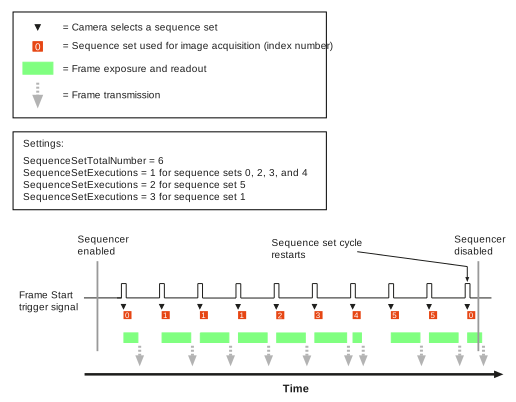
若需要,每個序列集可連續使用數次。
若要指定要使用每個序列集的次數,請:
範例:假設您要設定以下序列循環:

要設定上述序列週期:
- 將相機中的
SequenceAdvanceMode參數設為Auto. - 將相機中的
SequenceSetTotalNumber將參數設為 6。 -
設定
SequenceSetExecutions每個序列集的參數:
受控序列推進模式#
若您想設定一個可透過第 1 號線或軟體指令控制的動態序列,此模式將非常實用。
資訊
- 對於即時應用,Basler 強烈建議不要透過軟體指令來控制序列器。從發送軟體指令到該指令生效之間的延遲,取決於具體的安裝環境以及網路當下的負載狀況。因此,無法預測在發送軟體指令與該指令生效之間,可能會發生多少次影像擷取。
- 當您使用第 1 條線路控制音序器時,請務必注意:從設定該線路狀態到「幀起始」觸發訊號上升之間,會有一微秒的延遲。此外,在「幀起始」觸發訊號上升後,您還必須將該線路的狀態維持至少一微秒。請監控「幀觸發等待」訊號,以優化時序。
您可以透過設定 SequenceAdvanceMode 參數設為 Controlled.
與其他模式相同,進度總是按升序進行,從序列設定索引號 0 開始。
不過,您可以控制以下事項:
- 序列集前進:您希望音序器在何時前進至下一組序列?
- 序列集重新開始:您希望在何時讓序列循環從序列集 0 重新開始?
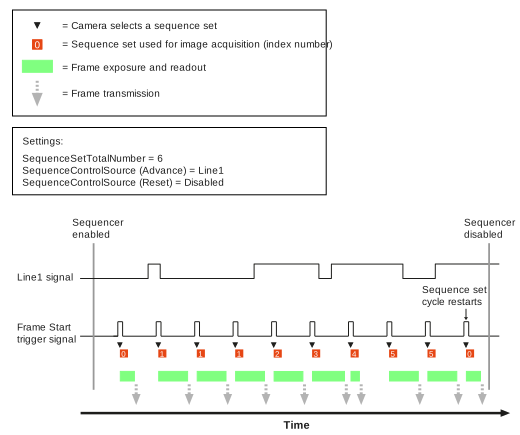
當 SequenceSetTotalNumber 此參數指定您要使用的序列集總數。當索引號最高的序列集使用完畢後,循環將從 0 重新開始。
設定序列集的進度#
要設定序列集的進度:
- 將相機中的
SequenceControlSelector參數設為Advance. - 將相機中的
SequenceControlSource將該參數設定為以下選項之一:Line1: 序列集的進度將透過第 1 行進行控制。若在 幀起始觸發器 當接收到觸發訊號時,序列控制器不會向前推進,而是再次使用當前的序列組進行影像擷取。若在接收到幀起始觸發訊號的同時,第 1 行處於高電平(1),則序列控制器會向前推進,並使用該週期中的下一組序列進行影像擷取。Disabled: 序列集的推進將透過以下方式控制:SequenceAsyncAdvance軟體指令。當接收到此指令時,序列器會繼續執行,而不會擷取影像。當下一個 幀起始觸發器 接收到訊號後,由SequenceCurrentSet該參數值用於影像擷取。AlwaysActive: 序列器運作起來彷彿Line1被選中,且第 1 條線路始終為高電平(1)。因此,每當一個 幀起始觸發器 接收到訊號。這種操作序列器的方式,類似於在「自動序列推進模式」下操作,即每個序列組在每個週期中僅使用一次。唯一的區別在於,此時使用序列組 1 作為第一個序列組,而非序列組 0。
設定序列集重新啟動#
要設定序列集重新啟動:
- 將相機中的
SequenceControlSelector參數設為Restart. - 將相機中的
SequenceControlSource將該參數設定為以下選項之一:
自由選擇進階模式#
若您希望在自由選擇的序列組之間快速切換,且無需遵循任何特定順序,此模式將非常實用。您可以透過相機的輸入線路來決定序列。
資訊
請注意,從設定線路狀態到幀起始觸發訊號上升之間,需間隔一微秒。此外,在幀起始觸發訊號上升後,您還必須將線路狀態維持至少一微秒。請監控「幀觸發等待」訊號以優化時序。
如何設定「自由選擇進度模式」,取決於您的攝影機上可用的輸入線路數量:
僅具一條輸入線的攝影機#
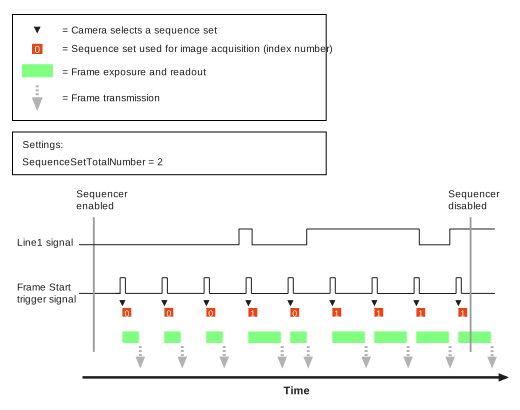
序列集是根據輸入線 1 的狀態來選擇的:
- 若在接收到幀起始觸發訊號時,第 1 行處於低電平(0),則會使用序列集 0 進行影像擷取。
- 若在接收到幀起始觸發訊號時,第 1 行處於高電平(1),則會使用序列組 1 進行影像擷取。
僅提供序列集 0 和 1。
要啟用自由選取前進模式:
- 將相機中的
SequenceAdvanceMode參數設為FreeSelection. - 將相機中的
SequenceSetTotalNumber參數設為 2。
當 SequenceAddressBitSelector 進行明確的生命週期管理即呼叫 SequenceAddressBitSource 這些參數也會控制「自由選擇進給模式」的運作。不過,這些參數是預設的,無法更改。
具有兩條輸入線的攝影機#
序列集是根據第 1 線(光耦合輸入線)和第 3 線(GPIO 線,必須設定為輸入)的狀態來選擇的,因此共有四種可能的組合。這讓您可以在四組序列集中進行選擇。因此,僅有序列集 0、1、2 和 3 可用。
若要設定自由選擇進給模式,必須為每條線路指派一個「序列集位址位元」。這些位址位元的組合將決定序列集索引號。下表列出了可能的組合及其對應的結果。
| 位址位元 1 | 位址位元 0 | 將被選中的序列集 |
|---|---|---|
| 0 | 0 | 序列集 0 |
| 0 | 1 | 序列集 1 |
| 1 | 0 | 序列集 2 |
| 1 | 1 | 序列集 3 |
例如,您可以將第 1 條線分配給第 1 位元,將第 3 條線分配給第 0 位元。這樣一來,便會產生以下範例配置:
- 若在接收到幀起始觸發訊號時,第 1 線為低電平(0)且第 3 線為低電平(0),則會使用序列組 0 進行影像擷取。
- 若在接收到幀起始觸發訊號時,第 1 線為低電平(0)且第 3 線為高電平(1),則會採用序列組 1 進行影像擷取。
- 若在接收到幀起始觸發訊號時,第 1 條線為高電平(1)且第 3 條線為低電平(0),則會使用序列組 2 進行影像擷取。
- 若在接收到幀起始觸發訊號時,第 1 線為高電平(1)且第 3 線為高電平(1),則會使用序列組 3 進行影像擷取。
若要設定位元並啟用自由選擇進給模式:
- 將相機中的
SequenceAdvanceMode參數設為FreeSelection. - 將相機中的
SequenceSetTotalNumber將參數設為 4。 - 將相機中的
SequenceAddressBitSelector參數設為Bit0. - 將相機中的
SequenceAddressBitSource將參數賦值給您要設定為位元 0 的那條線,例如:Line3. - 將相機中的
SequenceAddressBitSelector參數設為Bit1. - 將相機中的
SequenceAddressBitSource將參數傳遞至您要指派給位元 1 的那行,例如:Line1.
資訊
在自由選擇前進模式下,您也可以僅使用一行輸入。若要這麼做,請將 SequenceSetTotalNumber 將參數設為 2。現在,僅使用第 0 位元來選擇序列集。自由選擇前進模式的運作方式將如「僅具一條輸入線的攝影機"。
時序圖#
範例:自動序列推進模式#
範例:受控序列進給模式(透過第 1 行控制)#
範例:自由選取進階模式#
範例程式碼#
// ** Configuring sequence sets **
// Disable the sequencer during configuration
camera.SequenceEnable.SetValue(false);
// Enable configuration mode (available on selected cameras only)
camera.SequenceConfigurationMode.SetValue(SequenceConfigurationMode_On);
// Set the total number of sequence sets to 2
camera.SequenceSetTotalNumber.SetValue(2);
// Configure the parameters that you want to store in the first sequence set
camera.Width.SetValue(500);
camera.Height.SetValue(300);
// Select sequence set 0 and save the parameter values
camera.SequenceSetIndex.SetValue(0);
camera.SequenceSetStore.Execute();
// Configure the parameters that you want to store in the second sequence set
camera.Width.SetValue(800);
camera.Height.SetValue(600);
// Select sequence set 1 and save the parameter values
camera.SequenceSetIndex.SetValue(1);
camera.SequenceSetStore.Execute();
// ** Configuring the sequencer for auto sequence advance mode
// Assuming you want to configure the following sequence cycle:
// 0 - 0 - 1 - 1 - 1 (- 0 - 0 - ...) **
// Disable the sequencer during configuration
camera.SequenceEnable.SetValue(false);
camera.SequenceAdvanceMode.SetValue(SequenceAdvanceMode_Auto);
// Set the total number of sequence sets to 2
camera.SequenceSetTotalNumber.SetValue(2);
// Load sequence set 0 and specify that this set is to be used
// 2 times in a row
camera.SequenceSetIndex.SetValue(0);
camera.SequenceSetLoad.Execute();
camera.SequenceSetExecutions.SetValue(2);
camera.SequenceSetStore.Execute();
// Load sequence set 1 and specify that this set is to be used
// 3 times in a row
camera.SequenceSetIndex.SetValue(1);
camera.SequenceSetLoad.Execute();
camera.SequenceSetExecutions.SetValue(3);
camera.SequenceSetStore.Execute();
// Enable the sequencer
camera.SequenceEnable.SetValue(true);
// ** Configuring the sequencer for controlled sequence advance mode **
// Disable the sequencer during configuration
camera.SequenceEnable.SetValue(false);
camera.SequenceAdvanceMode.SetValue(SequenceAdvanceMode_Controlled);
// Set the total number of sequence sets to 2
camera.SequenceSetTotalNumber.SetValue(2);
// Specify that sequence set advance is controlled via line 1
camera.SequenceControlSelector.SetValue(SequenceControlSelector_Advance);
camera.SequenceControlSource.SetValue(SequenceControlSource_Line1);
// Specify that sequence set restart is controlled
// via software command
camera.SequenceControlSelector.SetValue(SequenceControlSelector_Restart);
camera.SequenceControlSource.SetValue(SequenceControlSource_Disabled);
// Enable the sequencer
camera.SequenceEnable.SetValue(true);
// Restart the sequencer via software command (for testing purposes)
camera.SequenceAsyncRestart.Execute();
// ** Configuring the sequencer for free selection advance mode
// on cameras with ONE input line **
// Disable the sequencer during configuration
camera.SequenceEnable.SetValue(false);
camera.SequenceAdvanceMode.SetValue(SequenceAdvanceMode_FreeSelection);
// Set the total number of sequence sets to 2
camera.SequenceSetTotalNumber.SetValue(2);
// Enable the sequencer
camera.SequenceEnable.SetValue(true);
// ** Configuring the sequencer for free selection advance mode
// on cameras with TWO input lines (1x opto-coupled, 1x GPIO set for input) **
// Disable the sequencer during configuration
camera.SequenceEnable.SetValue(false);
camera.SequenceAdvanceMode.SetValue(SequenceAdvanceMode_FreeSelection);
// Set the total number of sequence sets to 2
camera.SequenceSetTotalNumber.SetValue(4);
// Assign sequence address bit 0 to line 3
camera.SequenceAddressBitSelector.SetValue(SequenceAddressBitSelector_Bit0);
camera.SequenceAddressBitSource.SetValue(SequenceAddressBitSource_Line3);
// Assign sequence address bit 1 to line 1
camera.SequenceAddressBitSelector.SetValue(SequenceAddressBitSelector_Bit1);
camera.SequenceAddressBitSource.SetValue(SequenceAddressBitSource_Line1);
// Enable the sequencer
camera.SequenceEnable.SetValue(true);
INodeMap& nodemap = camera.GetNodeMap();
// ** Configuring sequence sets **
// Disable the sequencer during configuration
CBooleanParameter(nodemap, "SequenceEnable").SetValue(false);
// Enable configuration mode (available on selected cameras only)
CEnumParameter(nodemap, "SequenceConfigurationMode").SetValue("On");
// Set the total number of sequence sets to 2
CIntegerParameter(nodemap, "SequenceSetTotalNumber").SetValue(2);
// Configure the parameters that you want to store in the first sequence set
CIntegerParameter(nodemap, "Width").SetValue(500);
CIntegerParameter(nodemap, "Height").SetValue(300);
// Select sequence set 0 and save the parameter values
CIntegerParameter(nodemap, "SequenceSetIndex").SetValue(0);
CCommandParameter(nodemap, "SequenceSetStore").Execute();
// Configure the parameters that you want to store in the second sequence set
CIntegerParameter(nodemap, "Width").SetValue(800);
CIntegerParameter(nodemap, "Height").SetValue(600);
// Select sequence set 1 and save the parameter values
CIntegerParameter(nodemap, "SequenceSetIndex").SetValue(1);
CCommandParameter(nodemap, "SequenceSetStore").Execute();
// ** Configuring the sequencer for auto sequence advance mode
// Assuming you want to configure the following sequence cycle:
// 0 - 0 - 1 - 1 - 1 (- 0 - 0 - ...) **
// Disable the sequencer during configuration
CBooleanParameter(nodemap, "SequenceEnable").SetValue(false);
CEnumParameter(nodemap, "SequenceAdvanceMode").SetValue("Auto");
// Set the total number of sequence sets to 2
CIntegerParameter(nodemap, "SequenceSetTotalNumber").SetValue(2);
// Load sequence set 0 and specify that this set is to be used
// 2 times in a row
CIntegerParameter(nodemap, "SequenceSetIndex").SetValue(0);
CCommandParameter(nodemap, "SequenceSetLoad").Execute();
CIntegerParameter(nodemap, "SequenceSetExecutions").SetValue(2);
CCommandParameter(nodemap, "SequenceSetStore").Execute();
// Load sequence set 1 and specify that this set is to be used
// 3 times in a row
CIntegerParameter(nodemap, "SequenceSetIndex").SetValue(1);
CCommandParameter(nodemap, "SequenceSetLoad").Execute();
CIntegerParameter(nodemap, "SequenceSetExecutions").SetValue(3);
CCommandParameter(nodemap, "SequenceSetStore").Execute();
// Enable the sequencer
CBooleanParameter(nodemap, "SequenceEnable").SetValue(true);
// ** Configuring the sequencer for controlled sequence advance mode **
// Disable the sequencer during configuration
CBooleanParameter(nodemap, "SequenceEnable").SetValue(false);
CEnumParameter(nodemap, "SequenceAdvanceMode").SetValue("Controlled");
// Set the total number of sequence sets to 2
CIntegerParameter(nodemap, "SequenceSetTotalNumber").SetValue(2);
// Specify that sequence set advance is controlled via line 1
CEnumParameter(nodemap, "SequenceControlSelector").SetValue("Advance");
CEnumParameter(nodemap, "SequenceControlSource").SetValue("Line1");
// Specify that sequence set restart is controlled
// via software command
CEnumParameter(nodemap, "SequenceControlSelector").SetValue("Restart");
CEnumParameter(nodemap, "SequenceControlSource").SetValue("Disabled");
// Enable the sequencer
CBooleanParameter(nodemap, "SequenceEnable").SetValue(true);
// Restart the sequencer via software command (for testing purposes)
CCommandParameter(nodemap, "SequenceAsyncRestart").Execute();
// ** Configuring the sequencer for free selection advance mode
// on cameras with ONE input line **
// Disable the sequencer during configuration
CBooleanParameter(nodemap, "SequenceEnable").SetValue(false);
CEnumParameter(nodemap, "SequenceAdvanceMode").SetValue("FreeSelection");
// Set the total number of sequence sets to 2
CIntegerParameter(nodemap, "SequenceSetTotalNumber").SetValue(2);
// Enable the sequencer
CBooleanParameter(nodemap, "SequenceEnable").SetValue(true);
// ** Configuring the sequencer for free selection advance mode
// on cameras with TWO input lines (1x opto-coupled, 1x GPIO set for input) **
// Disable the sequencer during configuration
CBooleanParameter(nodemap, "SequenceEnable").SetValue(false);
CEnumParameter(nodemap, "SequenceAdvanceMode").SetValue("FreeSelection");
// Set the total number of sequence sets to 2
CIntegerParameter(nodemap, "SequenceSetTotalNumber").SetValue(4);
// Assign sequence address bit 0 to line 3
CEnumParameter(nodemap, "SequenceAddressBitSelector").SetValue("Bit0");
CEnumParameter(nodemap, "SequenceAddressBitSource").SetValue("Line3");
// Assign sequence address bit 1 to line 1
CEnumParameter(nodemap, "SequenceAddressBitSelector").SetValue("Bit1");
CEnumParameter(nodemap, "SequenceAddressBitSource").SetValue("Line1");
// Enable the sequencer
CBooleanParameter(nodemap, "SequenceEnable").SetValue(true);
// ** Configuring sequence sets **
// Disable the sequencer during configuration
camera.Parameters[PLCamera.SequenceEnable].SetValue(false);
// Enable configuration mode (available on selected cameras only)
camera.Parameters[PLCamera.SequenceConfigurationMode].SetValue(PLCamera.SequenceConfigurationMode.On);
// Set the total number of sequence sets to 2
camera.Parameters[PLCamera.SequenceSetTotalNumber].SetValue(2);
// Configure the parameters that you want to store in the first sequence set
camera.Parameters[PLCamera.Width].SetValue(500);
camera.Parameters[PLCamera.Height].SetValue(300);
// Select sequence set 0 and save the parameter values
camera.Parameters[PLCamera.SequenceSetIndex].SetValue(0);
camera.Parameters[PLCamera.SequenceSetStore].Execute();
// Configure the parameters that you want to store in the second sequence set
camera.Parameters[PLCamera.Width].SetValue(800);
camera.Parameters[PLCamera.Height].SetValue(600);
// Select sequence set 1 and save the parameter values
camera.Parameters[PLCamera.SequenceSetIndex].SetValue(1);
camera.Parameters[PLCamera.SequenceSetStore].Execute();
// ** Configuring the sequencer for auto sequence advance mode
// Assuming you want to configure the following sequence cycle:
// 0 - 0 - 1 - 1 - 1 (- 0 - 0 - ...) **
// Disable the sequencer during configuration
camera.Parameters[PLCamera.SequenceEnable].SetValue(false);
camera.Parameters[PLCamera.SequenceAdvanceMode].SetValue(PLCamera.SequenceAdvanceMode.Auto);
// Set the total number of sequence sets to 2
camera.Parameters[PLCamera.SequenceSetTotalNumber].SetValue(2);
// Load sequence set 0 and specify that this set is to be used
// 2 times in a row
camera.Parameters[PLCamera.SequenceSetIndex].SetValue(0);
camera.Parameters[PLCamera.SequenceSetLoad].Execute();
camera.Parameters[PLCamera.SequenceSetExecutions].SetValue(2);
camera.Parameters[PLCamera.SequenceSetStore].Execute();
// Load sequence set 1 and specify that this set is to be used
// 3 times in a row
camera.Parameters[PLCamera.SequenceSetIndex].SetValue(1);
camera.Parameters[PLCamera.SequenceSetLoad].Execute();
camera.Parameters[PLCamera.SequenceSetExecutions].SetValue(3);
camera.Parameters[PLCamera.SequenceSetStore].Execute();
// Enable the sequencer
camera.Parameters[PLCamera.SequenceEnable].SetValue(true);
// ** Configuring the sequencer for controlled sequence advance mode **
// Disable the sequencer during configuration
camera.Parameters[PLCamera.SequenceEnable].SetValue(false);
camera.Parameters[PLCamera.SequenceAdvanceMode].SetValue(PLCamera.SequenceAdvanceMode.Controlled);
// Set the total number of sequence sets to 2
camera.Parameters[PLCamera.SequenceSetTotalNumber].SetValue(2);
// Specify that sequence set advance is controlled via line 1
camera.Parameters[PLCamera.SequenceControlSelector].SetValue(PLCamera.SequenceControlSelector.Advance);
camera.Parameters[PLCamera.SequenceControlSource].SetValue(PLCamera.SequenceControlSource.Line1);
// Specify that sequence set restart is controlled
// via software command
camera.Parameters[PLCamera.SequenceControlSelector].SetValue(PLCamera.SequenceControlSelector.Restart);
camera.Parameters[PLCamera.SequenceControlSource].SetValue(PLCamera.SequenceControlSource.Disabled);
// Enable the sequencer
camera.Parameters[PLCamera.SequenceEnable].SetValue(true);
// Restart the sequencer via software command (for testing purposes)
camera.Parameters[PLCamera.SequenceAsyncRestart].Execute();
// ** Configuring the sequencer for free selection advance mode
// on cameras with ONE input line **
// Disable the sequencer during configuration
camera.Parameters[PLCamera.SequenceEnable].SetValue(false);
camera.Parameters[PLCamera.SequenceAdvanceMode].SetValue(PLCamera.SequenceAdvanceMode.FreeSelection);
// Set the total number of sequence sets to 2
camera.Parameters[PLCamera.SequenceSetTotalNumber].SetValue(2);
// Enable the sequencer
camera.Parameters[PLCamera.SequenceEnable].SetValue(true);
// ** Configuring the sequencer for free selection advance mode
// on cameras with TWO input lines (1x opto-coupled, 1x GPIO set for input) **
// Disable the sequencer during configuration
camera.Parameters[PLCamera.SequenceEnable].SetValue(false);
camera.Parameters[PLCamera.SequenceAdvanceMode].SetValue(PLCamera.SequenceAdvanceMode.FreeSelection);
// Set the total number of sequence sets to 2
camera.Parameters[PLCamera.SequenceSetTotalNumber].SetValue(4);
// Assign sequence address bit 0 to line 3
camera.Parameters[PLCamera.SequenceAddressBitSelector].SetValue(PLCamera.SequenceAddressBitSelector.Bit0);
camera.Parameters[PLCamera.SequenceAddressBitSource].SetValue(PLCamera.SequenceAddressBitSource.Line3);
// Assign sequence address bit 1 to line 1
camera.Parameters[PLCamera.SequenceAddressBitSelector].SetValue(PLCamera.SequenceAddressBitSelector.Bit1);
camera.Parameters[PLCamera.SequenceAddressBitSource].SetValue(PLCamera.SequenceAddressBitSource.Line1);
// Enable the sequencer
camera.Parameters[PLCamera.SequenceEnable].SetValue(true);
/* Macro to check for errors */
#define CHECK(errc) if (GENAPI_E_OK != errc) printErrorAndExit(errc)
GENAPIC_RESULT errRes = GENAPI_E_OK;  /* Return value of pylon methods */
/* ** Configuring sequence sets ** */
/* Disable the sequencer during configuration */
errRes = PylonDeviceSetBooleanFeature(hdev, "SequenceEnable", 0);
CHECK(errRes);
/* Enable configuration mode (available on selected cameras only) */
errRes = PylonDeviceFeatureFromString(hdev, "SequenceConfigurationMode", "On");
CHECK(errRes);
/* Set the total number of sequence sets to 2 */
errRes = PylonDeviceSetIntegerFeature(hdev, "SequenceSetTotalNumber", 2);
CHECK(errRes);
/* Configure the parameters that you want to store in the first sequence set */
errRes = PylonDeviceSetIntegerFeature(hdev, "Width", 500);
CHECK(errRes);
errRes = PylonDeviceSetIntegerFeature(hdev, "Height", 300);
CHECK(errRes);
/* Select sequence set 0 and save the parameter values */
errRes = PylonDeviceSetIntegerFeature(hdev, "SequenceSetIndex", 0);
CHECK(errRes);
errRes = PylonDeviceExecuteCommandFeature(hdev, "SequenceSetStore");
CHECK(errRes);
/* Configure the parameters that you want to store in the second sequence set */
errRes = PylonDeviceSetIntegerFeature(hdev, "Width", 800);
CHECK(errRes);
errRes = PylonDeviceSetIntegerFeature(hdev, "Height", 600);
CHECK(errRes);
/* Select sequence set 1 and save the parameter values */
errRes = PylonDeviceSetIntegerFeature(hdev, "SequenceSetIndex", 1);
CHECK(errRes);
errRes = PylonDeviceExecuteCommandFeature(hdev, "SequenceSetStore");
CHECK(errRes);
/* ** Configuring the sequencer for auto sequence advance mode */
/* Assuming you want to configure the following sequence cycle: */
/* 0 - 0 - 1 - 1 - 1 (- 0 - 0 - ...) ** */
/* Disable the sequencer during configuration */
errRes = PylonDeviceSetBooleanFeature(hdev, "SequenceEnable", 0);
CHECK(errRes);
errRes = PylonDeviceFeatureFromString(hdev, "SequenceAdvanceMode", "Auto");
CHECK(errRes);
/* Set the total number of sequence sets to 2 */
errRes = PylonDeviceSetIntegerFeature(hdev, "SequenceSetTotalNumber", 2);
CHECK(errRes);
/* Load sequence set 0 and specify that this set is to be used */
/* 2 times in a row */
errRes = PylonDeviceSetIntegerFeature(hdev, "SequenceSetIndex", 0);
CHECK(errRes);
errRes = PylonDeviceExecuteCommandFeature(hdev, "SequenceSetLoad");
CHECK(errRes);
errRes = PylonDeviceSetIntegerFeature(hdev, "SequenceSetExecutions", 2);
CHECK(errRes);
errRes = PylonDeviceExecuteCommandFeature(hdev, "SequenceSetStore");
CHECK(errRes);
/* Load sequence set 1 and specify that this set is to be used */
/* 3 times in a row */
errRes = PylonDeviceSetIntegerFeature(hdev, "SequenceSetIndex", 1);
CHECK(errRes);
errRes = PylonDeviceExecuteCommandFeature(hdev, "SequenceSetLoad");
CHECK(errRes);
errRes = PylonDeviceSetIntegerFeature(hdev, "SequenceSetExecutions", 3);
CHECK(errRes);
errRes = PylonDeviceExecuteCommandFeature(hdev, "SequenceSetStore");
CHECK(errRes);
/* Enable the sequencer */
errRes = PylonDeviceSetBooleanFeature(hdev, "SequenceEnable", 1);
CHECK(errRes);
/* ** Configuring the sequencer for controlled sequence advance mode ** */
/* Disable the sequencer during configuration */
errRes = PylonDeviceSetBooleanFeature(hdev, "SequenceEnable", 0);
CHECK(errRes);
errRes = PylonDeviceFeatureFromString(hdev, "SequenceAdvanceMode", "Controlled");
CHECK(errRes);
/* Set the total number of sequence sets to 2 */
errRes = PylonDeviceSetIntegerFeature(hdev, "SequenceSetTotalNumber", 2);
CHECK(errRes);
/* Specify that sequence set advance is controlled via line 1 */
errRes = PylonDeviceFeatureFromString(hdev, "SequenceControlSelector", "Advance");
CHECK(errRes);
errRes = PylonDeviceFeatureFromString(hdev, "SequenceControlSource", "Line1");
CHECK(errRes);
/* Specify that sequence set restart is controlled */
/* via software command */
errRes = PylonDeviceFeatureFromString(hdev, "SequenceControlSelector", "Restart");
CHECK(errRes);
errRes = PylonDeviceFeatureFromString(hdev, "SequenceControlSource", "Disabled");
CHECK(errRes);
/* Enable the sequencer */
errRes = PylonDeviceSetBooleanFeature(hdev, "SequenceEnable", 1);
CHECK(errRes);
/* Restart the sequencer via software command (for testing purposes) */
errRes = PylonDeviceExecuteCommandFeature(hdev, "SequenceAsyncRestart");
CHECK(errRes);
/* ** Configuring the sequencer for free selection advance mode */
/* on cameras with ONE input line ** */
/* Disable the sequencer during configuration */
errRes = PylonDeviceSetBooleanFeature(hdev, "SequenceEnable", 0);
CHECK(errRes);
errRes = PylonDeviceFeatureFromString(hdev, "SequenceAdvanceMode", "FreeSelection");
CHECK(errRes);
/* Set the total number of sequence sets to 2 */
errRes = PylonDeviceSetIntegerFeature(hdev, "SequenceSetTotalNumber", 2);
CHECK(errRes);
/* Enable the sequencer */
errRes = PylonDeviceSetBooleanFeature(hdev, "SequenceEnable", 1);
CHECK(errRes);
/* ** Configuring the sequencer for free selection advance mode */
/* on cameras with TWO input lines (1x opto-coupled, 1x GPIO set for input) ** */
/* Disable the sequencer during configuration */
errRes = PylonDeviceSetBooleanFeature(hdev, "SequenceEnable", 0);
CHECK(errRes);
errRes = PylonDeviceFeatureFromString(hdev, "SequenceAdvanceMode", "FreeSelection");
CHECK(errRes);
/* Set the total number of sequence sets to 2 */
errRes = PylonDeviceSetIntegerFeature(hdev, "SequenceSetTotalNumber", 4);
CHECK(errRes);
/* Assign sequence address bit 0 to line 3 */
errRes = PylonDeviceFeatureFromString(hdev, "SequenceAddressBitSelector", "Bit0");
CHECK(errRes);
errRes = PylonDeviceFeatureFromString(hdev, "SequenceAddressBitSource", "Line3");
CHECK(errRes);
/* Assign sequence address bit 1 to line 1 */
errRes = PylonDeviceFeatureFromString(hdev, "SequenceAddressBitSelector", "Bit1");
CHECK(errRes);
errRes = PylonDeviceFeatureFromString(hdev, "SequenceAddressBitSource", "Line1");
CHECK(errRes);
/* Enable the sequencer */
errRes = PylonDeviceSetBooleanFeature(hdev, "SequenceEnable", 1);
CHECK(errRes);
# ** Configuring sequence sets **
# Disable the sequencer during configuration
camera.SequenceEnable.Value = False
# Enable configuration mode (available on selected cameras only)
camera.SequenceConfigurationMode.Value = "On"
# Set the total number of sequence sets to 2
camera.SequenceSetTotalNumber.Value = 2
# Configure the parameters that you want to store in the first sequence set
camera.Width.Value = 500
camera.Height.Value = 300
# Select sequence set 0 and save the parameter values
camera.SequenceSetIndex.Value = 0
camera.SequenceSetStore.Execute()
# Configure the parameters that you want to store in the second sequence set
camera.Width.Value = 800
camera.Height.Value = 600
# Select sequence set 1 and save the parameter values
camera.SequenceSetIndex.Value = 1
camera.SequenceSetStore.Execute()
# ** Configuring the sequencer for auto sequence advance mode
# Assuming you want to configure the following sequence cycle:
# 0 - 0 - 1 - 1 - 1 (- 0 - 0 - ...) **
# Disable the sequencer during configuration
camera.SequenceEnable.Value = False
camera.SequenceAdvanceMode.Value = "Auto"
# Set the total number of sequence sets to 2
camera.SequenceSetTotalNumber.Value = 2
# Load sequence set 0 and specify that this set is to be used
# 2 times in a row
camera.SequenceSetIndex.Value = 0
camera.SequenceSetLoad.Execute()
camera.SequenceSetExecutions.Value = 2
camera.SequenceSetStore.Execute()
# Load sequence set 1 and specify that this set is to be used
# 3 times in a row
camera.SequenceSetIndex.Value = 1
camera.SequenceSetLoad.Execute()
camera.SequenceSetExecutions.Value = 3
camera.SequenceSetStore.Execute()
# Enable the sequencer
camera.SequenceEnable.Value = True
# ** Configuring the sequencer for controlled sequence advance mode **
# Disable the sequencer during configuration
camera.SequenceEnable.Value = False
camera.SequenceAdvanceMode.Value = "Controlled"
# Set the total number of sequence sets to 2
camera.SequenceSetTotalNumber.Value = 2
# Specify that sequence set advance is controlled via line 1
camera.SequenceControlSelector.Value = "Advance"
camera.SequenceControlSource.Value = "Line1"
# Specify that sequence set restart is controlled
# via software command
camera.SequenceControlSelector.Value = "Restart"
camera.SequenceControlSource.Value = "Disabled"
# Enable the sequencer
camera.SequenceEnable.Value = True
# Restart the sequencer via software command (for testing purposes)
camera.SequenceAsyncRestart.Execute()
# ** Configuring the sequencer for free selection advance mode
# on cameras with ONE input line **
# Disable the sequencer during configuration
camera.SequenceEnable.Value = False
camera.SequenceAdvanceMode.Value = "FreeSelection"
# Set the total number of sequence sets to 2
camera.SequenceSetTotalNumber.Value = 2
# Enable the sequencer
camera.SequenceEnable.Value = True
# ** Configuring the sequencer for free selection advance mode
# on cameras with TWO input lines (1x opto-coupled, 1x GPIO set for input) **
# Disable the sequencer during configuration
camera.SequenceEnable.Value = False
camera.SequenceAdvanceMode.Value = "FreeSelection"
# Set the total number of sequence sets to 2
camera.SequenceSetTotalNumber.Value = 4
# Assign sequence address bit 0 to line 3
camera.SequenceAddressBitSelector.Value = "Bit0"
camera.SequenceAddressBitSource.Value = "Line3"
# Assign sequence address bit 1 to line 1
camera.SequenceAddressBitSelector.Value = "Bit1"
camera.SequenceAddressBitSource.Value = "Line1"
# Enable the sequencer
camera.SequenceEnable.Value = True
您也可以 use the pylon Viewer 來輕鬆設定參數。