Image ROI (dart E)#
ROI 是「感興趣區域」(region of interest)的縮寫。
如果已指定 Image ROI,相機將只傳輸該區域內的像素資料。在多數相機上,這會大幅提高相機的最大幀率。
使用功能#
變更 Image ROI 的位置與大小#
啟用原廠設定後,相機會設為預設解析度。不過,您可以根據需要變更位置與大小。
若要變更 Image ROI 的位置與大小:
- 請確保相機處於閒置狀態,也就是未擷取影像。
-
使用下列參數來指定 Image ROI 的 大小:
WidthHeight
-
使用下列參數來指定 Image ROI 的 位置:
OffsetXOffsetY
Image ROI 的原點位於感光元件陣列的左上角(第 0 行,第 0 列)。
範例:假設您已指定下列設定:
Width= 16Height= 10OffsetX= 2OffsetY= 6
這會建立下列 Image ROI:
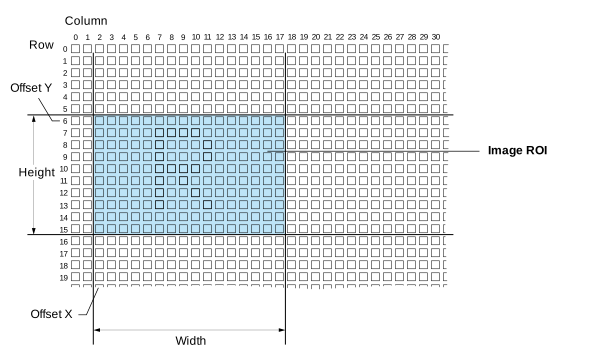
縮小影像 ROI 的尺寸(尤其是高度),可顯著提高攝影機的最大幀率。
指南#
當您指定 Image ROI 時,請遵循以下準則:
| 準則 | 範例 |
|---|---|
OffsetX + Width ≤ WidthMax | 配備 1920 x 1080 像素感光元件的相機:OffsetX + Width ≤ 1920 |
OffsetY + Height ≤ HeightMax | 配備 1920 x 1080 像素感光元件的相機:OffsetY + Height ≤ 1080 |
詳細資料#
Image ROI 大小#
| 相機型號 | 最小寬度 | 寬度增量 | 最小高度 | 高度增量 |
|---|---|---|---|---|
| daA2500-60mc | 2 | 2 | 2 | 2 |
| daA2500-60mci | 96 | 8 | 64 | 8 |
| daA3840-30mc | 2 | 2 | 2 | 2 |
| daA4200-30mci | 96 | 8 | 64 | 8 |
Image ROI 抵銷額#
| 相機型號 | Offset X 遞增 | Offset Y 遞增 |
|---|---|---|
| daA2500-60mc | 2 | 2 |
| daA2500-60mci | 8 | 8 |
| daA3840-30mc | 2 | 2 |
| daA4200-30mci | 8 | 8 |
範例程式碼#
INodeMap& nodemap = camera.GetNodeMap();
// Set the width to the maximum value
int64_t maxWidth = CIntegerParameter(nodemap, "WidthMax").GetValue();
CIntegerParameter(nodemap, "Width").SetValue(maxWidth);
// Set the height to 500
CIntegerParameter(nodemap, "Height").SetValue(500);
// Set the offset to 0
CIntegerParameter(nodemap, "OffsetX").SetValue(0);
CIntegerParameter(nodemap, "OffsetY").SetValue(0);
// Set the width to the maximum value
Int64 maxWidth = camera.Parameters[PLCamera.WidthMax].GetValue();
camera.Parameters[PLCamera.Width].SetValue(maxWidth);
// Set the height to 500
camera.Parameters[PLCamera.Height].SetValue(500);
// Set the offset to 0
camera.Parameters[PLCamera.OffsetX].SetValue(0);
camera.Parameters[PLCamera.OffsetY].SetValue(0);
/* Macro to check for errors */
#define CHECK(errc) if (GENAPI_E_OK != errc) printErrorAndExit(errc)
GENAPIC_RESULT errRes = GENAPI_E_OK;  /* Return value of pylon methods */
int64_t maxWidth = 0;
/* Set the width to the maximum value */
errRes = PylonDeviceGetIntegerFeature(hdev, "WidthMax", &maxWidth);
CHECK(errRes);
errRes = PylonDeviceSetIntegerFeature(hdev, "Width", maxWidth);
CHECK(errRes);
/* Set the height to 500 */
errRes = PylonDeviceSetIntegerFeature(hdev, "Height", 500);
CHECK(errRes);
/* Set the offset to 0 */
errRes = PylonDeviceSetIntegerFeature(hdev, "OffsetX", 0);
CHECK(errRes);
errRes = PylonDeviceSetIntegerFeature(hdev, "OffsetY", 0);
CHECK(errRes);
/* Macro to check for errors */
#define CHECK(errc) if (GENAPI_E_OK != errc) printErrorAndExit(errc)
GENAPIC_RESULT errRes = GENAPI_E_OK;  /* Return value of pylon methods */
int64_t maxWidth = 0;
/* Set the width to the maximum value */
errRes = PylonDeviceGetIntegerFeature(hdev, "WidthMax", &maxWidth);
CHECK(errRes);
errRes = PylonDeviceSetIntegerFeature(hdev, "Width", maxWidth);
CHECK(errRes);
/* Set the height to 500 */
errRes = PylonDeviceSetIntegerFeature(hdev, "Height", 500);
CHECK(errRes);
/* Set the offset to 0 */
errRes = PylonDeviceSetIntegerFeature(hdev, "OffsetX", 0);
CHECK(errRes);
errRes = PylonDeviceSetIntegerFeature(hdev, "OffsetY", 0);
CHECK(errRes);
您也可以使用 pylon Viewer 輕鬆設定參數。