Color Transformation#
透過色彩轉換矩陣,此功能不僅能校正因影像擷取時所用光源所造成的色彩偏移,還能補償感測器色彩生成過程中的瑕疵。
資訊
您應僅在完全熟悉矩陣色彩轉換的情況下,才使用此功能。若透過試錯法在轉換矩陣中輸入正確數值,幾乎是不可能的。
使用功能#
設定Color Transformation#
- 請確保白平衡已設定妥當。
- 將相機中的
ProcessedRawEnable參數設為true(若適用 如果您使用的是 Bayer 像素格式)。 - 將相機中的
LightSourcePreset參數設為Custom(若適用)。 - 將相機中的
ColorTransformationValueSelector參數設為所需的 矩陣中的位置,例如:Gain00. - 輸入所需的數值以用於
ColorTransformationValue用於調整選定位置數值的參數。該參數的數值範圍為 -8.0 至 +7.96875。
資訊
變換矩陣中已填入色彩變換值。這些值與先前選取的光源預設有關、對應於單位向量,或是源自先前使用色彩變換功能所產生的結果。
ColorTransformationMatrixFactor 參數
此參數僅適用於配備 GigE 介面的 aceClassic/U/L 相機,用於決定色彩矩陣對色彩值的影響程度。若設定為 0,則該矩陣將被有效停用。Basler 建議維持預設設定 (1)。
運作原理#
色彩轉換功能會運用轉換矩陣,針對每個像素產生經過修改的紅、綠、藍像素資料。
此轉換是透過將包含 R、G 和 B 像素值的 3 × 1 矩陣,與包含色彩轉換值的 3 × 3 矩陣進行預乘來實現:
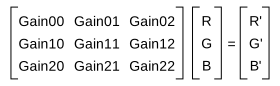
您可以根據需求設定每個矩陣值(Gain00、Gain01 等)。
外部連結#
範例程式碼#
// Select position Gain00 in the matrix
camera.ColorTransformationValueSelector.SetValue(ColorTransformationValueSelector_Gain00);
// Enter a floating point value for the selected position
camera.ColorTransformationValue.SetValue(1.5625);
// Select position Gain01 in the matrix
camera.ColorTransformationValueSelector.SetValue(ColorTransformationValueSelector_Gain01);
// Enter a floating point value for the selected position
camera.ColorTransformationValue.SetValue(-0.4375);
INodeMap& nodemap = camera.GetNodeMap();
// Select position Gain00 in the matrix
CEnumParameter(nodemap, "ColorTransformationValueSelector").SetValue("Gain00");
// Enter a floating point value for the selected position
CFloatParameter(nodemap, "ColorTransformationValue").SetValue(1.5625);
// Select position Gain01 in the matrix
CEnumParameter(nodemap, "ColorTransformationValueSelector").SetValue("Gain01");
// Enter a floating point value for the selected position
CFloatParameter(nodemap, "ColorTransformationValue").SetValue(-0.4375);
// Select position Gain00 in the matrix
camera.Parameters[PLCamera.ColorTransformationValueSelector].SetValue(PLCamera.ColorTransformationValueSelector.Gain00);
// Enter a floating point value for the selected position
camera.Parameters[PLCamera.ColorTransformationValue].SetValue(1.5625);
// Select position Gain01 in the matrix
camera.Parameters[PLCamera.ColorTransformationValueSelector].SetValue(PLCamera.ColorTransformationValueSelector.Gain01);
// Enter a floating point value for the selected position
camera.Parameters[PLCamera.ColorTransformationValue].SetValue(-0.4375);
/* Macro to check for errors */
#define CHECK(errc) if (GENAPI_E_OK != errc) printErrorAndExit(errc)
GENAPIC_RESULT errRes = GENAPI_E_OK;  /* Return value of pylon methods */
/* Select position Gain00 in the matrix */
errRes = PylonDeviceFeatureFromString(hdev, "ColorTransformationValueSelector", "Gain00");
CHECK(errRes);
/* Enter a floating point value for the selected position */
errRes = PylonDeviceSetFloatFeature(hdev, "ColorTransformationValue", 1.5625);
CHECK(errRes);
/* Select position Gain01 in the matrix */
errRes = PylonDeviceFeatureFromString(hdev, "ColorTransformationValueSelector", "Gain01");
CHECK(errRes);
/* Enter a floating point value for the selected position */
errRes = PylonDeviceSetFloatFeature(hdev, "ColorTransformationValue", -0.4375);
CHECK(errRes);
# Select position Gain00 in the matrix
camera.ColorTransformationValueSelector.Value = "Gain00"
# Enter a floating point value for the selected position
camera.ColorTransformationValue.Value = 1.5625
# Select position Gain01 in the matrix
camera.ColorTransformationValueSelector.Value = "Gain01"
# Enter a floating point value for the selected position
camera.ColorTransformationValue.Value = -0.4375
您也可以 use the pylon Viewer 來輕鬆設定參數。