Precision Time Protocol#
IEEE 1588 標準定義了該協定。Basler攝影機支援IEEE 1588-2008,亦稱為PTP 第2版。
資訊
PTP 同步的精準度在很大程度上取決於您的網路硬體與設定。若要達到最高精準度,請選用高品質的網路硬體、使用支援PTP 的網路交換機,並在您的網路中添加配備 GPS 接收器的外部PTP 時鐘裝置。
使用功能#
為何要使用PTP#
Precision Time Protocol (PTP )功能可讓相機在使用該功能的情況下,啟用以下功能:
運作原理#
透過PTP ,多個裝置(例如相機)會自動與網路中找到的最精準時鐘——即所謂的主時鐘或最佳主時鐘——進行同步。
該協定使網路內的系統能夠執行以下操作:
- 與主時鐘同步,也就是說,將本機時鐘盡可能精確地設定為主時鐘的時間。
- 與主時鐘同步,也就是將本地時鐘的頻率調整至與主時鐘的頻率一致。您希望兩台裝置上「一秒」的持續時間盡可能一致。
主時鐘是由數項準則所決定的。其中優先級最高的準則是裝置的「優先級 1」設定。
Timestamp 同步#
Precision Time Protocol (IEEE 1588 )的基本概念是基於交換PTP 訊息。這些訊息使從屬時鐘能夠同步其 時間戳記 值與主時鐘的時間戳值相符。對於 Basler 相機而言,這意味著其 TimestampLatchValue 參數值將盡可能保持一致。其精確度在很大程度上取決於您的網路硬體與設定。
若網路中沒有任何裝置與協調世界時(例如 TAI 或 UTC)同步,該網路將以任意時間尺度模式(ARB)運作。在此模式下,紀元是任意的,因為它不受絕對時間的約束。該時間尺度是相對的,且僅在此網路內有效。
資訊
- IEEE 1588 定義了 80 位元的時間戳,用於儲存和傳輸時間資訊。由於 GigE Vision 使用 64 位元的時間戳,因此PTP 的時間戳會被映射至 GigE Vision 的 64 位元時間戳。
- 在沒有其他支援PTP 的裝置的網路中運作,且本身支援PTP 的裝置,不會對其本機時鐘進行校準。其本機時鐘的精確度與不支援PTP 的裝置完全相同。
- 有關「Precision Time Protocol 」的更多資訊,請參閱《同步與即時:GigE 網路中的多攝影機應用》白皮書。
啟用PTP 時鐘同步功能#
開啟相機電源時,PTP 功能預設為停用狀態。若要使用PTP 功能,必須先啟用該功能。
要啟用PTP :
- 若要將外部裝置(例如 GPS 接收器)用作主時鐘,請將該外部裝置設定為主時鐘。
Basler 建議將 ANNOUNCE 間隔設定為 2 秒,SYNC 間隔設定為 0.5 秒。 - 請確保所有您希望透過PTP 進行同步的攝影機均已正確設定。
- 在所有您希望透過「PTP 」進行同步的相機上,請設定
GevIEEE1588參數設為true. - 請等待所有PTP 網路裝置充分同步完成。視您的網路設定而定,此過程可能需要數秒至數分鐘。
您可透過檢查PTP 時鐘同步狀態,來判斷裝置何時已同步完成。
現在,您可以使用支援「PTP 」功能的相機功能。
資訊
在 aceClassic/U/L 相機上,啟用PTP 時鐘同步功能會將相機的內部時鐘頻率從 125 MHz(即 8 ns 時鐘週期)變更為 1 GHz(即 1 ns 時鐘週期)。「封包間延遲」與「幀傳輸延遲」參數的數值會自動調整。
在其他相機上,時鐘頻率始終為 1 GHz。
設定PTP 時鐘同步#
根據您的相機型號,可使用以下設定:
第一優先級#
在啟用PTP 的網路中,主時鐘是由幾項標準所決定的。其中最重要的標準是裝置的「優先級 1」設定。優先級 1 設定值最低的網路裝置即為主時鐘。
開啟 ace 2 和 dart M 相機, 您可以變更「優先級 1」的設定,以強制某台攝影機擔任主時鐘,或防止某台攝影機擔任主時鐘。要執行此操作,請將 BslPtpPriority1 將參數設定為介於 0(最高優先級)與 255(最低優先級)之間的值。
在其他相機上,「優先級 1」的預設值為 128,且無法變更。
資訊
有關主時鐘標準的更多資訊,請參閱《IEEE 1588-2008》規範第 7.6.2.2 條。
PTP 延遲機制#
延遲測量機制定義了PTP 延遲測量訊息在網路內如何發送與接收。PTP 標準定義了兩種機制:端對端(E2E,亦稱「延遲請求-回應」)與點對點(P2P)。如需更多資訊,請參閱這篇文章。
開啟 ace 2 和 dart M 相機, 您可以變更延遲測量機制。要執行此操作,請設定 BslPtpProfile 參數設為 DelayRequestResponseDefaultProfile (預設) 或 PeerToPeerDefaultProfile.
在其他相機上,延遲測量機制預設為端到端模式,且無法變更。
資訊
網路模式#
網路模式設定用以定義PTP 訊息在網路內的傳輸方式。
開啟 ace 2 相機, 您可以變更網路模式。要執行此操作,請將 BslPtpNetworkMode 參數設定為以下值之一:
Multicast:PTP 訊息會發送至本地網路中所有已設定為支援PTP 多播功能的裝置。這是預設模式,對於大多數使用情境而言已足夠。Hybrid:PTP 訊息是透過多播和單播訊息傳送的。這能減輕網路負載,因為需要處理的訊息數量較少。如需更多資訊,請參閱 這篇文章.Unicast:PTP 訊息會傳送至本地網路中一個或多個指定的裝置。其他裝置無法接收PTP 訊息。
要設定單播:- 請確保
BslPtpNetworkMode設為Unicast. - 將相機中的
BslPtpUcPortAddrIndex將參數設為 0。 - 將相機中的
BslPtpUcPortAddr將此參數設定為第一個接收裝置的 IP 位址。 - 增加
BslPtpUcPortAddrIndex將參數增加 1。 - 將相機中的
BslPtpUcPortAddr將該參數設定為下一個接收裝置的 IP 位址。 - 請針對所有相關的PTP 裝置,重複步驟 3 和 4。
- 請確保
在其他攝影機上,網路模式預設為多播。不過,這些攝影機也能接收單播訊息,並據此做出回應。
資訊
使用單播模式時,所有相關裝置都必須支援單播協商。某些PTP 實作並未使用單播協商,因此與Basler攝影機不相容。
PTP 管理#
PTP 管理協定允許您透過管理訊息讀取任何PTP 裝置的設定,也就是無需使用pylon API 。若獲授權,亦可寫入設定。
在ace 2 和 dart M 相機上,您可以啟用或停用PTP 管理功能。操作步驟如下:
- 啟用PTP 時鐘同步功能。
- 將相機中的
BslPtpManagementEnable參數設定為以下值之一:true: 您可以使用具有訊息識別碼的管理訊息來讀取設定(GET)、寫入設定(SET)以及執行指令(COMMAND) 列於下文.false(預設):PTP 管理協定已停用,無法讀取或寫入設定。
在其他攝影機上,PTP 的管理功能始終處於啟用狀態,並預設為唯讀存取。
受支援的管理訊息#
| 管理訊息編號 | 支援的動作 |
|---|---|
| NULL_MANAGEMENT | 預備,起跑 |
| 時鐘說明 | GET |
| USER_DESCRIPTION | 預備,起跑 |
| 初始化 | 指令a |
| DEFAULT_DATA_SET | GET |
| CURRENT_DATA_SET | GET |
| PARENT_DATA_SET | GET |
| TIME_PROPERTIES_DATA_SET | GET |
| PORT_DATA_SET | GET |
| PRIORITY1 | 預備,起跑 |
| PRIORITY2 | 預備,起跑 |
| 網域 | GET |
| SLAVE_ONLY | GET |
| LOG_ANNOUNCE_INTERVAL | 預備,起跑 |
| ANNOUNCE_RECEIPT_TIMEOUT | 預備,起跑 |
| LOG_SYNC_INTERVAL | 預備,起跑 |
| VERSION_NUMBER | GET |
| ENABLE_PORT | COMMAND |
| DISABLE_PORT | COMMAND |
| 《時代》雜誌 | 準備,開始b |
| CLOCK_ACCURACY | 預備,起跑 |
| UTC_PROPERTIES | 預備,起跑 |
| 可追溯屬性 | 預備,起跑 |
| TIMESCALE_PROPERTIES | 預備,起跑 |
| UNICAST_NEGOTIATION_ENABLE | GET |
| ACCEPTABLE_MASTER_TABLE | 預備,起跑 |
| ACCEPTABLE_MASTER_TABLE_ENABLED | 預備,起跑 |
| ACCEPTABLE_MASTER_MAX_TABLE_SIZE | GET |
| 延遲機制 | 預備,起跑 |
| LOG_MIN_PDELAY_REQ_INTERVAL | 預備,起跑 |
-
INITIALIZE 指令會重設時脈速度。
-
僅當對應的裝置擔任主時鐘時,才可進行設定。
有關這些屬性的預設值與範圍的資訊,請參閱《IEEE 1588 –2008》規格書的附錄 J。
單步或雙步時鐘#
此設定用於定義針對任何需要輸出時間戳記的PTP 事件訊息,將產生多少則訊息:
- 在單步驟操作中,會傳送一則訊息。該訊息包含訊息資料及傳出時間戳記。
- 在兩步驟操作中,會傳送兩則訊息。第一則訊息包含訊息資料;第二則訊息則包含傳出時間戳記。
如需更多資訊,請參閱這篇文章。
開啟 ace 2 和 dart M 相機, 預設情況下,兩步驟操作已停用。若網路中另一台PTP 裝置明確要求傳送兩步驟事件訊息,您可以透過設定 BslPtpTwoStep 參數設為 true.
在其他相機上,兩步驟操作功能始終處於啟用狀態。
檢查PTP 時鐘同步狀態#
若要檢查 `PTP ` 時鐘同步的狀態,您必須使用 `pylon API` 來開發自己的檢查方法。
PTP 狀態檢查的典型實作包含以下步驟:
- 執行
GevIEEE1588DataSetLatch指令。
此指令可讓您擷取相機當前PTP 狀態的「快照」。此「快照」實作機制可確保所有 鎖存資料集中的參數值 指的正是同一個時間點。 - 請等到
GevIEEE1588Status參數值已不再是Initializing. -
請根據相機型號,從裝置中讀取以下參數值:
- 開啟 ace 2 和 dart M 相機, 請閱讀
PtpServoStatus來自所有從屬攝影機的參數。若該參數的值為Locked,相關裝置應已充分同步。若您需要更精確的狀態檢查,請改為遵循下方的「其他攝影機」操作步驟。 -
開啟 其他相機, 請閱讀
GevIEEE1588OffsetFromMaster從所有從屬攝影機取得參數值,直到與主攝影機之間的最大偏移量低於特定閾值為止(視您的需求而定,例如 1 毫秒)。
由於時鐘會由控制機制持續進行調整,因此偏移量並未呈單調遞減的趨勢。Basler 建議您檢查最大GevIEEE1588OffsetFromMaster特定時間區間內的參數值: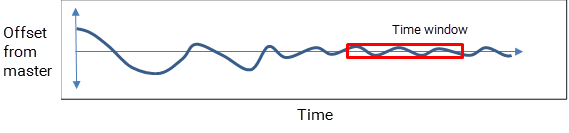
- 開啟 ace 2 和 dart M 相機, 請閱讀
-
請重複步驟 1 和 2,直到裝置充分同步為止。
「關聯資料集」包含哪些內容?#
執行完 GevIEEE1588DataSetLatch 透過此指令,您可以從裝置讀取以下參數值:
GevIEEE1588ClockId: 表示當前PTP 裝置的唯一識別碼(即「時鐘 ID」)。GevIEEE1588OffsetFromMaster: 表示主時鐘與當前PTP 裝置時鐘之間的預估時間偏移,單位為 tick(1 tick = 1 奈秒)。GevIEEE1588ParentClockId: 表示目前擔任主時鐘的PTP 裝置的時鐘 ID(即「父時鐘 ID」)。GevIEEE1588Status: 表示當前PTP 裝置的狀態,例如其為主時鐘或從時鐘。回傳的值與PTP 埠狀態枚舉相符(Initializing、Faulty、Disabled、Listening、Pre_Master、Master、Passive、Uncalibrated 及 Slave)。如需更多資訊,請參閱pylon API 文件以及 IEEE 1588-2008 年規格.GevIEEE1588StatusLatched: 若此參數可用,Basler 建議使用它來取代GevIEEE1588Status參數。這是因為該GevIEEE1588Status該參數未與GevIEEE1588DataSetLatch指令。因此,若您從裝置讀取多個與「PTP 」相關的數值,該裝置的狀態將不會與其他數值的同一時間點相對應。
其他參數#
開啟 ace 2 和 dart M 攝影機,在執行完 PtpDataSetLatch 透過此指令,您可以從裝置讀取以下額外的參數值:
BslPtpDelayMechanism: 表示 延遲機制 由PTP 網路所使用。其值為E2E表示採用「延遲請求-回應」機制。其數值為P2P表示採用了點對點機制。PtpClockAccuracy: 表示當PTP 裝置時鐘擔任或成為主時鐘時,其預期精確度。在Basler相機上,預期精確度預設為Unknown. 這是因為 Basler 相機不會與協調世界時(例如 UTC)同步。PtpGrandmasterClockID: 表示目前擔任主時鐘的PTP 裝置的時鐘識別碼。PtpServoStatus: 表示時鐘伺服的狀態,亦即PTP 時鐘同步的狀態。若該狀態為Locked, 當前裝置的時鐘已成功與主時鐘同步。在所有其他情況下,該狀態為Unknown.
外部連結#
- 端對端與點對點的比較(時間同步部落格)
- 混合模式PTP :多播與單播的混合(時間同步部落格)
- IEEE 1588-2008 年規格(IEEE 標準協會)
- 一步式還是兩步式?(時間同步部落格)
- Precision Time Protocol (維基百科)
- 白皮書:同步與即時:GigE 網路中的多攝影機應用(Basler)
範例程式碼#
ace 2 雙鏡頭#
// ** Configure PTP **
// Set Priority 1 to 128
camera.BslPtpPriority1.SetValue(128);
// Enable end-to-end delay measurement
camera.BslPtpProfile.SetValue(BslPtpProfile_DelayRequestResponseDefaultProfile);
// Set the network mode to unicast
camera.BslPtpNetworkMode.SetValue(BslPtpNetworkMode_Unicast);
// Set the IP address of the first unicast device to 192.168.10.12
// (0xC0 = 192, 0xA8 = 168, 0x0A = 10, 0x0C = 12)
camera.BslPtpUcPortAddrIndex.SetValue(0);
camera.BslPtpUcPortAddr.SetValue((0xC0A80A0C);
// Enable PTP Management Protocol
camera.BslPtpManagementEnable.SetValue(true);
// Disable two-step operation
camera.BslPtpTwoStep.SetValue(false);
// ** Enable PTP on the current device **
camera.PtpEnable.SetValue(true);
// To check the status of the PTP clock synchronization,
// implement your own check method here.
// For guidelines, see "Checking the Status of
// the PTP Clock Synchronization" in this topic.
INodeMap& nodemap = camera.GetNodeMap();
// ** Configure PTP **
// Set Priority 1 to 128
CIntegerParameter(nodemap, "BslPtpPriority1").SetValue(128);
// Enable end-to-end delay measurement
CEnumParameter(nodemap, "BslPtpProfile").SetValue("DelayRequestResponseDefaultProfile");
// Set the network mode to unicast
CEnumParameter(nodemap, "BslPtpNetworkMode").SetValue("Unicast");
// Set the IP address of the first unicast device to 192.168.10.12
// (0xC0 = 192, 0xA8 = 168, 0x0A = 10, 0x0C = 12)
CIntegerParameter(nodemap, "BslPtpUcPortAddrIndex").SetValue(0);
CIntegerParameter(nodemap, "BslPtpUcPortAddr").SetValue(0xC0A80A0C);
// Enable PTP Management Protocol
CBooleanParameter(nodemap, "BslPtpManagementEnable").SetValue(true);
// Disable two-step operation
CBooleanParameter(nodemap, "BslPtpTwoStep").SetValue(false);
// ** Enable PTP on the current device **
CBooleanParameter(nodemap, "PtpEnable").SetValue(true);
// To check the status of the PTP clock synchronization,
// implement your own check method here.
// For guidelines, see "Checking the Status of
// the PTP Clock Synchronization" in this topic.
// ** Configure PTP **
// Set Priority 1 to 128
camera.Parameters[PLCamera.BslPtpPriority1].SetValue(128);
// Enable end-to-end delay measurement
camera.Parameters[PLCamera.BslPtpProfile].SetValue(PLCamera.BslPtpProfile.DelayRequestResponseDefaultProfile);
// Set the network mode to unicast
camera.Parameters[PLCamera.BslPtpNetworkMode].SetValue(PLCamera.BslPtpNetworkMode.Unicast);
// Set the IP address of the first unicast device to 192.168.10.12
// (0xC0 = 192, 0xA8 = 168, 0x0A = 10, 0x0C = 12)
camera.Parameters[PLCamera.BslPtpUcPortAddrIndex].SetValue(0);
camera.Parameters[PLCamera.BslPtpUcPortAddr].SetValue(0xC0A80A0C);
// Enable PTP Management Protocol
camera.Parameters[PLCamera.BslPtpManagementEnable].SetValue(true);
// Disable two-step operation
camera.Parameters[PLCamera.BslPtpTwoStep].SetValue(false);
// ** Enable PTP on the current device **
camera.Parameters[PLCamera.PtpEnable].SetValue(true);
// To check the status of the PTP clock synchronization,
// implement your own check method here.
// For guidelines, see "Checking the Status of
// the PTP Clock Synchronization" in this topic.
/* Macro to check for errors */
#define CHECK(errc) if (GENAPI_E_OK != errc) printErrorAndExit(errc)
GENAPIC_RESULT errRes = GENAPI_E_OK;  /* Return value of pylon methods */
/* ** Configure PTP ** */
/* Set Priority 1 to 128 */
errRes = PylonDeviceSetIntegerFeature(hdev, "BslPtpPriority1", 128);
CHECK(errRes);
/* Enable end-to-end delay measurement */
errRes = PylonDeviceFeatureFromString(hdev, "BslPtpProfile", "DelayRequestResponseDefaultProfile");
CHECK(errRes);
/* Set the network mode to unicast */
errRes = PylonDeviceFeatureFromString(hdev, "BslPtpNetworkMode", "Unicast");
CHECK(errRes);
/* Set the IP address of the first unicast device to 192.168.10.12 */
/* (0xC0 = 192, 0xA8 = 168, 0x0A = 10, 0x0C = 12) */
errRes = PylonDeviceSetIntegerFeature(hdev, "BslPtpUcPortAddrIndex", 0);
CHECK(errRes);
errRes = PylonDeviceSetIntegerFeature(hdev, "BslPtpUcPortAddr", 0xC0A80A0C);
CHECK(errRes);
/* Enable PTP Management Protocol */
errRes = PylonDeviceSetBooleanFeature(hdev, "BslPtpManagementEnable", 1);
CHECK(errRes);
/* Disable two-step operation */
errRes = PylonDeviceSetBooleanFeature(hdev, "BslPtpTwoStep", 0);
CHECK(errRes);
/* ** Enable PTP on the current device ** */
errRes = PylonDeviceSetBooleanFeature(hdev, "PtpEnable", 1);
CHECK(errRes);
/* To check the status of the PTP clock synchronization, */
/* implement your own check method here. */
/* For guidelines, see "Checking the Status of */
/* the PTP Clock Synchronization" in this topic. */
# ** Configure PTP **
# Set Priority 1 to 128
camera.BslPtpPriority1.Value = 128
# Enable end-to-end delay measurement
camera.BslPtpProfile.Value = "DelayRequestResponseDefaultProfile"
# Set the network mode to unicast
camera.BslPtpNetworkMode.Value = "Unicast"
# Set the IP address of the first unicast device to 192.168.10.12
# (0xC0 = 192, 0xA8 = 168, 0x0A = 10, 0x0C = 12)
camera.BslPtpUcPortAddrIndex.Value = 0
camera.BslPtpUcPortAddr.Value = 0xC0A80A0C
# Enable PTP Management Protocol
camera.BslPtpManagementEnable.Value = True
# Disable two-step operation
camera.BslPtpTwoStep.Value = False
# ** Enable PTP on the current device **
camera.PtpEnable.Value = True
# To check the status of the PTP clock synchronization,
# implement your own check method here.
# For guidelines, see "Checking the Status of
# the PTP Clock Synchronization" in this topic.
其他相機#
INodeMap& nodemap = camera.GetNodeMap();
// Enable PTP on the current device
CBooleanParameter(nodemap, "GevIEEE1588").SetValue(true);
// To check the status of the PTP clock synchronization,
// implement your own check method here.
// For guidelines, see "Checking the Status of
// the PTP Clock Synchronization" in this topic.
/* Macro to check for errors */
#define CHECK(errc) if (GENAPI_E_OK != errc) printErrorAndExit(errc)
GENAPIC_RESULT errRes = GENAPI_E_OK;  /* Return value of pylon methods */
/* Enable PTP on the current device */
errRes = PylonDeviceSetBooleanFeature(hdev, "GevIEEE1588", 1);
CHECK(errRes);
/* To check the status of the PTP clock synchronization, */
/* implement your own check method here. */
/* For guidelines, see "Checking the Status of */
/* the PTP Clock Synchronization" in this topic. */
您也可以 use the pylon Viewer 來輕鬆設定參數。