Spatial Correction#
資訊
- 此功能基本上是 Basler racer 2 color 相機功能。
- 在 Basler racer 2 L mono 相機 r2L8192-240cm 和 r2L16384-120cm 上,spatial correction stride 用於 TDI 功能。
使用此功能#
運作原理#
Basler racer 2 彩色相機配備了兩種不同的感光元件類型:彩色雙線或彩色三線感光元件。
資訊
若要查詢相機型號的感光元件類型,請查看您相機型號的相機主題。您可以在 面陣與線掃描相機 專區找到您的相機主題。
彩色雙線感光元件具有兩個像素線,彩色三線感光元件具有三個相鄰排列的像素線。雙線感光元件的線緊密相鄰,而三線感光元件的線則由間隙隔開。
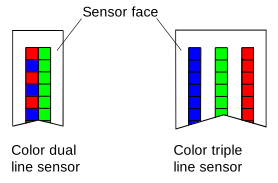
對通過相機的任何物體而言,每一條線都有不同的視野。每當觸發擷取時,感光元件的所有線都會同時曝光。這意味著對於單次曝光,感光元件中的每一條線都會擷取物體上的不同區域。
以下圖解顯示了彩色三線感光元件的視野。
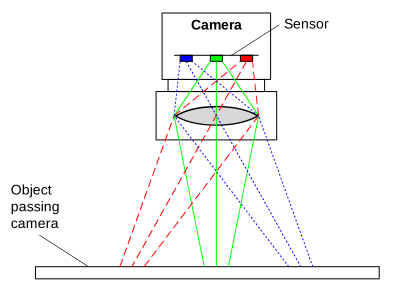
在以下範例中,物體上的單個小區域「A」通過相機。當物體通過相機時,區域 A 會在三個不同的時間點分別落入藍線、綠線和紅線的視野中。這意味著區域 A 的藍色資訊、綠色資訊和紅色資訊是在三次不同的影像擷取過程中收集的。
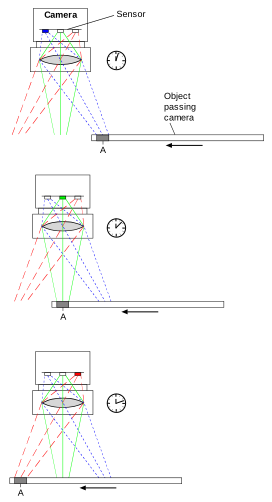
為了取得區域 A 的完整 RGB 資訊,必須結合三次不同擷取的資料。需要結合來自不同擷取的資料以取得完整色彩資訊的過程,稱為 Spatial Correction。換句話說,Spatial Correction 會對齊影像的色彩資訊。目前曝光的紅線資料會與過去曝光中所取得的綠線與藍線資料相結合。
Spatial Correction Stride#
影像 BslSpatialCorrectionStride 參數用於啟用和停用 Spatial Correction,以及設定 Spatial Correction 的兩個面向:起始線和步幅(stride)。
起始行#
Spatial Correction 起始線與物體通過相機的方向有關。
將 BslSpatialCorrectionStride 參數設定為正值或負值可決定起始線,進而決定 Spatial Correction 的方向。
線掃描彩色相機#
以下圖解根據運動方向顯示了 color 三線感光元件上的起始線。
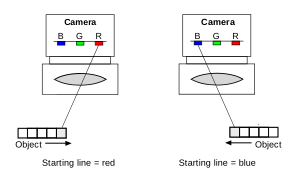
彩色三線感光元件:
- 正參數值:起始線為藍線。
- 負參數值:起始線為紅線。
彩色雙線陣感測器:
- 正參數值:起始線為藍色/紅色線。
- 負參數值:起始線為綠線。
線陣黑白相機#
下圖顯示了根據運動方向,黑白四線陣感測器上的起始線。
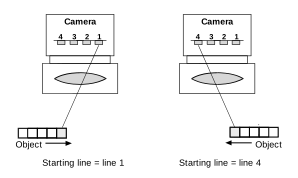
黑白四線陣感測器:
- 正參數值:起始線為第 4 線。
- 負參數值:起始線為第 1 線。
黑白雙線陣感測器:
- 正參數值:起始線為第 2 線。
- 負參數值:起始線為第 1 線。
Stride#
Spatial Correction 步幅決定了必須進行緩衝的擷取次數,以便結合正確的線資料並獲得影像上某個區域的完整 RGB 或完整 HDR 資料。
影像 BslSpatialCorrectionStride 參數可以在 -4 到 4 的範圍內設定,具體取決於您的相機型號。指定 0 的步幅值實際上會停用 Spatial Correction。
下表顯示了步幅值與獲取完整 RGB/HDR 資訊所需的擷取次數之間的關係。
線掃描彩色相機#
| 彩色雙線陣感測器 | |
|---|---|
| Stride = 1 | Full RGB = blue/red[n-1] + green[n] |
| Stride = -1 | Full RGB = blue/red[n] + green[n-1] |
| 彩色三線陣感測器 | |
|---|---|
| Stride = 1 | Full RGB = blue[n-2] + green[n-1] + red[n] |
| Stride = 2 | Full RGB = blue[n-4] + green[n-2] + red[n] |
| Stride = -1 | Full RGB = blue[n] + green[n-1] + red[n-2] |
| Stride = -2 | Full RGB = blue[n] + green[n-2] + red[n-4] |
線陣黑白相機#
| Mono Dual Line Sensor | |
|---|---|
| Stride = 1 | Full HDR = line 2[n-1] + line 1[n] |
| Stride = 2 | Full HDR = line 2[n-2] + line 1[n] |
| Stride = -1 | Full HDR = line 2[n] + line 1[n-1] |
| Stride = -2 | Fuss HDR = line 2[n] + line 1[n-2] |
| Mono Quad Line Sensor | |
|---|---|
| Stride = 1 | Full HDR = line 4[n-3] + line 3[n-2] + line 2[n-1] + line 1[n] |
| Stride = 2 | Full HDR = line 4[n-6] + line 3[n-4] + line 2[n-2] + line 1[n] |
| Stride = 3 | Full HDR = line 4[n-9] + line 3[n-6] + line 2[n-3] + line 1[n] |
| Stride = 4 | Full HDR = line 4[n-12] + line 3[n-8] + line 2[n-4] + line 1[n] |
| Stride = -1 | Full HDR = line 4[n] + line 3[n-1] + line 2[n-2] + line 1[n-3] |
| Stride = -2 | Full HDR = line 4[n] + line 3[n-2] + line 2[n-4] + line 1[n-6] |
| Stride = -3 | Full HDR = line 4[n] + line 3[n-3] + line 2[n-6] + line 1[n-9] |
| Stride = -4 | Full HDR = line 4[n] + line 3[n-4] + line 2[n-8] + line 1[n-12] |
資訊
行擷取通常由來自增量編碼器的信號觸發。物體從一行到另一行的移動與觸發擷取之間的關係必須進行設置,使其與線條的像素寬度相匹配。
避免暈影效果#
如果色彩資訊的對齊正確,擷取的影像將如下方右圖所示清晰銳利。如果在不同行擷取影像時其位置出現偏差,則會如下方左圖所示產生彩色「光暈」。
為了正確擷取物體上的特定區域,其影像必須精確落在感測器的彩色像素線上。
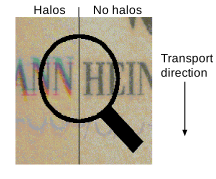
資訊
為避免彩色暈邊,請確保正確滿足系統設計要求。
反轉 Spatial Correction 方向#
物體通過相機的方向在您的應用環境中可能會交替變更。或者,相機可能會在物體上方來回移動。在這兩種情況下,運動方向都會改變。關於運動方向改變的資訊對於實現適當的 Spatial Correction 至關重要。
可以透過 I/O 線路取得此資訊,或使用相機的 Encoder Control 所輸出的 Encoder Reverse 1 信號。
影像 BslSpatialCorrectionDirectionReversal 參數可讓您決定應使用哪個信號源來觸發 Spatial Correction 方向的反轉。
您可以將 BslSpatialCorrectionDirectionReversal 參數設為下列其中一個值:
Off:已停用方向反轉。Spatial Correction 方向由設定的下列項目的正值或負值決定:BslSpatialCorrectionStride參數的值。Line1,Line2,Line3:如果 I/O 線路 1、2 或 3 的信號準位為高電位,則 Spatial Correction 方向會反轉。EncoderReverse1:如果 Encoder Reverse 1 信號為高電位,則 Spatial Correction 方向會反轉。
設定 Spatial Correction#
若要設定 Spatial Correction:
- 將
BslSpatialCorrectionStride參數,例如設為 2。 - 如果需要,請將
BslSpatialCorrectionDirectionReversal參數設定為,例如EncoderReverse1.
範例程式碼#
INodeMap& nodemap = camera.GetNodeMap();
// Set the stride for spatial correction to 2
CEnumParameter(nodemap, "BslSpatialCorrectionStride").SetValue("");
// Set the spatial correction direction reversal to Encoder Reverse 1
CEnumParameter(nodemap, "BslSpatialCorrectionDirectionReversal").SetValue("EncoderReverse1");
// Set the stride for spatial correction to 2
camera.Parameters[PLCamera.BslSpatialCorrectionStride].SetValue(PLCamera.BslSpatialCorrectionStride.);
// Set the spatial correction direction reversal to Encoder Reverse 1
camera.Parameters[PLCamera.BslSpatialCorrectionDirectionReversal].SetValue(PLCamera.BslSpatialCorrectionDirectionReversal.EncoderReverse1);
/* Macro to check for errors */
#define CHECK(errc) if (GENAPI_E_OK != errc) printErrorAndExit(errc)
GENAPIC_RESULT errRes = GENAPI_E_OK;  /* Return value of pylon methods */
/* Set the stride for spatial correction to 2 */
errRes = PylonDeviceFeatureFromString(hdev, "BslSpatialCorrectionStride", "");
CHECK(errRes);
/* Set the spatial correction direction reversal to Encoder Reverse 1 */
errRes = PylonDeviceFeatureFromString(hdev, "BslSpatialCorrectionDirectionReversal", "EncoderReverse1");
CHECK(errRes);
您也可以使用 pylon Viewer 來輕鬆設定參數。