Stacked Zone Imaging#
系統將僅傳輸這些區域的像素資料。這會提高相機的 畫面更新率。
使用此功能#
運作原理#
Stacked Zone Imaging 功能可讓您在感光元件陣列上定義最多八個垂直對齊且寬度相同的區域。擷取影像時,感光元件只會讀出所定義區域內的像素資訊。接著,這些像素資訊會堆疊在一起並作為單一影像傳輸。
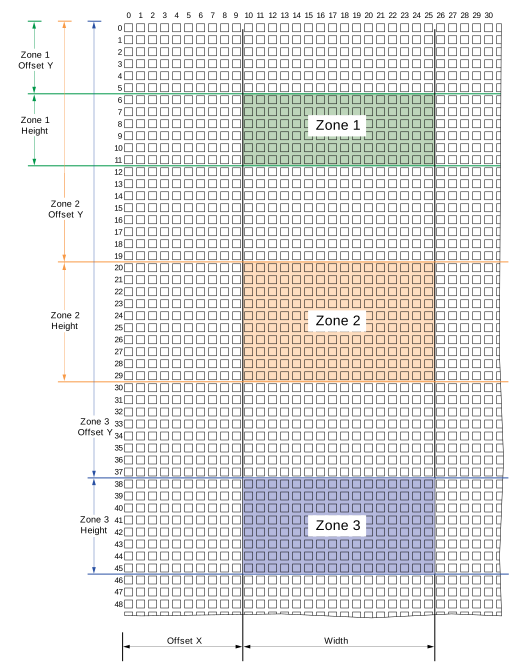
這些區域的寬度一律相同且垂直對齊。若要設定 ROI 區域,Basler 建議採取以下步驟:
- 定義適用於所有區域的寬度和水平位移。
- 定義個別區域的高度與垂直位移。
設定 Stacked Zone Imaging#
- 停用 Center X and Center Y 與 Decimation 功能(若適用)。
- 將
StackedZoneImagingEnable參數設為true.
已啟用 Stacked Zone Imaging 功能,且可進行設定。 - 將
OffsetX參數設為所需的水平位移。此數值適用於 所有區域. - 將
Width參數設為所需的區域寬度。此數值適用於 所有區域. - 將
StackedZoneImagingIndex參數設為您要設定的區域,例如 1。 - 將
StackedZoneImagingZoneEnable參數設為true以啟用步驟 4 中所選的區域。 - 將
StackedZoneImagingZoneOffsetY參數設為所需的垂直位移。此數值適用於步驟 4 中所選的區域。 - 將
StackedZoneImagingZoneHeight參數設為所需的區域高度。
此數值適用於步驟 4 中所選的區域。 - 對您要設定的每個區域重複步驟 4 至 7。
使用 Stacked Zone Imaging 的注意事項#
- 您可以依任何喜歡的順序啟用區域。例如,您可以啟用區域 2、4 和 6,並停用區域 1、3 和 5。
- 您可以將區域自由配置在感光元件周圍。例如,您可以將區域 1 放在底部附近、區域 3 放在頂部附近,以及區域 2 放在中間。不過,相機一律會從感光元件最頂端的區域開始讀出並傳輸像素資料,然後依序向下處理。
- 您可以定義垂直重疊的區域。如果兩個區域重疊,它們將作為單一合併區域傳輸。重疊區域中的像素資料只會讀出並傳輸一次。
- 您可以將
StackedZoneImagingZoneOffsetY和StackedZoneImagingZoneHeight黑白相機的參數遞增值為 1,彩色相機的參數遞增值則為 2。對於彩色相機,參數值必須為偶數。 - 啟用 Stacked Zone Imaging 功能後,下列參數將變為唯讀:
OffsetY
該參數設為最頂端區域的垂直位移。Height
此參數會設定為最終影像的高度,亦即所有區域高度的總和。CenterY
- 如果您已啟用 Stacked Zone Imaging 功能,接著又啟用 binning,則堆疊區域的位置與大小將會自動調整。參數值會除以對應的 binning 因子並向下捨入。
- 如果您在使用 Stacked Zone Imaging 功能後停用所有區域,則 Image ROI 的大小與位置將會設定為最後停用之區域的大小與位置。例如,假設區域 0、1 和 2 已啟用。然後您依下列順序停用區域:2、1、0。因此,Image ROI 的大小與位置將會設定為被停用的區域 0 的大小與位置。
範例程式碼#
// Enable stacked zone imaging
camera.StackedZoneImagingEnable.SetValue(true);
// Configure width and offset X for all zones
camera.Width.SetValue(200);
camera.OffsetX.SetValue(100);
// Select zone 1
camera.StackedZoneImagingIndex.SetValue(1);
// Enable the selected zone
camera.StackedZoneImagingZoneEnable.SetValue(true);
// Set the vertical offset for the selected zone
camera.StackedZoneImagingZoneOffsetY.SetValue(100);
// Set the height for the selected zone
camera.StackedZoneImagingZoneHeight.SetValue(100);
// Select zone 2
camera.StackedZoneImagingIndex.SetValue(2);
// Enable the selected zone
camera.StackedZoneImagingZoneEnable.SetValue(true);
// Set the offset Y for the selected zone
camera.StackedZoneImagingZoneOffsetY.SetValue(250);
// Set the height for the selected zone
camera.StackedZoneImagingZoneHeight.SetValue(200);
INodeMap& nodemap = camera.GetNodeMap();
// Enable stacked zone imaging
CBooleanParameter(nodemap, "StackedZoneImagingEnable").SetValue(true);
// Configure width and offset X for all zones
CIntegerParameter(nodemap, "Width").SetValue(200);
CIntegerParameter(nodemap, "OffsetX").SetValue(100);
// Select zone 1
CIntegerParameter(nodemap, "StackedZoneImagingIndex").SetValue(1);
// Enable the selected zone
CBooleanParameter(nodemap, "StackedZoneImagingZoneEnable").SetValue(true);
// Set the vertical offset for the selected zone
CIntegerParameter(nodemap, "StackedZoneImagingZoneOffsetY").SetValue(100);
// Set the height for the selected zone
CIntegerParameter(nodemap, "StackedZoneImagingZoneHeight").SetValue(100);
// Select zone 2
CIntegerParameter(nodemap, "StackedZoneImagingIndex").SetValue(2);
// Enable the selected zone
CBooleanParameter(nodemap, "StackedZoneImagingZoneEnable").SetValue(true);
// Set the offset Y for the selected zone
CIntegerParameter(nodemap, "StackedZoneImagingZoneOffsetY").SetValue(250);
// Set the height for the selected zone
CIntegerParameter(nodemap, "StackedZoneImagingZoneHeight").SetValue(200);
// Enable stacked zone imaging
camera.Parameters[PLCamera.StackedZoneImagingEnable].SetValue(true);
// Configure width and offset X for all zones
camera.Parameters[PLCamera.Width].SetValue(200);
camera.Parameters[PLCamera.OffsetX].SetValue(100);
// Select zone 1
camera.Parameters[PLCamera.StackedZoneImagingIndex].SetValue(1);
// Enable the selected zone
camera.Parameters[PLCamera.StackedZoneImagingZoneEnable].SetValue(true);
// Set the vertical offset for the selected zone
camera.Parameters[PLCamera.StackedZoneImagingZoneOffsetY].SetValue(100);
// Set the height for the selected zone
camera.Parameters[PLCamera.StackedZoneImagingZoneHeight].SetValue(100);
// Select zone 2
camera.Parameters[PLCamera.StackedZoneImagingIndex].SetValue(2);
// Enable the selected zone
camera.Parameters[PLCamera.StackedZoneImagingZoneEnable].SetValue(true);
// Set the offset Y for the selected zone
camera.Parameters[PLCamera.StackedZoneImagingZoneOffsetY].SetValue(250);
// Set the height for the selected zone
camera.Parameters[PLCamera.StackedZoneImagingZoneHeight].SetValue(200);
/* Macro to check for errors */
#define CHECK(errc) if (GENAPI_E_OK != errc) printErrorAndExit(errc)
GENAPIC_RESULT errRes = GENAPI_E_OK;  /* Return value of pylon methods */
/* Enable stacked zone imaging */
errRes = PylonDeviceSetBooleanFeature(hdev, "StackedZoneImagingEnable", 1);
CHECK(errRes);
/* Configure width and offset X for all zones */
errRes = PylonDeviceSetIntegerFeature(hdev, "Width", 200);
CHECK(errRes);
errRes = PylonDeviceSetIntegerFeature(hdev, "OffsetX", 100);
CHECK(errRes);
/* Select zone 1 */
errRes = PylonDeviceSetIntegerFeature(hdev, "StackedZoneImagingIndex", 1);
CHECK(errRes);
/* Enable the selected zone */
errRes = PylonDeviceSetBooleanFeature(hdev, "StackedZoneImagingZoneEnable", 1);
CHECK(errRes);
/* Set the vertical offset for the selected zone */
errRes = PylonDeviceSetIntegerFeature(hdev, "StackedZoneImagingZoneOffsetY", 100);
CHECK(errRes);
/* Set the height for the selected zone */
errRes = PylonDeviceSetIntegerFeature(hdev, "StackedZoneImagingZoneHeight", 100);
CHECK(errRes);
/* Select zone 2 */
errRes = PylonDeviceSetIntegerFeature(hdev, "StackedZoneImagingIndex", 2);
CHECK(errRes);
/* Enable the selected zone */
errRes = PylonDeviceSetBooleanFeature(hdev, "StackedZoneImagingZoneEnable", 1);
CHECK(errRes);
/* Set the offset Y for the selected zone */
errRes = PylonDeviceSetIntegerFeature(hdev, "StackedZoneImagingZoneOffsetY", 250);
CHECK(errRes);
/* Set the height for the selected zone */
errRes = PylonDeviceSetIntegerFeature(hdev, "StackedZoneImagingZoneHeight", 200);
CHECK(errRes);
# Enable stacked zone imaging
camera.StackedZoneImagingEnable.Value = True
# Configure width and offset X for all zones
camera.Width.Value = 200
camera.OffsetX.Value = 100
# Select zone 1
camera.StackedZoneImagingIndex.Value = 1
# Enable the selected zone
camera.StackedZoneImagingZoneEnable.Value = True
# Set the vertical offset for the selected zone
camera.StackedZoneImagingZoneOffsetY.Value = 100
# Set the height for the selected zone
camera.StackedZoneImagingZoneHeight.Value = 100
# Select zone 2
camera.StackedZoneImagingIndex.Value = 2
# Enable the selected zone
camera.StackedZoneImagingZoneEnable.Value = True
# Set the offset Y for the selected zone
camera.StackedZoneImagingZoneOffsetY.Value = 250
# Set the height for the selected zone
camera.StackedZoneImagingZoneHeight.Value = 200
您也可以使用 pylon Viewer 來輕鬆設定參數。