Line Debouncer#
只有夠長的訊號才能傳遞到相機並生效。
此功能類似於 Input Filter 功能,該功能僅適用於 ace 2、boost 和 dart R 相機。
使用此功能#
運作原理#
Line Debouncer 可以過濾掉來自傳入硬體觸發訊號上升緣和下降緣的不必要短訊號(接點彈跳)。為此,Line Debouncer 會評估硬體訊號邏輯狀態的所有變化與持續時間。
此評估期間的最長持續時間由 LineDebouncerTime 參數定義。Line Debouncer 的運作方式類似時鐘,可測量訊號持續時間以識別有效訊號。
每當硬體訊號改變其邏輯狀態(從高到低或反之)時,時鐘便開始計數:
- 如果新邏輯狀態的持續時間短於指定的 Line Debouncer 時間,則該新邏輯狀態將被視為無效且不生效。
- 如果新邏輯狀態的持續時間等於或長於指定的 Line Debouncer 時間,則該新邏輯狀態將被視為有效,並獲准在相機中生效。
資訊
指定 Line Debouncer 時間會在有效的觸發訊號到達相機與將相關的邏輯狀態變更傳遞到相機的時刻之間引入延遲。
延遲時間至少等於 LineDebouncerTime 參數的值。這是因為相機需要等待指定的時間來判斷訊號是否有效。同理,Line Debouncer 也會延遲有效觸發訊號的結束時間。
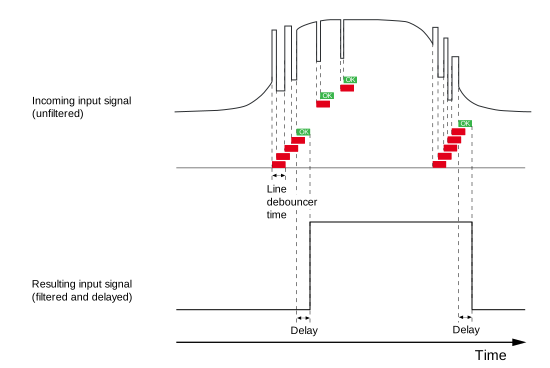
下圖說明了 Line Debouncer 如何從硬體觸發訊號的上升緣和下降緣過濾掉無效訊號。允許相機中邏輯狀態變更的 Line Debouncer 時間標示為「OK」。圖中同時也說明瞭相對於硬體觸發訊號的延遲。
啟用 Line Debouncer#
- 請確保相機已設定為 hardware triggering。
- 將
LineSelectorparameter 設為所需的輸入線,例如:Line1. - 為
LineDebouncerTime參數的值。
選擇 Debouncer 值#
- 選擇
LineDebouncerTime過低 的 值會導致接受無效的訊號和訊號狀態。 - 選擇過高的值會導致拒絕有效的訊號和訊號狀態。
Basler 建議選擇略長於預期無效訊號最長持續時間的 Line Debouncer 時間。
這會有極小的風險拒絕短的有效訊號,但在大多數情況下,此方法應該能提供良好的結果。請監控您的應用程式,如果發現有太多有效訊號遭到拒絕,請視需要調整數值。
範例程式碼#
ace Classic/U/L GigE 相機#
/* Macro to check for errors */
#define CHECK(errc) if (GENAPI_E_OK != errc) printErrorAndExit(errc)
GENAPIC_RESULT errRes = GENAPI_E_OK;  /* Return value of pylon methods */
/* Select the desired input line */
errRes = PylonDeviceFeatureFromString(hdev, "LineSelector", "Line1");
CHECK(errRes);
/* Set the parameter value to 10 microseconds */
errRes = PylonDeviceSetFloatFeature(hdev, "LineDebouncerTimeAbs", 10.0);
CHECK(errRes);
其他相機#
/* Macro to check for errors */
#define CHECK(errc) if (GENAPI_E_OK != errc) printErrorAndExit(errc)
GENAPIC_RESULT errRes = GENAPI_E_OK;  /* Return value of pylon methods */
/* Select the desired input line */
errRes = PylonDeviceFeatureFromString(hdev, "LineSelector", "Line1");
CHECK(errRes);
/* Set the parameter value to 10 microseconds */
errRes = PylonDeviceSetFloatFeature(hdev, "LineDebouncerTime", 10.0);
CHECK(errRes);
您也可以使用 pylon Viewer 來輕鬆設定參數。