Dual ROI#
系統只會傳輸這些區域中的像素資料。這能提高相機的 畫面更新率。
此功能僅適用於 Basler boost V 相機型號。
使用功能#
運作原理#
Dual ROI 功能允許您在感光元件陣列的垂直方向上定義兩個區域。
擷取影像時,感光元件只會讀取這些區域內的像素資訊,並將其作為單一影像進行傳輸。
- 高度 (height) 和垂直偏移 (vertical offset) 可以針對這兩個區域分別進行定義。您可以透過在感光元件陣列上配置列 (rows) 來實現。
- 當 寬度 (width) 進行明確的生命週期管理即呼叫 水平偏移 (horizontal offset) 對於這兩個區域而言始終是相同的。它們是由全域
OffsetX進行明確的生命週期管理即呼叫Width參數。
在以下範例中,已定義了兩列。這建立了兩個區域:
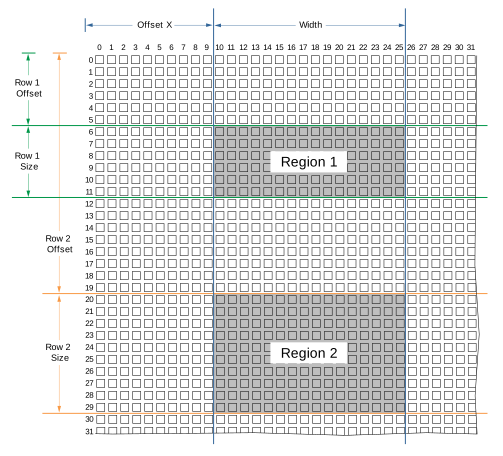
來自區域 1 和區域 2 內的像素資訊會作為單一影像進行傳輸。
設定區域#
若要配置這些區域:
- 請確保相機處於閒置狀態,也就是未擷取影像。
- 將相機中的
BslDualROIRowsEnable參數設為true. - 將相機中的
BslDualROIRowSelector參數設為Row1. - 將相機中的
BslDualROIRowOffset將參數設為所需的行垂直偏移量,例如 100。 - 將相機中的
BslDualROIRowSize將參數設為所需的行高度,例如 50。 - 驗證以下參數的值:
BslDualROIImageValid為true。如果沒有,請更改您的參數設定。
例如,這些區域不得重疊,且所有區域的總高度不得超過影像感光元件的高度。 - 對第 2 列重複上述步驟。
- 將相機中的
OffsetX參數設為兩個區域所需的水平偏移。 - 將相機中的
Width參數設為兩個區域所需的寬度。
使用 Dual ROI 功能時的注意事項#
-
若 buffer operator 的
BslDualROIRowsEnable參數設為true,只要影像擷取 (Acquisition Start) 開始,就會自動設定以下參數:OffsetY:此參數會設為第 1 行的垂直偏移量。Height:此參數設定為所有區域的總高度,也就是由 Dual ROI 功能所建立影像的高度。
在使用 Dual ROI 功能的同時變更這些參數是可能的,但不會產生任何效果。
-
Auto Function ROI 的位置和大小不會自動配合 Dual ROI 功能的輸出進行調整。如果您正在使用自動功能,請確保 Dual ROI 區域包含在 Auto Function ROI 內。
範例程式碼#
// ** In this example, we define two regions in vertical direction
// that will be transmitted as a single image. **
// Enable the Dual ROI feature
camera.BslDualROIRowsEnable.SetValue(true);
// Select row 1
camera.BslDualROIRowSelector.SetValue(BslDualROIRowSelector_Row1);
// The first region should have a vertical offset of 100 and a height of 300 pixels
camera.BslDualROIRowOffset.SetValue(100);
camera.BslDualROIRowSize.SetValue(300);
// Select row 2
camera.BslDualROIRowSelector.SetValue(BslDualROIRowSelector_Row1);
// The second region should have a vertical offset of 500 and a height of 400 pixels
camera.BslDualROIRowOffset.SetValue(500);
camera.BslDualROIRowSize.SetValue(400);
// Check whether the outgoing image is valid
bool heightValid = camera.BslDualROIImageValid.GetValue();
// Both regions should have a horizontal offset of 200 and a width of 500
camera.OffsetX.SetValue(200);
camera.Width.SetValue(500);
INodeMap& nodemap = camera.GetNodeMap();
// ** In this example, we define two regions in vertical direction
// that will be transmitted as a single image. **
// Enable the Dual ROI feature
CBooleanParameter(nodemap, "BslDualROIRowsEnable").SetValue(true);
// Select row 1
CEnumParameter(nodemap, "BslDualROIRowSelector").SetValue("Row1");
// The first region should have a vertical offset of 100 and a height of 300 pixels
CIntegerParameter(nodemap, "BslDualROIRowOffset").SetValue(100);
CIntegerParameter(nodemap, "BslDualROIRowSize").SetValue(300);
// Select row 2
CEnumParameter(nodemap, "BslDualROIRowSelector").SetValue("Row1");
// The second region should have a vertical offset of 500 and a height of 400 pixels
CIntegerParameter(nodemap, "BslDualROIRowOffset").SetValue(500);
CIntegerParameter(nodemap, "BslDualROIRowSize").SetValue(400);
// Check whether the outgoing image is valid
bool heightValid = CBooleanParameter(nodemap, "BslDualROIImageValid").GetValue();
// Both regions should have a horizontal offset of 200 and a width of 500
CIntegerParameter(nodemap, "OffsetX").SetValue(200);
CIntegerParameter(nodemap, "Width").SetValue(500);
// ** In this example, we define two regions in vertical direction
// that will be transmitted as a single image. **
// Enable the Dual ROI feature
camera.Parameters[PLCamera.BslDualROIRowsEnable].SetValue(true);
// Select row 1
camera.Parameters[PLCamera.BslDualROIRowSelector].SetValue(PLCamera.BslDualROIRowSelector.Row1);
// The first region should have a vertical offset of 100 and a height of 300 pixels
camera.Parameters[PLCamera.BslDualROIRowOffset].SetValue(100);
camera.Parameters[PLCamera.BslDualROIRowSize].SetValue(300);
// Select row 2
camera.Parameters[PLCamera.BslDualROIRowSelector].SetValue(PLCamera.BslDualROIRowSelector.Row1);
// The second region should have a vertical offset of 500 and a height of 400 pixels
camera.Parameters[PLCamera.BslDualROIRowOffset].SetValue(500);
camera.Parameters[PLCamera.BslDualROIRowSize].SetValue(400);
// Check whether the outgoing image is valid
bool heightValid = camera.Parameters[PLCamera.BslDualROIImageValid].GetValue();
// Both regions should have a horizontal offset of 200 and a width of 500
camera.Parameters[PLCamera.OffsetX].SetValue(200);
camera.Parameters[PLCamera.Width].SetValue(500);
/* Macro to check for errors */
#define CHECK(errc) if (GENAPI_E_OK != errc) printErrorAndExit(errc)
GENAPIC_RESULT errRes = GENAPI_E_OK;  /* Return value of pylon methods */
_Bool heightValid = false;
/* ** In this example, we define two regions in vertical direction */
/* that will be transmitted as a single image. ** */
/* Enable the Dual ROI feature */
errRes = PylonDeviceSetBooleanFeature(hdev, "BslDualROIRowsEnable", 1);
CHECK(errRes);
/* Select row 1 */
errRes = PylonDeviceFeatureFromString(hdev, "BslDualROIRowSelector", "Row1");
CHECK(errRes);
/* The first region should have a vertical offset of 100 and a height of 300 pixels */
errRes = PylonDeviceSetIntegerFeature(hdev, "BslDualROIRowOffset", 100);
CHECK(errRes);
errRes = PylonDeviceSetIntegerFeature(hdev, "BslDualROIRowSize", 300);
CHECK(errRes);
/* Select row 2 */
errRes = PylonDeviceFeatureFromString(hdev, "BslDualROIRowSelector", "Row1");
CHECK(errRes);
/* The second region should have a vertical offset of 500 and a height of 400 pixels */
errRes = PylonDeviceSetIntegerFeature(hdev, "BslDualROIRowOffset", 500);
CHECK(errRes);
errRes = PylonDeviceSetIntegerFeature(hdev, "BslDualROIRowSize", 400);
CHECK(errRes);
/* Check whether the outgoing image is valid */
errRes = PylonDeviceGetBooleanFeature(hdev, "BslDualROIImageValid", &heightValid);
CHECK(errRes);
/* Both regions should have a horizontal offset of 200 and a width of 500 */
errRes = PylonDeviceSetIntegerFeature(hdev, "OffsetX", 200);
CHECK(errRes);
errRes = PylonDeviceSetIntegerFeature(hdev, "Width", 500);
CHECK(errRes);
# ** In this example, we define two regions in vertical direction
# that will be transmitted as a single image. **
# Enable the Dual ROI feature
camera.BslDualROIRowsEnable.Value = True
# Select row 1
camera.BslDualROIRowSelector.Value = "Row1"
# The first region should have a vertical offset of 100 and a height of 300 pixels
camera.BslDualROIRowOffset.Value = 100
camera.BslDualROIRowSize.Value = 300
# Select row 2
camera.BslDualROIRowSelector.Value = "Row1"
# The second region should have a vertical offset of 500 and a height of 400 pixels
camera.BslDualROIRowOffset.Value = 500
camera.BslDualROIRowSize.Value = 400
# Check whether the outgoing image is valid
heightValid = camera.BslDualROIImageValid.Value
# Both regions should have a horizontal offset of 200 and a width of 500
camera.OffsetX.Value = 200
camera.Width.Value = 500
您也可以 use the pylon Viewer 來輕鬆設定參數。