跳至內容
測試伺服器
開發伺服器

Gamma (dart E)#

Gamma 相機功能可讓您最佳化所擷取影像的亮度,以便在監視器上顯示。

使用功能#

運作原理#

相機會根據下列公式,將 Gamma 修正值 ($\gamma$) 套用到每個像素的亮度值(以彩色相機的紅色像素值 (R) 為例):
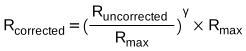
Gamma 修正公式(紅色像素)

最大像素值 ($R_{max}$) 例如在 8 位元 Pixel Format 中等於 255,或在 10 位元 pixel format 中等於 1 023。

設定 Gamma 修正#

若要設定 Gamma 修正,請將 Gamma 參數設定為所需的值。此參數的數值範圍為 0 到 ≈4。- Gamma = 1:整體亮度保持 不變。- Gamma < 1:整體亮度 增加。- Gamma > 1:整體亮度 減少.

在所有情況下,黑色像素(亮度 = 0)和白色像素(亮度 = 最大值)都不會進行調整。

資訊

如果您啟用 Gamma 修正且 Pixel Format 設為 12 位元 pixel format,將會遺失部分影像資訊。像素資料輸出仍會是 12 位元,但像素值會在 Gamma 修正過程中進行插補。

設定色彩空間#

在 daA…mci 相機模組上, BslColorSpace 參數可用。它允許您選擇以下其中一種 Gamma 修正模式:

  • RGB:不套用其他 Gamma 修正值。
  • sRGB:影像亮度已針對在 sRGB 顯示器上顯示進行最佳化。套用約 0.4 的 Gamma 修正值, Gamma 參數將變為唯讀,且 Gamma 參數值將遭到忽略。

範例程式碼#

// Set the Gamma value to 1.2
camera.Gamma.SetValue(1.2);
INodeMap& nodemap = camera.GetNodeMap();
// Set the Gamma value to 1.2
CFloatParameter(nodemap, "Gamma").SetValue(1.2);
// Set the Gamma value to 1.2
camera.Parameters[PLCamera.Gamma].SetValue(1.2);
/* Macro to check for errors */
#define CHECK(errc) if (GENAPI_E_OK != errc) printErrorAndExit(errc)
GENAPIC_RESULT errRes = GENAPI_E_OK;  /* Return value of pylon methods */
/* Set the Gamma value to 1.2 */
errRes = PylonDeviceSetFloatFeature(hdev, "Gamma", 1.2);
CHECK(errRes);
# Set the Gamma value to 1.2
camera.Gamma.Value = 1.2
/* Macro to check for errors */
#define CHECK(errc) if (GENAPI_E_OK != errc) printErrorAndExit(errc)
GENAPIC_RESULT errRes = GENAPI_E_OK;  /* Return value of pylon methods */
/* Set the Gamma value to 1.2 */
errRes = PylonDeviceSetFloatFeature(hdev, "Gamma", 1.2);
CHECK(errRes);

您也可以使用 pylon Viewer 輕鬆設定參數。