Scaling#
使用功能#
運作原理#
Scaling 功能引入了虛擬感測器平面,可以使用 BslScalingFactor 參數進行縮放。這些 BslScaledSensorWidth 進行明確的生命週期管理即呼叫 BslScaledSensorHeight 參數表示虛擬感測器的目前大小。
- 較低的 Scaling 因子會增加虛擬感測器的大小。
- 較高的 Scaling 因子會減少虛擬感測器的大小。
公式
虛擬感測器大小 = 實體感測器大小 / BslScalingFactor
範例: 假設您的相機感測器解析度為 2592 x 1944 像素。如果您將 BslScalingFactor 參數設為 0.5,虛擬感測器的大小將是實體感測器的兩倍,即 5184 x 3888 像素。
放大#
若要放大,請將 BslScalingFactor 參數設為 低於 小於 1.0 的值。
這會增加虛擬感測器的大小,而 Image ROI 的大小和位置保持不變。
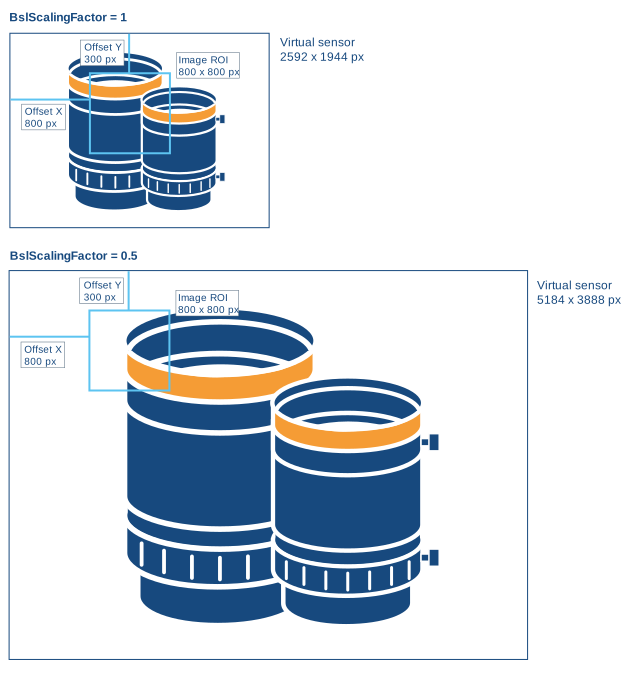
範例: 在以下範例中, BslScalingFactor 參數設為 0.5。虛擬感測器的大小減半,而 Image ROI 的大小和位置保持不變。
因此,影像內容會顯示為放大並向左上方偏移。
縮小#
若要縮小,請將 BslScalingFactor 參數設為 較高 小於 1.0 的值。
這會減少虛擬感測器的大小,而 Image ROI 的大小和位置保持不變。
資訊
虛擬感測器不能小於 Image ROI。
因此,您可能需要在縮小之前減小 Image ROI 的高度和寬度。
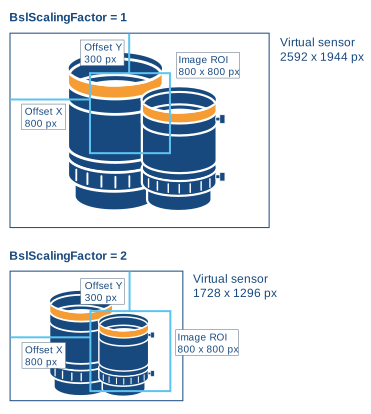
範例: 在以下範例中, BslScalingFactor parameter 設為 2.0。虛擬感光元件大小加倍,而 Image ROI 大小與位置保持不變。
因此,影像內容會顯得縮小並向右下方偏移。
範例程式碼#
// Set scaling to 0.5, i.e., set the size of the
// virtual sensor to 2x the size of the physical sensor
camera.BslScalingFactor.SetValue(0.5);
// Get the size of the virtual sensor
double scaledWidth = camera.BslScaledSensorWidth.GetValue();
double scaledHeight = camera.BslScaledSensorHeight.GetValue();
// Disable scaling
camera.BslScalingFactor.SetValue(1.0);
INodeMap& nodemap = camera.GetNodeMap();
// Set scaling to 0.5, i.e., set the size of the
// virtual sensor to 2x the size of the physical sensor
CFloatParameter(nodemap, "BslScalingFactor").SetValue(0.5);
// Get the size of the virtual sensor
double scaledWidth = CFloatParameter(nodemap, "BslScaledSensorWidth").GetValue();
double scaledHeight = CFloatParameter(nodemap, "BslScaledSensorHeight").GetValue();
// Disable scaling
CFloatParameter(nodemap, "BslScalingFactor").SetValue(1.0);
// Set scaling to 0.5, i.e., set the size of the
// virtual sensor to 2x the size of the physical sensor
camera.Parameters[PLCamera.BslScalingFactor].SetValue(0.5);
// Get the size of the virtual sensor
double scaledWidth = camera.Parameters[PLCamera.BslScaledSensorWidth].GetValue();
double scaledHeight = camera.Parameters[PLCamera.BslScaledSensorHeight].GetValue();
// Disable scaling
camera.Parameters[PLCamera.BslScalingFactor].SetValue(1.0);
/* Macro to check for errors */
#define CHECK(errc) if (GENAPI_E_OK != errc) printErrorAndExit(errc)
GENAPIC_RESULT errRes = GENAPI_E_OK;  /* Return value of pylon methods */
double scaledWidth = 0;
double scaledHeight = 0;
/* Set scaling to 0.5, i.e., set the size of the */
/* virtual sensor to 2x the size of the physical sensor */
errRes = PylonDeviceSetFloatFeature(hdev, "BslScalingFactor", 0.5);
CHECK(errRes);
/* Get the size of the virtual sensor */
errRes = PylonDeviceGetFloatFeature(hdev, "BslScaledSensorWidth", &scaledWidth);
CHECK(errRes);
errRes = PylonDeviceGetFloatFeature(hdev, "BslScaledSensorHeight", &scaledHeight);
CHECK(errRes);
/* Disable scaling */
errRes = PylonDeviceSetFloatFeature(hdev, "BslScalingFactor", 1.0);
CHECK(errRes);
# Set scaling to 0.5, i.e., set the size of the
# virtual sensor to 2x the size of the physical sensor
camera.BslScalingFactor.Value = 0.5
# Get the size of the virtual sensor
scaledWidth = camera.BslScaledSensorWidth.Value
scaledHeight = camera.BslScaledSensorHeight.Value
# Disable scaling
camera.BslScalingFactor.Value = 1.0
您也可以使用 pylon Viewer 輕鬆設定參數。