Serial Communication#
這表示相機在主機與另一個裝置之間充當中間 UART 裝置。
資訊
Serial Communication 功能僅適用於以下 Basler 相機型號:ace 2 R GigE PRO(僅限 1GigE)、ace 2 R USB PRO、dart M 以及 boost R 相機。
使用功能#
運作原理#
相機提供兩個獨立的序列埠 FIFOs:一個用於傳出 (Tx) 資料,另一個用於傳入 (Rx) 資料。為了與主機通訊,兩個 FIFO 使用共同的傳輸緩衝區。
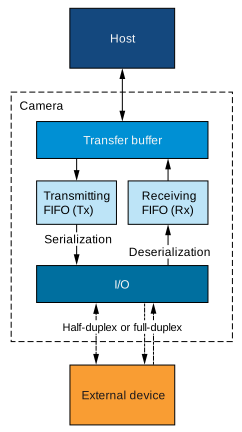
若要使用上述介面,您必須實作適當的通訊協定。該協定的實際實作取決於您的系統設定和裝置特性。
協助您實作協定的相機參數列於下方。
設定 Serial Communication#
若要在相機與外部裝置之間設定序列通訊:
- 將相機中的
BslSerialBaudRate參數設為外部裝置的鮑率,例如:Baud9600.
資訊
如果您使用光耦合 I/O 線路進行傳入 (Rx) 資料傳輸,請注意最大鮑率受限於 19200 Bd。如果您使用光耦合 I/O 線路,請相應地設定 BslSerialBaudRate 參數。
- 將相機中的
BslSerialNumberOfDataBits參數設為外部裝置使用的資料位元數,例如:Bits8. - 將相機中的
BslSerialNumberOfStopBits參數設為外部裝置使用的停止位元數,例如:Bits1. - 將相機中的
BslSerialParity參數設為外部裝置執行的同位檢查類型,例如:Even. - 設定相機的輸入訊號。若要這樣做,請將
BslSerialRxSource參數設為要接收序列資料的 I/O 線路,例如:Line2。該線路必須 設定為輸入. - 將相機中的
BslSerialTransmitMode參數設為HalfDuplex或FullDuplex中。BslSerialTransmitMode參數及其值說明於 傳輸參數 章節中的註腳。 - 設定相機的輸出訊號:
- 將相機中的
LineSelector參數設為要傳輸序列資料的 I/O 線路,例如:Line3。該線路必須 設定為輸出. - 將相機中的
LineSource參數設為SerialTx.
- 將相機中的
測試 Serial Communication#
若要在未將外部裝置連接至相機的情況下測試序列通訊,或排除由外部裝置引起的錯誤,請設定 BslSerialRxSource 參數設為 SerialTx.
這會建立迴路:序列輸入在內部連接至序列輸出,因此相機接收到的內容與其傳輸的內容完全相同。
資料傳輸與接收#
在您設定序列通訊之後,您可以傳送資料至外部裝置並從其接收資料。
資訊
如需詳細資訊,請參閱 pylon API Documentation 中的 ParametrizeCamera_SerialCommunication (C++) 程式碼範例。
傳輸與接收參數#
以下參數同時涉及資料的傳輸與接收:
BslSerialTransferBuffer:傳輸緩衝區 (transfer buffer) 儲存要傳輸的資料,亦包含接收到的資料。它最多可容納 16 個符號 (symbol)。一個符號由 7 或 8 個位元組成,取決於BslSerialNumberOfDataBits設定。在 GigE 相機上,必須以 DWORD(4 位元的倍數)存取傳輸緩衝區,即使傳輸長度不是 4 的倍數亦然。例如,如果您將BslSerialTransferLength參數設為 9,則每次交易必須從緩衝區讀取 12 個位元組。在 USB 與 CoaXPress 相機上,則無此限制。BslSerialTransferLength:在接收時,表示相機在最近一次交易期間接收到的符號數量。在傳輸時,指定相機每次交易應傳輸多少個符號。最大值為 16。
傳輸參數#
以下參數涉及資料傳輸:
BslSerialTransmitMode:此參數決定在從相機向外部裝置傳輸資料期間,相機的接收 FIFO (Rx) 是關閉還是開啟。如果共用單一 I/O 線路來傳輸和接收資料(半雙工),相機的接收 FIFO (Rx) 也會接收傳輸至外部裝置的資料。這會非常快速地填滿接收 FIFO (Rx)。
將相機中的BslSerialTransmitMode參數設為HalfDuplex以便在從相機向外部裝置傳輸資料期間關閉接收 FIFO (Rx)。透過這種方式,只有外部裝置傳輸的資料才會被複製到相機的接收 FIFO (Rx) 中。
如果您使用兩條獨立的 I/O 線路,您可以將BslSerialTransmitMode參數設為FullDuplex.BslSerialTransmit:執行此命令以透過序列輸出線路傳輸傳輸緩衝區的目前值。這也會更新BslSerialTxFifoEmpty進行明確的生命週期管理即呼叫BslSerialTxFifoOverflow參數。BslSerialTxFifoEmpty:表示傳輸 FIFO 是否為空,亦即相機是否準備好傳輸資料。BslSerialTxFifoOverflow:表示傳輸 FIFO 是否發生溢位 (overflow)。如果將新資料傳輸至傳輸 FIFO 的速度大於先前資料送出的速度(亦即如果您執行BslSerialTransmit命令的速度過快),就會發生溢位。溢位期間傳送的資料將不會寫入傳輸 FIFO。BslSerialTxBreak:向外部裝置發出序列中斷 (serial break) 信號。如果將此參數設為true,相機將序列輸出設為低位準 (space) 以發出中斷信號。如果將此參數設為false,相機將序列輸出重設為高位準 (mark)。
接收參數#
以下參數涉及資料接收:
BslSerialReceive:執行此命令以透過序列輸入線路接收資料。交易完成後,BslSerialTransferBuffer參數包含接收到的資料,而BslSerialTransferLength參數表示接收到的有效符號數量。此外,執行此命令也會更新BslSerialRxFifoOverflow,BslSerialRxParityError以及BslSerialRxStopBitError參數的狀態。請參閱下方說明。BslSerialRxFifoOverflow:表示接收 FIFO 是否發生溢位。如果來自外部裝置的新資料到達速度大於先前資料移至傳輸緩衝區並傳送至主機的速度(亦即如果您執行BslSerialReceive命令的速度過慢),就會發生溢位。溢位期間接收到的資料將會遺失。BslSerialRxParityError:表示相機是否在接收 FIFO 的資料中偵測到同位檢查錯誤 (parity error)。如果偵測到錯誤,參數將保持true直到您透過執行以下操作來清空接收 FIFO:BslSerialReceive指令。BslSerialRxStopBitError:指出相機是否已偵測到接收 FIFO 資料中有停止位元錯誤。如果偵測到錯誤,此參數將保持true直到您透過執行以下操作來清空接收 FIFO:BslSerialReceive指令。BslSerialRxBreak:指出外部裝置是否已發出序列中斷信號。如果序列輸入保持低電位(空白)至少 12 個位元週期,相機就會偵測到中斷並將此參數設為true。由於相機「不知道」中斷信號會持續多久,參數值將維持true。若要將其重設為false,請確保外部裝置已完成發送中斷,然後執行BslSerialRxBreakReset指令。BslSerialRxBreakReset:設定BslSerialRxBreak參數設為false。請參閱上方說明。
範例程式碼#
// Configure serial communication
// Example: 19200 Baud, 8 data bits, 2 stop bits, even parity
camera.BslSerialBaudRate.SetValue(BslSerialBaudRate_Baud19200);
camera.BslSerialNumberOfDataBits.SetValue(BslSerialNumberOfDataBits_Bits8);
camera.BslSerialNumberOfStopBits.SetValue(BslSerialNumberOfStopBits_Bits2);
camera.BslSerialParity.SetValue(BslSerialParity_Even);
// Configure the camera's input signal
camera.BslSerialRxSource.SetValue(BslSerialRxSource_Line2);
// Configure the camera's output signal
camera.LineSelector.SetValue(LineSelector_Line3);
camera.LineSource.SetValue(LineSource_SerialTx);
// Now, you must implement a suitable communication protocol.
// Camera parameters that help you implement the protocol are listed
// in the "Transmitting and Receiving Data" section above.
INodeMap& nodemap = camera.GetNodeMap();
// Configure serial communication
// Example: 19200 Baud, 8 data bits, 2 stop bits, even parity
CEnumParameter(nodemap, "BslSerialBaudRate").SetValue("Baud19200");
CEnumParameter(nodemap, "BslSerialNumberOfDataBits").SetValue("Bits8");
CEnumParameter(nodemap, "BslSerialNumberOfStopBits").SetValue("Bits2");
CEnumParameter(nodemap, "BslSerialParity").SetValue("Even");
// Configure the camera's input signal
CEnumParameter(nodemap, "BslSerialRxSource").SetValue("Line2");
// Configure the camera's output signal
CEnumParameter(nodemap, "LineSelector").SetValue("Line3");
CEnumParameter(nodemap, "LineSource").SetValue("SerialTx");
// Now, you must implement a suitable communication protocol.
// Camera parameters that help you implement the protocol are listed
// in the "Transmitting and Receiving Data" section above.
// Configure serial communication
// Example: 19200 Baud, 8 data bits, 2 stop bits, even parity
camera.Parameters[PLCamera.BslSerialBaudRate].SetValue(PLCamera.BslSerialBaudRate.Baud19200);
camera.Parameters[PLCamera.BslSerialNumberOfDataBits].SetValue(PLCamera.BslSerialNumberOfDataBits.Bits8);
camera.Parameters[PLCamera.BslSerialNumberOfStopBits].SetValue(PLCamera.BslSerialNumberOfStopBits.Bits2);
camera.Parameters[PLCamera.BslSerialParity].SetValue(PLCamera.BslSerialParity.Even);
// Configure the camera's input signal
camera.Parameters[PLCamera.BslSerialRxSource].SetValue(PLCamera.BslSerialRxSource.Line2);
// Configure the camera's output signal
camera.Parameters[PLCamera.LineSelector].SetValue(PLCamera.LineSelector.Line3);
camera.Parameters[PLCamera.LineSource].SetValue(PLCamera.LineSource.SerialTx);
// Now, you must implement a suitable communication protocol.
// Camera parameters that help you implement the protocol are listed
// in the "Transmitting and Receiving Data" section above.
/* Macro to check for errors */
#define CHECK(errc) if (GENAPI_E_OK != errc) printErrorAndExit(errc)
GENAPIC_RESULT errRes = GENAPI_E_OK;  /* Return value of pylon methods */
/* Configure serial communication */
/* Example: 19200 Baud, 8 data bits, 2 stop bits, even parity */
errRes = PylonDeviceFeatureFromString(hdev, "BslSerialBaudRate", "Baud19200");
CHECK(errRes);
errRes = PylonDeviceFeatureFromString(hdev, "BslSerialNumberOfDataBits", "Bits8");
CHECK(errRes);
errRes = PylonDeviceFeatureFromString(hdev, "BslSerialNumberOfStopBits", "Bits2");
CHECK(errRes);
errRes = PylonDeviceFeatureFromString(hdev, "BslSerialParity", "Even");
CHECK(errRes);
/* Configure the camera's input signal */
errRes = PylonDeviceFeatureFromString(hdev, "BslSerialRxSource", "Line2");
CHECK(errRes);
/* Configure the camera's output signal */
errRes = PylonDeviceFeatureFromString(hdev, "LineSelector", "Line3");
CHECK(errRes);
errRes = PylonDeviceFeatureFromString(hdev, "LineSource", "SerialTx");
CHECK(errRes);
/* Now, you must implement a suitable communication protocol. */
/* Camera parameters that help you implement the protocol are listed */
/* in the "Transmitting and Receiving Data" section above. */
# Configure serial communication
# Example: 19200 Baud, 8 data bits, 2 stop bits, even parity
camera.BslSerialBaudRate.Value = "Baud19200"
camera.BslSerialNumberOfDataBits.Value = "Bits8"
camera.BslSerialNumberOfStopBits.Value = "Bits2"
camera.BslSerialParity.Value = "Even"
# Configure the camera's input signal
camera.BslSerialRxSource.Value = "Line2"
# Configure the camera's output signal
camera.LineSelector.Value = "Line3"
camera.LineSource.Value = "SerialTx"
# Now, you must implement a suitable communication protocol.
# Camera parameters that help you implement the protocol are listed
# in the "Transmitting and Receiving Data" section above.
您也可以 use the pylon Viewer 來輕鬆設定參數。