TDI (Time Delay Integration)#
TDI 可提高光敏度並產生具有更廣動態範圍的更亮影像,這使其非常適合在微光條件下使用。
資訊
此功能僅適用於 Basler racer 2 XL 和 racer 2 L mono 相機。
使用功能#
此功能的實作方式會因相機而異:
racer 2 XL 相機#
racer 2 XL 相機配備了 TDI 感光元件。TDI 感光元件由多行像素(稱為級 (stages))組成,這些像素排列成一個陣列 (array)。
當物體穿過感光元件的視野時,其影像會從第一級的曝光區域投影到最後一級的曝光區域。各級不是逐級進行單獨曝光,而是作為整個區塊進行曝光。因此,感光元件會在每個級對同一個物體進行曝光,並累積和傳輸電荷,直到它們到達讀出線。
以下圖解顯示了具有四級的感光元件內的電荷傳輸。
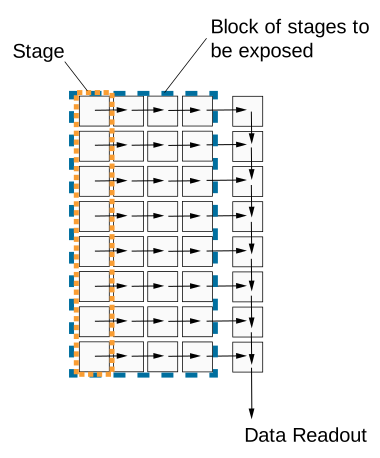
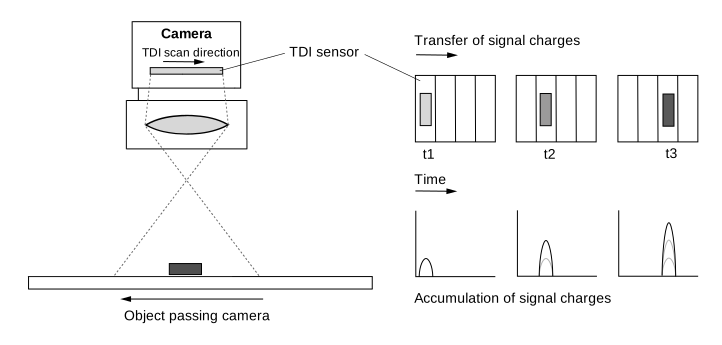
從一級到下一級的電荷傳輸必須與物體的移動保持精確同步。這確保了持續曝光和電荷整合。物體曝光的時間長短取決於它在相機視野中的停留時間。使用的級數越多,有效的 Exposure Time 和整合時間就越長。
以下圖解顯示了 TDI 感光元件的視野及其電荷轉移原理:
級數#
級數決定了電荷累積並從一級轉移到下一級直到到達最後一級的頻率。級數越高,影像靈敏度越高。例如,如果級數為 256,相機擷取影像的靈敏度將提高 256 倍。級數也會影響產生的 Exposure Time。
可以將感光元件設定為使用不同的級數,例如 4 級或最多 256 級。可用的級數取決於所使用的感光元件。
若要設定級數,請將 BslTDINumberOfStages 參數值設為,例如, Stages4 或 Stages256.
資訊
在 Area sensor acquisition mode 中,級數決定了影像高度。例如,如果將級數設為 128,r2T16416-500cm 相機將在 Area sensor acquisition mode 中擷取 16416 x 128 的「區域 (area)」影像。
掃描方向#
TDI 感光元件的掃描方向必須與經過相機的物體移動方向保持同步。掃描方向必須與物體移動的方向相同,以確保持續曝光和電荷整合。
資訊
關於如何設定掃描方向的說明假設您在相機上使用了鏡頭。鏡頭會使影像反轉。
若要設定掃描方向,請設定 BslTDIScanDirection 參數設定為以下值之一:
Forward:通過感光元件視野的物體將在 正向 掃描方向中進行掃描。它會先通過相機的底部,然後通過頂部。Reverse:通過感光元件視野的物體將在 reverse 掃描方向中進行掃描。它會先通過相機的頂部,然後通過底部。
最終 Exposure Time#
在 TDI 中 感測器擷取模式,Exposure Time 並非透過 ExposureTime 參數來設定。相反地,它是由以下兩個採集參數所決定:
- Number of stages:定義當電荷累積與位移時,物件在感測器視野中停留的時間。
- Line rate:定義電荷從一個階段移至下一個階段的速度。它也決定了每個獨立階段的積分時間。
這兩個參數共同決定了總 Exposure Time:
$$ \text{Exposure time} = \frac{\text{Number of stages}}{\text{Line rate}} $$
下表顯示在 500 kHz 的固定 Line Rate 以及不同級數下的範例 Exposure Time:
| Number of Stages | Line Rate [kHz] | Exposure Time [µs] |
|---|---|---|
| 4 | 500 | 8 |
| 64 | 500 | 128 |
| 128 | 500 | 256 |
| 256 | 500 | 512 |
下表顯示在固定 128 級以及高達 500 kHz 的不同 Line Rate 下的範例 Exposure Time:
| Line Rate [kHz] | Number of Stages | Exposure Time [µs] |
|---|---|---|
| 100 | 128 | 1280 |
| 200 | 128 | 640 |
| 400 | 128 | 320 |
| 500 | 128 | 256 |
由於 Number of Stages 與 Line Rate 皆會影響 Exposure Time,因此它們也會影響影像亮度,前提是觸發已與物件移動正確同步,且符合像素飽和度限制:
- 較高的級數會增加 Exposure Time,因此會導致更多的累積電荷。影像會顯得更亮。
- 較低的級數會減少 Exposure Time,因此會導致較少的累積電荷。影像會顯得更暗。
- 較高的 Line Rate 會減少每個階段的 Exposure Time,因此會導致較少的累積電荷。影像會顯得更暗。
- 較低的 Line Rate 會增加每個階段的 Exposure Time,因此會導致更多的累積電荷。影像會顯得更亮。
為 TDI 配置 racer 2 XL 相機#
若要將 racer 2 XL 相機設定為 TDI 模式:
- 將相機中的
BslSensorAcquisitionMode參數設為TDISingleLine。此感測器使用一條讀出線。 - 根據您的系統設置,將
BslTDIScanDirection參數設定為(例如)Forward. - 將相機中的
BslTDINumberOfStages參數設定為(例如)128。
資訊
- 確保感測器的讀出程序與物件移動的速度和方向完全同步。出於測試目的,請相應地變更 Acquisition Line Rate。這也會影響產生的 Exposure Time。
- 在觸發暫停後重新觸發時,至少必須將前 n 個讀出線視為無效,其中 n 代表最小級數。
racer 2 L Mono 相機#
racer 2 L mono cameras 配備多行感測器,即雙行或四行感測器。感測器的每個像素行都可以設定為使用不同的 Exposure Time 進行曝光。每當觸發採集時,感測器的所有像素行都會同時曝光。對於單次曝光,感測器中的每一行都會擷取物件上的不同區域,因為每一行在通過相機的任何物件上都有不同的視野。
以下圖解顯示單四線感光元件的視野。
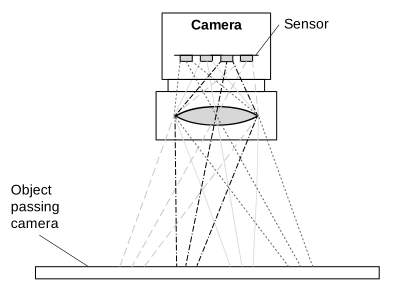
在這種情況下,必須對來自四個不同擷取的資料進行緩衝並組合,以取得物件上特定區域的完整資訊。這可透過 Spatial Correction 來完成。目前曝光的最後一行資料會與先前曝光所取得之前幾行資料進行組合。
使用 Line Combination Mode,您最終可以指定組合各行像素值的方式,以取得 HDR 影像。
行組合模式#
線條組合模式可讓您定義是要將組合感光元件線條的像素值相加還是取平均值。您可以設定 BslLineCombinationMode 參數設定為以下值之一:
Off:Line combination 已停用。TDISum:將組合感光元件線條的像素值相加。這會增加相機對光的響應以及訊噪比。TDIAverage:將組合感光元件線條的像素值取平均值。這會增加訊噪比,同時不影響相機對光的響應。
為 TDI 配置 racer 2 L Mono 相機#
若要將 racer 2 L 單色相機設定為 TDI:
- 將相機中的 感測器擷取模式 設為雙線或四線影像擷取:
將相機中的BslSensorAcquisitionMode參數設為DualLine或QuadLine具體取決於您是要將兩行還是四行用於 TDI。 -
指定每一行(階段)的 Exposure Time:
- 將相機中的
ExposureTimeMode參數設為Individual. - 將相機中的
ExposureTimeSelector參數設為Stage1. - 將相機中的
ExposureTime參數設為所需的微秒 Exposure Time。
注意: 您可以在以下位置找到相機型號的最小和最大 Exposure Time 值: 詳細資料 一節中所解釋的 Exposure Time 主題。 - 對其他階段重複步驟 b 和 c。
- 將相機中的
-
指定 spatial correction stride 以決定 Spatial Correction 的起始行和方向:
將相機中的BslSpatialCorrectionStride參數設為例如 2。 - 將相機中的 line combination mode 以確定合併線的感測器像素值是進行求和還是求平均:
將相機中的BslLineCombinationMode參數設定為(例如)TDIAverage.
使用外部後處理程式來組合線條資訊,以產生 High Dynamic Range 影像。
範例程式碼#
racer 2 XL 相機#
// Set the sensor acquisition mode to TDI Single Line
camera.BslSensorAcquisitionMode.SetValue(BslSensorAcquisitionMode_TDISingleLine);
// Set the sensor scan direction to Forward
camera.BslTDIScanDirection.SetValue(BslTDIScanDirection_Forward);
// Set the number of stages to 128
camera.BslTDINumberOfStages.SetValue(BslTDINumberOfStages_128);
INodeMap& nodemap = camera.GetNodeMap();
// Set the sensor acquisition mode to TDI Single Line
CEnumParameter(nodemap, "BslSensorAcquisitionMode").SetValue("TDISingleLine");
// Set the sensor scan direction to Forward
CEnumParameter(nodemap, "BslTDIScanDirection").SetValue("Forward");
// Set the number of stages to 128
CEnumParameter(nodemap, "BslTDINumberOfStages").SetValue("");
// Set the sensor acquisition mode to TDI Single Line
camera.Parameters[PLCamera.BslSensorAcquisitionMode].SetValue(PLCamera.BslSensorAcquisitionMode.TDISingleLine);
// Set the sensor scan direction to Forward
camera.Parameters[PLCamera.BslTDIScanDirection].SetValue(PLCamera.BslTDIScanDirection.Forward);
// Set the number of stages to 128
camera.Parameters[PLCamera.BslTDINumberOfStages].SetValue(PLCamera.BslTDINumberOfStages.);
/* Macro to check for errors */
#define CHECK(errc) if (GENAPI_E_OK != errc) printErrorAndExit(errc)
GENAPIC_RESULT errRes = GENAPI_E_OK;  /* Return value of pylon methods */
/* Set the sensor acquisition mode to TDI Single Line */
errRes = PylonDeviceFeatureFromString(hdev, "BslSensorAcquisitionMode", "TDISingleLine");
CHECK(errRes);
/* Set the sensor scan direction to Forward */
errRes = PylonDeviceFeatureFromString(hdev, "BslTDIScanDirection", "Forward");
CHECK(errRes);
/* Set the number of stages to 128 */
errRes = PylonDeviceFeatureFromString(hdev, "BslTDINumberOfStages", "");
CHECK(errRes);
racer 2 L Mono 相機#
// Set the sensor acquisition mode to Dual Line
camera.BslSensorAcquisitionMode.SetValue(BslSensorAcquisitionMode_DualLine);
// Set the exposure time for both lines (stages)
// Select stage 1
camera.ExposureTimeSelector.SetValue(ExposureTimeSelector_Stage1);
// Set the exposure time to 1000 microseconds
camera.ExposureTime.SetValue(1000.0);
// Select stage 2
camera.ExposureTimeSelector.SetValue(ExposureTimeSelector_Stage2);
// Set the exposure time to 1000000 microseconds
camera.ExposureTime.SetValue(1000000.0);
// Set the spatial correction stride to 2
camera.BslSpatialCorrectionStride.SetValue(BslSpatialCorrectionStride_2);
// Set the line combination mode to TDI Sum
camera.BslLineCombinationMode.SetValue(BslLineCombinationMode_TDISum);
INodeMap& nodemap = camera.GetNodeMap();
// Set the sensor acquisition mode to Dual Line
CEnumParameter(nodemap, "BslSensorAcquisitionMode").SetValue("DualLine");
// Set the exposure time for both lines (stages)
// Select stage 1
CEnumParameter(nodemap, "ExposureTimeSelector").SetValue("Stage1");
// Set the exposure time to 1000 microseconds
CFloatParameter(nodemap, "ExposureTime").SetValue(1000.0);
// Select stage 2
CEnumParameter(nodemap, "ExposureTimeSelector").SetValue("Stage2");
// Set the exposure time to 1000000 microseconds
CFloatParameter(nodemap, "ExposureTime").SetValue(1000000.0);
// Set the spatial correction stride to 2
CEnumParameter(nodemap, "BslSpatialCorrectionStride").SetValue("");
// Set the line combination mode to TDI Sum
CEnumParameter(nodemap, "BslLineCombinationMode").SetValue("TDISum");
// Set the sensor acquisition mode to Dual Line
camera.Parameters[PLCamera.BslSensorAcquisitionMode].SetValue(PLCamera.BslSensorAcquisitionMode.DualLine);
// Set the exposure time for both lines (stages)
// Select stage 1
camera.Parameters[PLCamera.ExposureTimeSelector].SetValue(PLCamera.ExposureTimeSelector.Stage1);
// Set the exposure time to 1000 microseconds
camera.Parameters[PLCamera.ExposureTime].SetValue(1000.0);
// Select stage 2
camera.Parameters[PLCamera.ExposureTimeSelector].SetValue(PLCamera.ExposureTimeSelector.Stage2);
// Set the exposure time to 1000000 microseconds
camera.Parameters[PLCamera.ExposureTime].SetValue(1000000.0);
// Set the spatial correction stride to 2
camera.Parameters[PLCamera.BslSpatialCorrectionStride].SetValue(PLCamera.BslSpatialCorrectionStride.);
// Set the line combination mode to TDI Sum
camera.Parameters[PLCamera.BslLineCombinationMode].SetValue(PLCamera.BslLineCombinationMode.TDISum);
/* Macro to check for errors */
#define CHECK(errc) if (GENAPI_E_OK != errc) printErrorAndExit(errc)
GENAPIC_RESULT errRes = GENAPI_E_OK;  /* Return value of pylon methods */
/* Set the sensor acquisition mode to Dual Line */
errRes = PylonDeviceFeatureFromString(hdev, "BslSensorAcquisitionMode", "DualLine");
CHECK(errRes);
/* Set the exposure time for both lines (stages) */
/* Select stage 1 */
errRes = PylonDeviceFeatureFromString(hdev, "ExposureTimeSelector", "Stage1");
CHECK(errRes);
/* Set the exposure time to 1000 microseconds */
errRes = PylonDeviceSetFloatFeature(hdev, "ExposureTime", 1000.0);
CHECK(errRes);
/* Select stage 2 */
errRes = PylonDeviceFeatureFromString(hdev, "ExposureTimeSelector", "Stage2");
CHECK(errRes);
/* Set the exposure time to 1000000 microseconds */
errRes = PylonDeviceSetFloatFeature(hdev, "ExposureTime", 1000000.0);
CHECK(errRes);
/* Set the spatial correction stride to 2 */
errRes = PylonDeviceFeatureFromString(hdev, "BslSpatialCorrectionStride", "");
CHECK(errRes);
/* Set the line combination mode to TDI Sum */
errRes = PylonDeviceFeatureFromString(hdev, "BslLineCombinationMode", "TDISum");
CHECK(errRes);
# Set the sensor acquisition mode to Dual Line
camera.BslSensorAcquisitionMode.Value = "DualLine"
# Set the exposure time for both lines (stages)
# Select stage 1
camera.ExposureTimeSelector.Value = "Stage1"
# Set the exposure time to 1000 microseconds
camera.ExposureTime.Value = 1000.0
# Select stage 2
camera.ExposureTimeSelector.Value = "Stage2"
# Set the exposure time to 1000000 microseconds
camera.ExposureTime.Value = 1000000.0
# Set the spatial correction stride to 2
camera.BslSpatialCorrectionStride.Value = ""
# Set the line combination mode to TDI Sum
camera.BslLineCombinationMode.Value = "TDISum"
您也可以 use the pylon Viewer 來輕鬆設定參數。