Transfer Bit Depth#
降低 Transfer Bit Depth 可以提高相機的 frame rate。增加 Transfer Bit Depth 可以提升影像 Quality。
使用功能#
為什麼使用 Transfer Bit Depth#
Transfer Bit Depth 允許您變更內部影像處理期間所傳輸資料的位元深度。如果由於感測器的特定特性而不建議變更 Sensor Bit Depth,這時此功能就非常有用。
重要
如果您的相機提供 Transfer Bit Depth 功能,請務必使用此功能,而不是 Sensor Bit Depth 功能。 只有在對結果不滿意時,才變更 Sensor Bit Depth。
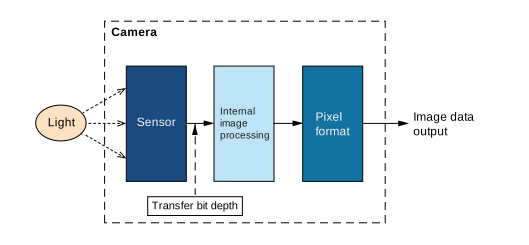
設定 Transfer Bit Depth 時,適用以下準則:
- 為了獲得最佳 image quality,請將 Transfer Bit Depth 設定為 high 值。
較高的 Transfer Bit Depth 可以改善影像 Quality,因為相機的內部影像計算是基於較高的位元深度。 - 為了獲得最佳 效能,請將 Transfer Bit Depth 設定為 low 值。
較低的 Sensor Bit Depth 可以改善效能,因為需要傳輸的資料量減少了。
使用情境#
對於某些相機,當使用 8 位元 Pixel Format 時,Sensor Bit Depth 會自動設定為 10 位元。這取決於所使用的感測器,是由於感測器的特定特性所致。不建議針對這些感測器將 Sensor Bit Depth 變更為較低的值(例如為了提高相機的影格速率),因為這會影響某些其他感測器特性。
這正是 Transfer Bit Depth 派上用場的地方。您可以獨立於所使用的 Sensor Bit Depth 來設定數值,例如享受更高的影格速率。
Transfer Bit Depth 模式#
Transfer Bit Depth 模式允許您定義是否可以獨立於所使用的 Pixel Format 來設定 Transfer Bit Depth。您可以將 BslTransferBitDepthMode 參數設定為以下值之一:
Auto:Transfer Bit Depth 會根據所使用的 像素格式 自動調整。這是預設設定。例如,如果您將 Pixel Format 設定為 Bayer 12,Transfer Bit Depth 會自動設定為 12 位元。Manual:可以獨立於所使用的 Pixel Format 來設定 Transfer Bit Depth。例如,您可以將相機設定為根據用於內部影像處理的 10 位元資料輸出 8 位元影像資料(Pixel Format = Mono 8,Transfer Bit Depth = 10 位元)。
設定 Transfer Bit Depth#
- 將相機中的
BslTransferBitDepthMode參數設為Manual. - 將相機中的
BslTransferBitDepth參數設定為所需的數值。
例如,將參數設定為Bpp12會設定 12 bpp(每像素位元數)的位元深度。
範例程式碼#
// Set the pixel format to Mono 8
camera.PixelFormat.SetValue(PixelFormat_Mono8);
// Set the transfer bit depth mode to Manual
camera.BslTransferBitDepthMode.SetValue(BslTransferBitDepthMode_Manual);
// Set the transfer bit depth to 10 bit
camera.BslTransferBitDepth.SetValue(BslTransferBitDepth_Bpp10);
INodeMap& nodemap = camera.GetNodeMap();
// Set the pixel format to Mono 8
CEnumParameter(nodemap, "PixelFormat").SetValue("Mono8");
// Set the transfer bit depth mode to Manual
CEnumParameter(nodemap, "BslTransferBitDepthMode").SetValue("Manual");
// Set the transfer bit depth to 10 bit
CEnumParameter(nodemap, "BslTransferBitDepth").SetValue("Bpp10");
// Set the pixel format to Mono 8
camera.Parameters[PLCamera.PixelFormat].SetValue(PLCamera.PixelFormat.Mono8);
// Set the transfer bit depth mode to Manual
camera.Parameters[PLCamera.BslTransferBitDepthMode].SetValue(PLCamera.BslTransferBitDepthMode.Manual);
// Set the transfer bit depth to 10 bit
camera.Parameters[PLCamera.BslTransferBitDepth].SetValue(PLCamera.BslTransferBitDepth.Bpp10);
/* Macro to check for errors */
#define CHECK(errc) if (GENAPI_E_OK != errc) printErrorAndExit(errc)
GENAPIC_RESULT errRes = GENAPI_E_OK;  /* Return value of pylon methods */
/* Set the pixel format to Mono 8 */
errRes = PylonDeviceFeatureFromString(hdev, "PixelFormat", "Mono8");
CHECK(errRes);
/* Set the transfer bit depth mode to Manual */
errRes = PylonDeviceFeatureFromString(hdev, "BslTransferBitDepthMode", "Manual");
CHECK(errRes);
/* Set the transfer bit depth to 10 bit */
errRes = PylonDeviceFeatureFromString(hdev, "BslTransferBitDepth", "Bpp10");
CHECK(errRes);
您也可以 use the pylon Viewer 來輕鬆設定參數。