Two-Wire Interface#
例如,您可以使用相機來控制支援 TWI 的鏡頭對焦。
使用此功能#
運作原理#
TWI 總線是一個雙線總線,由一條序列資料線 (SDA) 和一條序列時脈線 (SCL) 組成。這些是雙向線。
相機(主機)與外部裝置(從機)同時連接至資料線和時脈線。資料透過資料線由相機發送或請求並擷取。時脈線用於發送時脈訊號,並由相機控制。
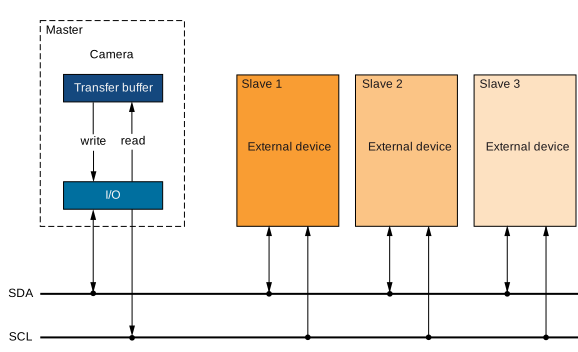
若要使用上述的 TWI 介面,相機的 GenICam 引數必須符合從機裝置的規格。
有助於實作適當通訊協定的相機引數列於下方。
設定 TWI 通訊#
若要設定相機與外部裝置之間的 TWI 通訊:
- 將
BslTwiBitrate引數設為您要用於 TWI 的位元速率,例如 50 kbps。 - 設定相機的輸入-輸出訊號。
- 將
LineSelector引數設為應用於寫入和讀取序列資料的 I/O 線,例如Line2。該線必須設定為 輸入-輸出線. - 將
BslLineConnection參數設為TwiSda. - 將
LineSelector引數設為應用於發送時脈訊號的 I/O 線,例如Line3。該線必須設定為輸入-輸出線。 - 將
BslLineConnection參數設為TwiScl.
- 將
寫入和讀取資料#
在您設定 TWI 通訊之後,您可以向外部裝置寫入資料並從中讀取資料。
寫入和讀取引數#
寫入和讀取資料涉及以下引數:
BslTwiTransferBuffer:傳輸緩衝區儲存要寫入的資料,也包含已讀取的資料。它最多可儲存 16 個位元組。BslTwiTransferLength:指出應從傳輸緩衝區傳輸或傳輸至傳輸緩衝區的位元組數。寫入時,傳輸長度指定相機在每個交易中應傳輸的位元組數。讀取時,它指定相機在上一個交易期間接收到的位元組數。最大值為 16。BslTwiTargetAddress: 表示外部從屬裝置的 7 位元目標位址。
寫入資料涉及以下 Property:
BslTwiWrite: 執行此命令,將傳輸長度指定的位元組數從傳輸緩衝區寫入從屬裝置的目標位址。
讀取資料涉及以下 Property:
BslTwiRead: 執行此命令以從從屬裝置的目標位址讀取或擷取資料。讀取的位元組數由傳輸長度指定。
傳輸狀態#
傳輸狀態表示資料傳輸的目前狀態。當傳輸成功完成時,傳輸狀態表示 Success。若要擷取目前的傳輸狀態,請透過執行 BslTwiUpdateTransferStatus 命令來更新傳輸狀態,然後取得 BslTwiTransferStatus.
的值。如果 BslTwiTransferStatus 為 Pending的值為 Success,您必須重複更新並讀取傳輸狀態,直到傳輸狀態顯示 Success.
。唯有當傳輸狀態顯示
Success時,才可以寫入或讀取新資料。Pending: 資料傳輸擱置中。NAKAddress: 相機在最近一次寫入或讀取命令之後,未收到確認目標位址的確認位元 (acknowledge bit)。在此情況下,資料傳輸失敗。NAKData: 相機在最近一次寫入命令之後,未收到資料傳輸成功的確認位元。在此情況下,資料傳輸失敗。
將 I/O 線拉低#
某些 TWI 從屬裝置要求在開始運作之前將 I/O 線拉低 (pull low)。如果您需要將 I/O 線拉低,請將 BslTwiPullSdaLow Property、 BslTwiPullSclLow Property 或兩者皆設定為 true。當其中一者為 true時,將會停用資料傳輸。
範例程式碼#
// Configure TWI communication
// Set the bit rate to 50 kbps
camera.BslTwiBitrate.SetValue(BslTwiBitrate_Bitrate50kbps);
// Set line 2 to input-output and use it for TWI SDA
camera.LineSelector.SetValue(LineSelector_Line2);
camera.LineMode.SetValue(LineMode_InOut);
camera.BslLineConnection.SetValue(BslLineConnection_TwiSda);
// Set line 3 to input-output and use it for TWI SCL
camera.LineSelector.SetValue(LineSelector_Line3);
camera.LineMode.SetValue(LineMode_InOut);
camera.BslLineConnection.SetValue(BslLineConnection_TwiScl);
// Now, you must implement a suitable communication protocol.
// Camera parameters that help you implement the protocol are listed
// in the "Writing and Reading and Data" section above.
INodeMap& nodemap = camera.GetNodeMap();
// Configure TWI communication
// Set the bit rate to 50 kbps
CEnumParameter(nodemap, "BslTwiBitrate").SetValue("Bitrate50kbps");
// Set line 2 to input-output and use it for TWI SDA
CEnumParameter(nodemap, "LineSelector").SetValue("Line2");
CEnumParameter(nodemap, "LineMode").SetValue("InOut");
CEnumParameter(nodemap, "BslLineConnection").SetValue("TwiSda");
// Set line 3 to input-output and use it for TWI SCL
CEnumParameter(nodemap, "LineSelector").SetValue("Line3");
CEnumParameter(nodemap, "LineMode").SetValue("InOut");
CEnumParameter(nodemap, "BslLineConnection").SetValue("TwiScl");
// Now, you must implement a suitable communication protocol.
// Camera parameters that help you implement the protocol are listed
// in the "Writing and Reading and Data" section above.
// Configure TWI communication
// Set the bit rate to 50 kbps
camera.Parameters[PLCamera.BslTwiBitrate].SetValue(PLCamera.BslTwiBitrate.Bitrate50kbps);
// Set line 2 to input-output and use it for TWI SDA
camera.Parameters[PLCamera.LineSelector].SetValue(PLCamera.LineSelector.Line2);
camera.Parameters[PLCamera.LineMode].SetValue(PLCamera.LineMode.InOut);
camera.Parameters[PLCamera.BslLineConnection].SetValue(PLCamera.BslLineConnection.TwiSda);
// Set line 3 to input-output and use it for TWI SCL
camera.Parameters[PLCamera.LineSelector].SetValue(PLCamera.LineSelector.Line3);
camera.Parameters[PLCamera.LineMode].SetValue(PLCamera.LineMode.InOut);
camera.Parameters[PLCamera.BslLineConnection].SetValue(PLCamera.BslLineConnection.TwiScl);
// Now, you must implement a suitable communication protocol.
// Camera parameters that help you implement the protocol are listed
// in the "Writing and Reading and Data" section above.
/* Macro to check for errors */
#define CHECK(errc) if (GENAPI_E_OK != errc) printErrorAndExit(errc)
GENAPIC_RESULT errRes = GENAPI_E_OK;  /* Return value of pylon methods */
/* Configure TWI communication */
/* Set the bit rate to 50 kbps */
errRes = PylonDeviceFeatureFromString(hdev, "BslTwiBitrate", "Bitrate50kbps");
CHECK(errRes);
/* Set line 2 to input-output and use it for TWI SDA */
errRes = PylonDeviceFeatureFromString(hdev, "LineSelector", "Line2");
CHECK(errRes);
errRes = PylonDeviceFeatureFromString(hdev, "LineMode", "InOut");
CHECK(errRes);
errRes = PylonDeviceFeatureFromString(hdev, "BslLineConnection", "TwiSda");
CHECK(errRes);
/* Set line 3 to input-output and use it for TWI SCL */
errRes = PylonDeviceFeatureFromString(hdev, "LineSelector", "Line3");
CHECK(errRes);
errRes = PylonDeviceFeatureFromString(hdev, "LineMode", "InOut");
CHECK(errRes);
errRes = PylonDeviceFeatureFromString(hdev, "BslLineConnection", "TwiScl");
CHECK(errRes);
/* Now, you must implement a suitable communication protocol. */
/* Camera parameters that help you implement the protocol are listed */
/* in the "Writing and Reading and Data" section above. */
# Configure TWI communication
# Set the bit rate to 50 kbps
camera.BslTwiBitrate.Value = "Bitrate50kbps"
# Set line 2 to input-output and use it for TWI SDA
camera.LineSelector.Value = "Line2"
camera.LineMode.Value = "InOut"
camera.BslLineConnection.Value = "TwiSda"
# Set line 3 to input-output and use it for TWI SCL
camera.LineSelector.Value = "Line3"
camera.LineMode.Value = "InOut"
camera.BslLineConnection.Value = "TwiScl"
# Now, you must implement a suitable communication protocol.
# Camera parameters that help you implement the protocol are listed
# in the "Writing and Reading and Data" section above.
您也可以使用 pylon Viewer 來輕鬆設定參數。