周邊裝置控制#
Peripheral Devices Control 中包含的功能是以 SLP 通訊協定為基礎,該協定可讓相機與燈光或光學裝置直接互相通訊。
Peripheral Devices Control 部分包含下列 camera features 及其參數:
- Peripheral Devices Control 主題:
部分參數在不同類型的周邊裝置之間共用,因此會在目前的主題中進行說明,包含組態步驟。 - Light Control 主題:
專門用於搭配 Basler ace 2、boost R 與 dart M 相機運作之燈光裝置的參數。
如需關於 Basler ace U 與 ace L 相機,以及未具備 Peripheral Devices Control 功能之 ace 2、boost R 與 dart M 相機之 Light Control 功能的資訊,請參閱 Light Control (ace U/L) 主題。 - Optic Control:專門用於光學裝置(例如鏡頭)的參數。
下列資訊適用於所有周邊裝置:
- Device Type:所選周邊裝置的類型。
- Model Name:裝置的產品名稱與型號指定。
- Firmware Version:目前安裝在裝置上的韌體版本。
- Error Status:周邊裝置目前的錯誤狀態,包含任何作用中的故障狀況。
這些欄位中顯示的值取決於目前所選的周邊裝置。當您選擇不同的周邊裝置時,顯示的資訊會相應更新,以顯示該裝置專屬的值。
如需關於其餘參數的資訊,請參閱 Using the Peripheral Devices Control Parameters。
特定裝置類型專屬的參數可在對應的功能主題(Light Control 或 Optic Control)中取得並進行說明。
資訊
如需關於參數名稱變更與舊版韌體移轉的資訊,請參閱 Compatibility and Parameter Mapping 主題中的表格。該主題提供舊版至新版參數對應的概觀。
下列章節說明適用於燈光裝置與光學裝置的功能。
使用此功能#
準備周邊裝置#
若要準備您的周邊裝置:
- 如果您尚未這麼做,請連接周邊裝置(例如燈光、鏡頭)以及控制器(如有需要)。
- 開啟電源。
-
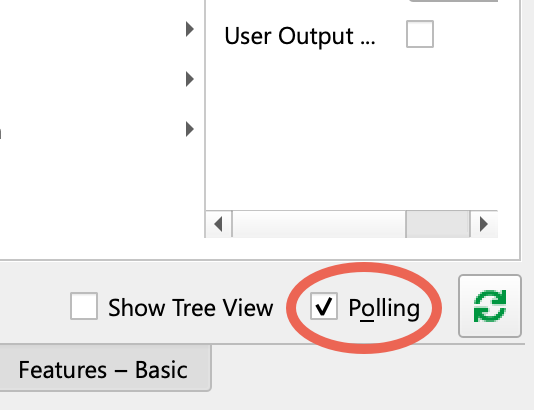
使用 pylon Viewer 時,請確保已選取 Features 窗格中的 Polling 選項:
-
請確保相機處於閒置狀態,也就是未擷取影像。
- 將
BslPeripheralControlMode參數設為On.
這會透過 GPIO line 並將 Line 3 設定為PeripheralControl. - 執行
BslLightControlEnumerateDevices命令。
這會指派一個 light device ID 給新裝置並啟用對所連接燈光裝置的存取。 - 如果
BslPeripheralErrorSummary顯示錯誤,請透過設定來檢查所有連接的裝置(燈光與鏡頭)BslPeripheralDeviceSelector,以及您想要檢查的周邊裝置。
影像BslPeripheralDeviceErrorStatus參數會向您顯示所選裝置的狀態。 - 您只需要進行設定
BslPeripheralDeviceTriggerSource和BslPeripheralDeviceTriggerActivation如果您想將連接的燈光用於頻閃。
對於大多數應用,預設值FlashWindows中,以了解BslPeripheralDeviceTriggerSource是一個很好的選擇。
如需詳細資訊,請參閱 Light Control 主題中的 Configuring Trigger Signals and Strobe Duration 章節。如果您使用持續光源,則無需設定任何一個參數。
設定觸發訊號與頻閃持續時間#
周邊裝置是透過在 BslPeripheralDeviceTriggerSource 中設定的訊號來觸發。觸發的效果取決於所連接周邊裝置的類型。只會有一個觸發訊號傳輸至所有周邊裝置。
以下範例顯示了處於頻閃模式狀態的燈光如何回應觸發訊號:
- 最初,燈光處於 off 狀態。
- 燈光透過觸發訊號被切換至 on 狀態。
- 燈光會保持開啟一段特定時間,這就是頻閃持續時間
- 在 strobe duration 結束後,燈光再次被切換至 off 狀態。
若要在具備 Peripheral Devices Control 功能的相機上設定觸發訊號與頻閃持續時間:
- 將
BslPeripheralTriggerSource參數設定為您要用來開啟連接燈光的來源,例如:FlashWindow. - 若適用,請將
BslPeripheralTriggerActivation參數設為下列其中一個值:RisingEdge(預設):
當訊號到達時,所有連接的燈光都會開啟 上升,亦即當信號狀態由低變高時。FallingEdge:
當訊號到達時,所有連接的燈光都會開啟 下降,亦即當信號狀態由高變低時。AnyEdge:當信號 下降 或 上升.
檢查與清除錯誤#
Basler ace 2、boost R 與 dart M 相機可以從連接的周邊裝置讀取以下錯誤資料:
error status 可以幫助您自行修正錯誤。
若要檢查並清除錯誤:
- 如果您連接了多個裝置:
- 檢查
BslPeripheralErrorSummary參數以找出哪個裝置發生問題,例如Device2。如果有多個裝置發生問題,其值將會是MultipleDevices. - 將
BslPeripheralDeviceSelector參數設定為發生問題的裝置。
- 檢查
- 取得
BslPeripheralDeviceErrorStatus參數的值,並在下方的 Error Statuses 表中尋找其含義。
資訊
您可以使用 BslPeripheralOvertriggerCount 參數,以決定當一個或多個連接的周邊裝置尚未準備好處理觸發訊號時,接收到了多少個觸發訊號。
Error Statuses#
影像 BslPeripheralDeviceErrorStatus 參數可接受下列值:
| Value | 含義 |
|---|---|
| No Error | 未偵測到錯誤。 |
| Not Connected | 周邊裝置未連接至相機或尚未完成列舉。請執行 BslPeripheralEnumerateDevices 命令以列舉裝置。 |
| Communication Error | 如果周邊裝置與相機之間的資料傳輸發生故障,就會發生通訊錯誤。這可能是由於使用的纜線過長或線路上的雜訊過多所造成的。 |
| Connection Lost | 與先前連線的照明裝置已失去連線。例如,如果纜線鬆脫,就可能會發生這種情況。 |
| Hardware Error | 照明裝置發生技術故障。如需有關硬體錯誤類型的詳細資訊,請執行 BslLightDeviceErrorStatusReadAndClear 命令以擷取 error code。[^a] |
| Peripheral Device Error | 周邊裝置發生內部錯誤。[^a] |
| 不支援的裝置版本 | 周邊裝置與目前的相機不相容。聯絡支援團隊以了解是否有可用的韌體更新。 |
檢查裝置資訊#
您可以從相機讀取所連接裝置的詳細資料:
- 使用以下項目選取要使用的裝置:
BslPeripheralDeviceSelector例如Device2. - 使用以下項目檢查裝置類型:
BslPeripheralDeviceType。該值將為LightControl或OpticControl. - 使用以下內容取得連接裝置的型號名稱與韌體版本:
BslPeripheralDeviceModelName和BslPeripheralDeviceFirmwareVersion.
範例程式碼#
資訊
程式碼範例僅適用於韌體中包含 Peripheral Devices Control 功能的相機。
ace 2, boost R, dart M 相機#
// Enable the peripheral devices control mode
camera.BslPeripheralControlMode.SetValue(BslPeripheralControlMode_On);
// Enumerate the peripheral devices
camera.BslPeripheralEnumerateDevices.Execute();
// Check the error summary for any errors that might have occurred
auto summary = camera.BslPeripheralErrorSummary.GetValue();
// Configure the trigger source for all devices.
camera.BslPeripheralTriggerSource.SetValue(BslPeripheralTriggerSource_FlashWindow);
// Trigger on the rising edge of the selected signal.
camera.BslPeripheralTriggerActivation.SetValue(BslPeripheralTriggerActivation_RisingEdge);
// Check for overtrigger from the selected trigger source and reset it
auto count = camera.BslPeripheralOvertriggerCount.GetValue();
camera.BslPeripheralOvertriggerCountReset.Execute();
// Select the peripheral device to configure.
camera.BslPeripheralDeviceSelector.SetValue(BslPeripheralDeviceSelector_Device1);
// Check device type and model name and firmware version
auto deviceType = camera.BslPeripheralDeviceType.GetValue();
auto modelName = camera.BslPeripheralDeviceModelName.GetValue();
auto firmwareVersion = camera.BslPeripheralDeviceFirmwareVersion.GetValue();
// Read error status of the device
auto status = camera.BslPeripheralDeviceErrorStatus.GetValue();
INodeMap& nodemap = camera.GetNodeMap();
// Enable the peripheral devices control mode
CEnumParameter(nodemap, "BslPeripheralControlMode").SetValue("On");
// Enumerate the peripheral devices
CCommandParameter(nodemap, "BslPeripheralEnumerateDevices").Execute();
// Check the error summary for any errors that might have occurred
String_t summary = CEnumParameter(nodemap, "BslPeripheralErrorSummary").GetValue();
// Configure the trigger source for all devices.
CEnumParameter(nodemap, "BslPeripheralTriggerSource").SetValue("FlashWindow");
// Trigger on the rising edge of the selected signal.
CEnumParameter(nodemap, "BslPeripheralTriggerActivation").SetValue("RisingEdge");
// Check for overtrigger from the selected trigger source and reset it
String_t count = CEnumParameter(nodemap, "BslPeripheralOvertriggerCount").GetValue();
CCommandParameter(nodemap, "BslPeripheralOvertriggerCountReset").Execute();
// Select the peripheral device to configure.
CEnumParameter(nodemap, "BslPeripheralDeviceSelector").SetValue("Device1");
// Check device type and model name and firmware version
String_t deviceType = CEnumParameter(nodemap, "BslPeripheralDeviceType").GetValue();
String_t modelName = CEnumParameter(nodemap, "BslPeripheralDeviceModelName").GetValue();
String_t firmwareVersion = CEnumParameter(nodemap, "BslPeripheralDeviceFirmwareVersion").GetValue();
// Read error status of the device
String_t status = CEnumParameter(nodemap, "BslPeripheralDeviceErrorStatus").GetValue();
// Enable the peripheral devices control mode
camera.Parameters[PLCamera.BslPeripheralControlMode].SetValue(PLCamera.BslPeripheralControlMode.On);
// Enumerate the peripheral devices
camera.Parameters[PLCamera.BslPeripheralEnumerateDevices].Execute();
// Check the error summary for any errors that might have occurred
string summary = camera.Parameters[PLCamera.BslPeripheralErrorSummary].GetValue();
// Configure the trigger source for all devices.
camera.Parameters[PLCamera.BslPeripheralTriggerSource].SetValue(PLCamera.BslPeripheralTriggerSource.FlashWindow);
// Trigger on the rising edge of the selected signal.
camera.Parameters[PLCamera.BslPeripheralTriggerActivation].SetValue(PLCamera.BslPeripheralTriggerActivation.RisingEdge);
// Check for overtrigger from the selected trigger source and reset it
string count = camera.Parameters[PLCamera.BslPeripheralOvertriggerCount].GetValue();
camera.Parameters[PLCamera.BslPeripheralOvertriggerCountReset].Execute();
// Select the peripheral device to configure.
camera.Parameters[PLCamera.BslPeripheralDeviceSelector].SetValue(PLCamera.BslPeripheralDeviceSelector.Device1);
// Check device type and model name and firmware version
string deviceType = camera.Parameters[PLCamera.BslPeripheralDeviceType].GetValue();
string modelName = camera.Parameters[PLCamera.BslPeripheralDeviceModelName].GetValue();
string firmwareVersion = camera.Parameters[PLCamera.BslPeripheralDeviceFirmwareVersion].GetValue();
// Read error status of the device
string status = camera.Parameters[PLCamera.BslPeripheralDeviceErrorStatus].GetValue();
/* Macro to check for errors */
#define CHECK(errc) if (GENAPI_E_OK != errc) printErrorAndExit(errc)
GENAPIC_RESULT errRes = GENAPI_E_OK;  /* Return value of pylon methods */
size_t len = 0;
char summary_str[64] = {0};
char count_str[64] = {0};
char deviceType_str[64] = {0};
char modelName_str[64] = {0};
char firmwareVersion_str[64] = {0};
char status_str[64] = {0};
/* Enable the peripheral devices control mode */
errRes = PylonDeviceFeatureFromString(hdev, "BslPeripheralControlMode", "On");
CHECK(errRes);
/* Enumerate the peripheral devices */
errRes = PylonDeviceExecuteCommandFeature(hdev, "BslPeripheralEnumerateDevices");
CHECK(errRes);
/* Check the error summary for any errors that might have occurred */
len = sizeof(summary_str);
errRes = PylonDeviceFeatureToString(hdev, "BslPeripheralErrorSummary", summary_str, &len);
CHECK(errRes);
/* Configure the trigger source for all devices. */
errRes = PylonDeviceFeatureFromString(hdev, "BslPeripheralTriggerSource", "FlashWindow");
CHECK(errRes);
/* Trigger on the rising edge of the selected signal. */
errRes = PylonDeviceFeatureFromString(hdev, "BslPeripheralTriggerActivation", "RisingEdge");
CHECK(errRes);
/* Check for overtrigger from the selected trigger source and reset it */
len = sizeof(count_str);
errRes = PylonDeviceFeatureToString(hdev, "BslPeripheralOvertriggerCount", count_str, &len);
CHECK(errRes);
errRes = PylonDeviceExecuteCommandFeature(hdev, "BslPeripheralOvertriggerCountReset");
CHECK(errRes);
/* Select the peripheral device to configure. */
errRes = PylonDeviceFeatureFromString(hdev, "BslPeripheralDeviceSelector", "Device1");
CHECK(errRes);
/* Check device type and model name and firmware version */
len = sizeof(deviceType_str);
errRes = PylonDeviceFeatureToString(hdev, "BslPeripheralDeviceType", deviceType_str, &len);
CHECK(errRes);
len = sizeof(modelName_str);
errRes = PylonDeviceFeatureToString(hdev, "BslPeripheralDeviceModelName", modelName_str, &len);
CHECK(errRes);
len = sizeof(firmwareVersion_str);
errRes = PylonDeviceFeatureToString(hdev, "BslPeripheralDeviceFirmwareVersion", firmwareVersion_str, &len);
CHECK(errRes);
/* Read error status of the device */
len = sizeof(status_str);
errRes = PylonDeviceFeatureToString(hdev, "BslPeripheralDeviceErrorStatus", status_str, &len);
CHECK(errRes);
# Enable the peripheral devices control mode
camera.BslPeripheralControlMode.Value = "On"
# Enumerate the peripheral devices
camera.BslPeripheralEnumerateDevices.Execute()
# Check the error summary for any errors that might have occurred
summary = camera.BslPeripheralErrorSummary.Value
# Configure the trigger source for all devices.
camera.BslPeripheralTriggerSource.Value = "FlashWindow"
# Trigger on the rising edge of the selected signal.
camera.BslPeripheralTriggerActivation.Value = "RisingEdge"
# Check for overtrigger from the selected trigger source and reset it
count = camera.BslPeripheralOvertriggerCount.Value
camera.BslPeripheralOvertriggerCountReset.Execute()
# Select the peripheral device to configure.
camera.BslPeripheralDeviceSelector.Value = "Device1"
# Check device type and model name and firmware version
deviceType = camera.BslPeripheralDeviceType.Value
modelName = camera.BslPeripheralDeviceModelName.Value
firmwareVersion = camera.BslPeripheralDeviceFirmwareVersion.Value
# Read error status of the device
status = camera.BslPeripheralDeviceErrorStatus.Value
您也可以使用 pylon Viewer 來輕鬆設定參數。