Tonal Range#
如果您將相機用於光學顯微鏡,此功能特別有用。
如果您想要手動調整對比度或色偏,請使用 Tonal Range 功能。
如果您想使用線性或 S 曲線函數調整對比度,請使用 Brightness and Contrast 功能(若適用)。
您可以定義多個 Auto Function ROI,以便使用來自影像不同部分的像素資料。
使用此功能#
使用 Tonal Range Auto#
使用預設設定的 Tonal Range Auto#
自動功能的參數已預先設定為能在大多數情況下提供良好結果的數值。
若要使用預設設定調整對比度、顏色或兩者:
- 請確保相機已經能產生良好的影像,僅剩 low contrast 或 shifted colors 等問題。色調範圍操作只能在已經具備良好 Quality 的影像上執行。
在最佳化影像 Quality 時,請遵循 sequence given below。 - 將至少一個 Auto Function ROI 指定給 Tonal Range Auto 自動功能。
確保 Auto Function ROI 與 Image ROI 重疊(部分或完全)。 - 如果您使用的是彩色相機:
- 如果您想在單一步驟中調整對比度和顏色,請將
AutoTonalRangeModeSelector參數設為ColorAndContrast. - 如果您只想調整對比度,請將
AutoTonalRangeModeSelector參數設為Contrast. - 如果您只想修正色偏,請將
AutoTonalRangeModeSelector參數設為Color.
(如果您使用的是黑白相機,則僅提供對比度調整。AutoTonalRangeModeSelector參數已預設為Contrast且無法變更。)
- 如果您想在單一步驟中調整對比度和顏色,請將
- 將
TonalRangeAuto參數設為Once.
在下一次影像擷取中,相機將使用預設設定調整對比度、顏色或兩者。調整完成後,相機將自動功能設定為Off並將調整套用到所有後續影像。 - 如果您想微調調整結果,請使用 Tonal Range 功能。
使用自訂設定的 Tonal Range Auto#
若要使用自訂設定調整對比度、顏色或兩者:
- 如果您使用的是彩色相機:
- 如果您想在單一步驟中調整對比度和顏色,請將
AutoTonalRangeModeSelector參數設為ColorAndContrast. - 如果您只想調整對比度,請將
AutoTonalRangeModeSelector參數設為Contrast. - 如果您只想修正色偏,請將
AutoTonalRangeModeSelector參數設為Color.
(如果您使用的是黑白相機,則僅提供對比度調整。AutoTonalRangeModeSelector參數已預設為Contrast且無法變更。)
- 如果您想在單一步驟中調整對比度和顏色,請將
- 將
AutoTonalRangeAdjustmentSelector參數設為下列其中一個值:BrightAndDark(預設):自動調整會套用到影像的暗部與亮部。Dark:自動調整僅套用到影像的暗部。Bright:自動調整僅套用到影像的亮部。
- 指定暗部 閾值 使用
AutoTonalRangeThresholdDark參數的值。 - 指定亮 閾值 使用
AutoTonalRangeThresholdBright參數的值。 -
如果已啟用
AutoTonalRangeModeSelector參數已設定為ColorAndContrast或Contrast:- 將
AutoTonalRangeTargetDark參數到暗 目標值. - 將
AutoTonalRangeTargetBright參數到亮 目標值. - 將
TonalRangeAuto參數設為Once.
在下一次影像擷取中,相機將使用預設設定調整對比度、顏色或兩者。調整完成後,相機將自動功能設定為Off並將調整應用於所有後續影像。 - 如果您想微調調整結果,請使用 Tonal Range 功能。
- 將
影像最佳化順序#
若要最佳化影像 Quality,請按照以下順序操作以避免產生副作用:
- 使用 Exposure Time、Black Level 和 Gain 功能進行基本的影像最佳化。確保影像沒有過度曝光。
- 如果您使用的是彩色相機,請使用 Light Source Preset、Balance White Auto 或 Balance White 功能調整白平衡。
- 使用 Tonal Range Auto 和 Tonal Range 功能可最佳化對比度、色彩或兩者。
運作原理#
要理解色調範圍操作,最好透過檢視影像中色調分佈的圖形表示(即 image histogram)來進行。
Basler pylon Viewer 提供 Histogram 窗格,這在執行色調範圍操作時非常有用。
資訊
根據相機上啟用的其他功能而定,pylon Viewer 中的 Histogram 窗格可能不會顯示自動功能實際使用的資料。
例如,Gamma 功能是在色調範圍操作之後處理的。因此,pylon Viewer 中顯示的直方圖會包含 Gamma 校正,但自動功能使用的資料則否。
來源與目標值#
Tonal Range Auto 功能的概念與 Tonal Range 功能相同:即將來源值對應至目標值。
不同之處在於相機決定來源與目標值的方式:
- 相機透過計算閾值來決定暗色與亮色來源值。
-
相機決定暗色與亮色目標值的方式如下:
- 對於對比度調整,相機讀取以下參數的值:
AutoTonalRangeTargetDark和AutoTonalRangeTargetBright參數的狀態。 - 對於色彩調整,相機會自動決定能正確對齊 RGB 直方圖的目標值。
- 對於對比度調整,相機讀取以下參數的值:
一旦相機決定了來源與目標值,便會完全按照 Tonal Range 主題中所述的方式執行對比度和色彩調整。
閾值#
在自動色調範圍調整期間,來源值是根據閾值自動計算的。
您必須使用以下項目指定閾值 AutoTonalRangeThresholdDark 和 AutoTonalRangeThresholdBright 參數。這些參數以影像中所有像素的百分比表示。
資訊
在本節中,假設指派的 auto function ROI 與 image ROI 相同,這是預設設定。如果您變更了 auto function ROI 設定,則百分比是指指派的 auto function ROI 與 image ROI 之間的重疊區域中的像素。
相機會根據這些百分比計算以下內容:
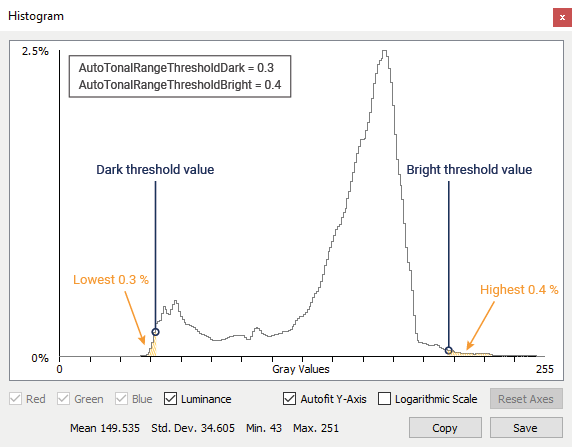
- 暗閾值,即直方圖中指定數量的像素其像素值低於或等於該閾值的數值。
- 亮閾值,即直方圖中指定數量的像素其像素值大於或等於該閾值的數值。
兩個閾值之間的區域定義了您的中間調,也就是您認為對影像至關重要的像素值。
範例: 假設您將 Image ROI 的 AutoTonalRangeThresholdDark 參數設為 0.3 以及 AutoTonalRangeThresholdBright 參數設為 0.4。相機會偵測到您的影像中,有 0.3% 的像素值小於或等於 52,且有 0.4% 的像素值大於或等於 204。因此,dark threshold 值為 52,bright threshold 值為 204。
範例程式碼#
// Enable contrast adjustments only
camera.AutoTonalRangeModeSelector.SetValue(AutoTonalRangeModeSelector_Contrast);
// Specify that both ends of the tonal range are to be adjusted automatically
camera.AutoTonalRangeAdjustmentSelector.SetValue(AutoTonalRangeAdjustmentSelector_BrightAndDark);
// Set the percentage of pixels that is used to calculate the dark threshold
camera.AutoTonalRangeThresholdDark.SetValue(0.3);
// Set the percentage of pixels that is used to calculate the bright threshold
camera.AutoTonalRangeThresholdBright.SetValue(0.4);
// Set the dark target value
camera.AutoTonalRangeTargetDark.SetValue(0);
// Set the bright target value
camera.AutoTonalRangeTargetBright.SetValue(255);
// Enable the Tonal Range Auto auto function
camera.TonalRangeAuto.SetValue(TonalRangeAuto_Once);
INodeMap& nodemap = camera.GetNodeMap();
// Enable contrast adjustments only
CEnumParameter(nodemap, "AutoTonalRangeModeSelector").SetValue("Contrast");
// Specify that both ends of the tonal range are to be adjusted automatically
CEnumParameter(nodemap, "AutoTonalRangeAdjustmentSelector").SetValue("BrightAndDark");
// Set the percentage of pixels that is used to calculate the dark threshold
CFloatParameter(nodemap, "AutoTonalRangeThresholdDark").SetValue(0.3);
// Set the percentage of pixels that is used to calculate the bright threshold
CFloatParameter(nodemap, "AutoTonalRangeThresholdBright").SetValue(0.4);
// Set the dark target value
CIntegerParameter(nodemap, "AutoTonalRangeTargetDark").SetValue(0);
// Set the bright target value
CIntegerParameter(nodemap, "AutoTonalRangeTargetBright").SetValue(255);
// Enable the Tonal Range Auto auto function
CEnumParameter(nodemap, "TonalRangeAuto").SetValue("Once");
// Enable contrast adjustments only
camera.Parameters[PLCamera.AutoTonalRangeModeSelector].SetValue(PLCamera.AutoTonalRangeModeSelector.Contrast);
// Specify that both ends of the tonal range are to be adjusted automatically
camera.Parameters[PLCamera.AutoTonalRangeAdjustmentSelector].SetValue(PLCamera.AutoTonalRangeAdjustmentSelector.BrightAndDark);
// Set the percentage of pixels that is used to calculate the dark threshold
camera.Parameters[PLCamera.AutoTonalRangeThresholdDark].SetValue(0.3);
// Set the percentage of pixels that is used to calculate the bright threshold
camera.Parameters[PLCamera.AutoTonalRangeThresholdBright].SetValue(0.4);
// Set the dark target value
camera.Parameters[PLCamera.AutoTonalRangeTargetDark].SetValue(0);
// Set the bright target value
camera.Parameters[PLCamera.AutoTonalRangeTargetBright].SetValue(255);
// Enable the Tonal Range Auto auto function
camera.Parameters[PLCamera.TonalRangeAuto].SetValue(PLCamera.TonalRangeAuto.Once);
/* Macro to check for errors */
#define CHECK(errc) if (GENAPI_E_OK != errc) printErrorAndExit(errc)
GENAPIC_RESULT errRes = GENAPI_E_OK;  /* Return value of pylon methods */
/* Enable contrast adjustments only */
errRes = PylonDeviceFeatureFromString(hdev, "AutoTonalRangeModeSelector", "Contrast");
CHECK(errRes);
/* Specify that both ends of the tonal range are to be adjusted automatically */
errRes = PylonDeviceFeatureFromString(hdev, "AutoTonalRangeAdjustmentSelector", "BrightAndDark");
CHECK(errRes);
/* Set the percentage of pixels that is used to calculate the dark threshold */
errRes = PylonDeviceSetFloatFeature(hdev, "AutoTonalRangeThresholdDark", 0.3);
CHECK(errRes);
/* Set the percentage of pixels that is used to calculate the bright threshold */
errRes = PylonDeviceSetFloatFeature(hdev, "AutoTonalRangeThresholdBright", 0.4);
CHECK(errRes);
/* Set the dark target value */
errRes = PylonDeviceSetIntegerFeature(hdev, "AutoTonalRangeTargetDark", 0);
CHECK(errRes);
/* Set the bright target value */
errRes = PylonDeviceSetIntegerFeature(hdev, "AutoTonalRangeTargetBright", 255);
CHECK(errRes);
/* Enable the Tonal Range Auto auto function */
errRes = PylonDeviceFeatureFromString(hdev, "TonalRangeAuto", "Once");
CHECK(errRes);
# Enable contrast adjustments only
camera.AutoTonalRangeModeSelector.Value = "Contrast"
# Specify that both ends of the tonal range are to be adjusted automatically
camera.AutoTonalRangeAdjustmentSelector.Value = "BrightAndDark"
# Set the percentage of pixels that is used to calculate the dark threshold
camera.AutoTonalRangeThresholdDark.Value = 0.3
# Set the percentage of pixels that is used to calculate the bright threshold
camera.AutoTonalRangeThresholdBright.Value = 0.4
# Set the dark target value
camera.AutoTonalRangeTargetDark.Value = 0
# Set the bright target value
camera.AutoTonalRangeTargetBright.Value = 255
# Enable the Tonal Range Auto auto function
camera.TonalRangeAuto.Value = "Once"
您也可以使用 pylon Viewer 來輕鬆設定參數。